
Infor CloudSuite Modules & Capabilities
Infor CloudSuite is rated across 14 of 14 ERP modules, 10 of them a core strength and 2,929 documented capabilities catalogued across those modules.
- 14of 14
- Modules rated
- 10
- Core strengths
- 2,929
- Documented capabilities
- Cloud
- Deployment
Infor CloudSuite module ratings
Ordered strongest to weakest. Each rating reflects standard-edition depth, not what a third-party add-on could bolt on.
Finance & Accounting
strongCore financial management including general ledger, accounts payable/receivable, fixed assets, cash management, and financial reporting. The backbone of any ERP system.
›477 documented capabilities in 49 areas
Finance & Accounting
strongGeneral Financials Information12
Provides core financial reference material and setup covering accounts, control accounts, budgets, statistical accounts, and multi-site consolidation.
About Accounts · About Control Accounts · About Cancellation Posting for Single-Entry Accounting · A/R A/P Offset Overview · Offsetting A/R Invoices and A/P Vouchers
China Localization7
Enables the ChinaCountryPack module, covering system parameter setup, chart-of-accounts digit configuration, bank code and journal security by user group, cross-site account mapping, bank balance setup, and loading bank transactions from the general ledger for Chinese operations.
China Localization Overview · Setting Parameters for the China Localization · Securing Users to Particular Bank Codes and Journals · Mapping Accounts and Unit Codes for Imported Journals from Other Sites · Providing Bank Balance Information
Accounts Payable (A/P)40
Manages vendor payables end to end, from setup and voucher processing to payments, aging reports, and electronic funds transfer.
Accounts Payable Setup · Accounts Payable Steps · About the Accounts Payable Aging Report · Deleting A/P Posted Transactions · Electronic Funds Transfer (EFT)
France Localization7
Supports French statutory rules, including the FEC audit file that tax authorities require, plus AP, purchasing, and foreign-currency invoice revaluation.
About this guide · Related documents · General configuration of the product for France · Requirements for France · Accounts payable and purchasing
Payroll3
Automates end-to-end payroll processing, from setup and parameter configuration through check printing, tip credit calculation, and year-end reporting.
Year-end Procedures · Closing the Year for Payroll · Processing W-2 Forms at Year End
Accounts Receivable (A/R)64
Manages customer billing and collections, covering invoicing, payments, credit memos, rebates, chargebacks, and dunning.
Accounts Receivable Steps · About A/R Posting · About Credit for Returns · About Rebate Programs · Chargebacks Overview
Germany Localization5
Covers Germany-specific functionality including tax code setup, preparation of audit data media under GoBD rules, and standards-compliant e-invoicing.
About the Germany Localization · Setting up Tax Codes for Germany · Preparing Data Media for Audit Submission · E-Invoicing
Managing Customer Orders9
Covers day-to-day order administration: shipment approvals, non-inventory item costing, billing terms, interaction logging, due-date corrections, price adjustments, reservations, progressive billing, supply pegging, and customer interactions.
Price Adjustment Invoices · About Price Adjustment Invoices · Creating a Price Adjustment Invoice · Progressive Billing · About Progressive Billing
Contracts10
Covers setting up, creating, invoicing, and amortizing service contracts, including rental agreements and coverage-time calculations.
Invoicing a Service Contract · Invoicing a Contract · Running the (Service) Contracts to be Invoiced Report · Multi-Lingual Invoice Support · Amortizations
Costing Items33
Covers the full range of costing methods and processes, including setup, posting, analysis, and comparison of standard, average, LIFO, FIFO, and specific costing.
Costing Overview · Setting Up Costing · Costing Setup · Average Costing Setup · LIFO and FIFO Costing Setup
Bank Statements7
Imports, reconciles, and manages electronic bank statement data, including positive pay files and reconciliation utilities.
About Bank Statement Reconciliations · About Electronic File Transfer and Bank Statements · Setting Up a Mapping Profile · Purging Bank Statements · Generating a Positive Pay File
Letters of Credit3
Covers creating vendor letters of credit and linking them to vendor records and purchase orders.
Creating a Vendor Letter of Credit · Linking a Vendor LCR to Vendors and Purchase Orders
Japan Localization6
Supports Japan-specific configuration, including tax system setup, Zengin-Tejun electronic funds transfer banking, EFT bank fee schedules, and voucher numbering used to group journal transactions.
General Setup for the Japan Localization · Firm Banking Overview · AP EFT Posting Example · Using EFT Bank Fees · About Journal Voucher Numbers
Currency6
Manages currency conversion, euro triangulation, and realized or unrealized gains and losses from exchange rate changes.
About the Euro Triangulation Conversion · Converting the Domestic Currency to the euro · About Realized and Unrealized Gains and Losses · Revaluing Assets and Liabilities for the Euro · Running the Currency Revaluation Report
Using Credit Hold7
Covers placing customers or individual orders on credit hold, activating the feature, and applying it to EDI orders.
About Credit Hold · Using Credit Hold · Activating Credit Hold · Activating Credit Hold for EDI Customer Orders · Manually Placing a Customer on Credit Hold
Managing Multiple Currencies3
Covers converting vendor records to the euro currency and understanding the conversion process.
About the Vendor Euro Currency Conversion Utility · Converting Vendor Records to the Euro
Mexico Localization7
Supports Mexico's SAT compliance requirements, covering VAT payment calculation, DIOT reporting, and voucher distribution adjustments for both VAT and DIOT.
About the Mexico Localization · About SAT payments and reporting · Making VAT payments · Modifying Mexican DIOT voucher distribution adjustments · Modifying VAT voucher distribution adjustments
Partners7
Covers managing service partners, including mass creation, viewing assignments, tracking transactions, and reimbursing expenses.
Handling Partner Expenses · Running the Miscellaneous Expense Report · Reimbursing Partner Expenses · Viewing Partner Reimbursement Tax Details · Reconciling Partner Expenses
Domain information10
Organizes Birst's available facts into finance, inventory, and sales domains.
External Financial Interface5
Connects SyteLine to external financial systems for incoming and outgoing data exchange.
Setting Up an External Financial Interface · Setting Up an Incoming Financial Interface · Updating Data from Data in an External Financial Application · Example: Requesting Data from an External Financial Application
Using Consolidated Invoices16
Covers combining multiple shipped orders into a single invoice per customer over a billing period, and maintaining those consolidated records.
Consolidated Invoice Overview · Setting Up Consolidated Invoices · Setting Up Consolidated Invoicing for a Customer · Setting Up Consolidated Invoicing for a Customer Order · Setting Up Consolidated Invoicing for a Customer Order Line/Release
Poland Localization7
Supports Poland's VAT compliance rules by allowing corrections to invoice and voucher tax dates through the Poland Country Pack, alongside accounts receivable and sales reporting requirements.
About this guide · Related documents · General configuration of the application for Poland · Requirements for Poland · Planning worksheet
Financial Statements9
Sets up, prints, and troubleshoots financial statements, including combined and multi-site reporting.
Financial Statement Setup · About Dates in Financial Statements · About Print Sort Methods · Printing a Financial Statement · Troubleshooting Financial Statements
Sweden Localization7
Supports Sweden's statutory and legal requirements, covering general site configuration, accounts payable and purchasing rules, and setup of country-specific reporting.
About this guide · Related documents · General configuration of the application for Sweden · Requirements for Sweden · Planning worksheet
Service Request Orders (SROs)12
Covers creating, invoicing, and accounting for Service Request Orders, including setup, data collection, and reporting.
Invoicing Service Orders · Invoicing Customers for Service Work · Reporting on Service Orders to be Invoiced · Running Service Order Invoicing · Using the Multi-Lingual Service Invoice Form
Report Definition7
Creates, edits, copies, and prints custom financial report definitions.
Creating a report definition · Adding report columns · Adding report lines · Editing a report definition · Copying a report definition
Thailand Localization7
Supports Thailand-specific forms and processes, including inventory month-end closing, VAT invoice and tax detail reporting, petty cash transaction reprints, and currency revaluation reporting.
About the Thailand Localization · Initializing Inventory Month End Data · Printing the Invoice Summary, Tax Detail, and Company Information · Reprinting Unposted Petty Cash Transaction Reports · Running Inventory Month End Processes
Fixed Assets7
Tracks fixed assets and calculates and posts depreciation to the general ledger.
Fixed Assets Overview · Fixed Assets Steps · About Depreciation · About Partial Depreciation · Depreciation Calculations
Managing Multiple Currencies4
Covers converting customer records to the euro and creating customer orders and invoices in foreign currencies.
Converting Customer Records to the Euro · Creating Customer Orders and Invoices in Foreign Currencies · About the Customer Euro Currency Conversion Utility
Vietnam Localization7
Supports Vietnam's statutory requirements, covering general site configuration, auditing and external reporting, and electronic submission of financial statements such as the balance sheet, profit and loss report, and cash flow statement.
About this guide · General configuration of the application for Vietnam · Requirements for Vietnam · Auditing and external reporting · Balance sheet, profit and loss report, cash flow statement
Using Letters of Credit4
Covers creating customer letters of credit and linking them to customer records and orders.
Creating a Customer Letter of Credit · How Letters of Credit Affect Customer Orders · Linking a Customer LCR to Customers and Orders
Journals7
Creates, imports, compresses, and manages general ledger journal entries.
About Journal Entries · Accounting References and Distribution Journal Entries · Compressing Journals · Deleting a User-Defined Journal · Importing Bulk Journal Entries
Invoice Builder3
Generates and prints multi-site invoices and credit memos for customer order shipments and returns.
Invoice Builder Overview · Using the Invoice Builder
Working with Transfer Orders3
Covers creating, shipping, receiving, and costing transfer orders that move material between warehouses, sites, or entities, including multi-site transfers.
About Transfer Order Costing · Example: Warehouse To Warehouse, Different Cost · Example: Warehouse To Warehouse, Same Cost
Ledgers29
Manages the general ledger, including setup, accounting periods, analytical accounting, expense allocation, and year-end closing.
General Ledger Overview · General Ledger Setup · Setting Up Accounting Periods · Setting Up the Chart of Accounts · Setting Up Beginning Account Balances
Multiple Financial Sets of Books (Multi-FSB)7
Maintains additional ledgers with their own calendar, chart of accounts, or currency alongside the general ledger.
Multiple Financial Sets of Books Overview · Setting Up Multiple Financial Sets of Books · Maintaining the Multi-FSB Chart of Accounts · Deleting Multi-FSB Records · About the Multi-FSB Year-End Closing Process
Enterprise automations7
Bundles the Value+ enterprise automations, including AI-assisted quality trend analysis, make-vs-buy decisions, and RPA-driven document processing, that automate recurring SyteLine workflows.
Invoice Processing · Authorization and security · Prerequisites · Security roles · Logging in and defining user parameters
Taxes14
Configures and calculates tax transactions, including VAT, and supports UK Making Tax Digital compliance.
Automatically Create Tax Transactions · Recording Tax for Manually Created Journal Transactions · Defining the Accounts that Can Have Tax Records Created · Calculating Value-Added Tax Information · Setup and handling of non-deductible VAT
Setting Up European Union Sales Information8
Covers configuring EU-specific reporting requirements, including sales list and supplementary statistical declaration reports.
European Union (EU) Supplemental Information · Setting Up Information for the EU Sales List Report · Setting Up Information for the EU SSD Report · Intrastat SSD ASCII File Format and Data Mapping · Intrastat SSD XML File Format
Unit Codes4
Tracks and reports unit codes used to classify financial transactions across the system.
About Unit Code Reporting · Where Unit Codes Come From · Using Unit Code 1-4 Detail on Financial Statements
Target Group Types3
Defines target group types used to categorize and track organizational performance targets over set time intervals.
Mapping COA with target types · Viewing the Target and Actual Values
Using Jobs5
Covers the full job lifecycle, from creation and release through material issuing, outside processing, shop floor execution, co-products, and job costs.
About Job Costs · About Job WIP Costs · Recovering WIP Costs for a Job Closed Accidentally · About Planned Costs on a Job · How Scrap Affects Job Cost
Shipping and Invoicing Credit Card Orders3
Invoices and ships a credit card order as one delivery or split it across several partial deliveries.
Handling Single Shipments for a Credit Card Order · Handling Multiple Shipments for a Credit Card Order
Recording Status of Shop Floor Activity5
Covers recording shop floor transactions, backflushing, end-of-period costing, backflush reporting, and reversing job transactions.
About End of Period Costing · Example 1: Actual Materials, Labor and Machine Hours - Costing · Example 2: Scrap Transactions - Costing · Example 3: Earned Materials Labor and Machine Hours - Costing · Example 4: Accounting (Labor Usage for WC)
Setting Up a Tax Interface3
Configures an integration to an external tax calculation provider, such as Vertex or AvaTax, for automated tax determination.
Setting up a Vertex Tax Interface · Setting up an AvaTax Tax Interface
Setting Up a Tax Interface5
Configures an integration to an external tax calculation provider — Vertex, AvaTax, or Taxware — for automated tax determination.
Setting up a Vertex Tax Interface · Setting up an AvaTax Tax Interface · Setting up a Taxware Tax Interface · Setting up a Taxware Enterprise Tax Interface
Configuration19
Configures items, estimates, jobs, and customer orders through the product configurator, including authorizations and printing.
Configuring Items, Estimates or Jobs · Configuring an Item, Estimate, or Job · Configuring a Job or Item · Costing Method for Configurable Items · Deleting Configurable Jobs, Items, and Operations
Document Automation3
Generates and attaches configurable documents, such as proposals and safety data sheets, to SyteLine records.
Attaching Configuration Documents to Records · Setting Up the Document Automation Interface
Other capabilities11
Manufacturing
strongProduction planning, shop floor control, BOM management, MRP, and manufacturing execution. Supports discrete, process, and mixed-mode manufacturing environments.
›494 documented capabilities in 37 areas
Manufacturing
strong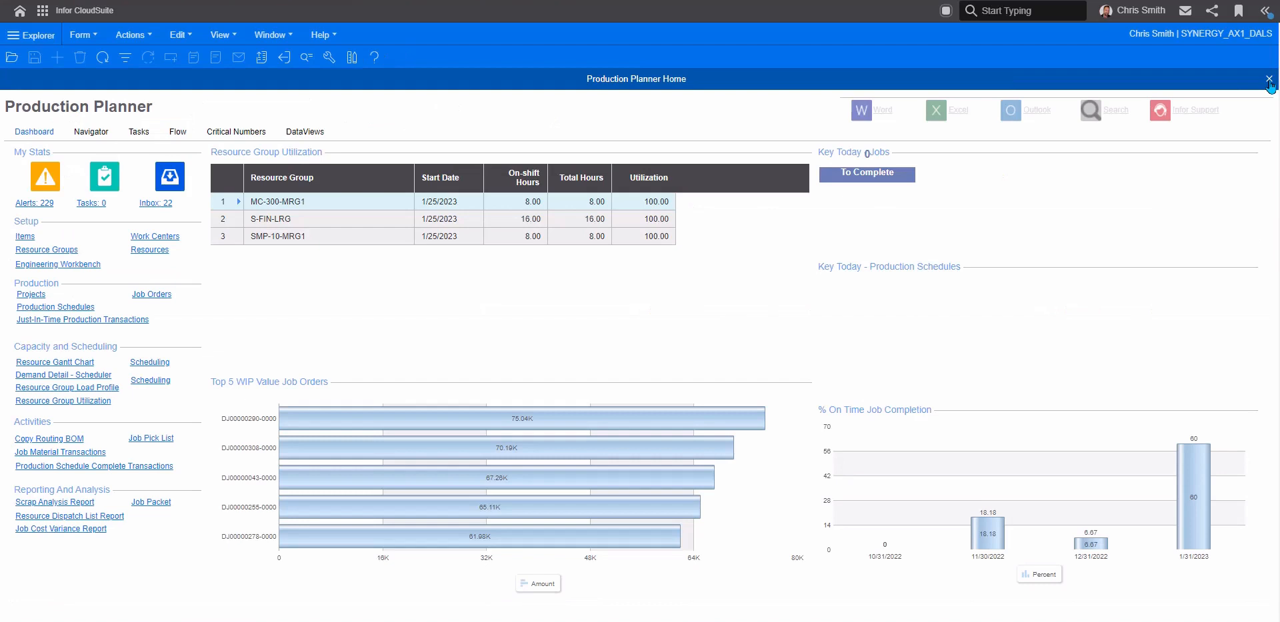
Printing Industry Pack7
Adds print-job cost estimating, based on paper weight, dimensions, and sections, along with the routings and bills of material needed for print and packaging quotes.
About the Printing Industry Pack · Setting the Printing Industry Parameters · Preparing Printing and Packaging Quotations · Print Industry Data Setup · Processing Job Material Transactions for Batched Productions
Process Manufacturing Industry Pack7
Adds formula-based batch production for process manufacturers, covering formulas, unit-of-measure conversions, and process-versus-discrete manufacturing concepts.
About this guide · Process Manufacturing overview · Process manufacturing vs. discrete manufacturing · Formulas · Using density to determine a common U/M
Overview16
Introduces how the Advanced Planning System evaluates demand against a long-term plan and outlines the modes, order types, and setup steps involved in generating a plan.
Advanced planning system · Infinite APS vs. APS planning · About Infinite Resource Capacity · Specifying Infinite Resource Capacity · Pull and Push Planning
Planning Parameters - General22
Groups the general Planning Parameters that govern forecast consumption, reschedule tolerances, bucket reporting, work-day calendars, and shrink and scrap handling; changes apply the next time APS Planning runs.
Use Customer Order or Forecast · Forecast Look Ahead · Forecast Look Behind · Forecasting Overview · Items - Order Minimum
Automotive Industry Pack7
Adds automotive-industry features including FMEA risk analysis, returnable container tracking, master contracts, and purchase order repricing, gated behind group authorization.
About the Automotive Industry Pack · Designing FMEA · Managing Automotive Containers · Managing Customer and Vendor Master Contracts · Recalculating a Purchase Order
Managing Customer Orders7
Covers day-to-day order administration: shipment approvals, non-inventory item costing, billing terms, interaction logging, due-date corrections, price adjustments, reservations, progressive billing, supply pegging, and customer interactions.
Pegging Demands to Supplies · Cross-Referencing Demands to Supplies · Cross-Referencing Blanket Releases and Order Shipping · Cross-Referencing a Customer Order to a Job Order · Cross-Referencing a Customer Order to a Project
Planning Parameters - APS18
Groups the core APS planning parameters covering buffer shift assignment, scheduler handoff, negative on-hand handling, supply usage tolerance, sub-job date calculation, and planned order consolidation.
Move/Finish/Buffer Shift ID · Use Planning Output for Scheduling · Using APS to Backward Schedule · Preserve Pre-Released Production Dates · Consider Negative on Hand
Molding Industry Pack7
Adds tooling management, alternate routings, and equipment effectiveness reporting for molding and other highly repetitive, tooling-intensive manufacturing.
About the Molding Industry Pack · About Tooling · Initiating and Ending Maintenance · About Alternate BOMs · Specifying Alternate BOMs Manually
Defining Lead Time5
Defines fixed and variable lead times used by APS and MRP planning, including the lead time processor algorithm and lead time shifts.
Defining Lead Time for APS Planning · Defining Lead Time for MRP Planning · About the Lead Time Processor Algorithm · Using Lead Time Shifts
Planning Parameters - Advanced APS37
Groups advanced APS parameters covering what-if databases, infinite purchased items, buffer scaling, pull tolerances, iteration limits, lead-time reduction, tracing, alternate materials, and job or production-schedule supply switching.
Maximum What-If Databases · Infinite Purchased Items After (Hours) · Items - Infinite · Resource Group Buffer Scale · Resource Groups - Buffer-in Time
Working with ECNs9
Manages engineering change notices used to record and approve changes to items, operations, materials, and revisions.
Engineering Change Notice Steps · Creating an Engineering Change Notice Header · Creating an Engineering Change Notice Line Item · Approving an ECN · Approving an ECN at the Item Level
APS Sites and Alternative Management7
Sets the network details, site priority, and server assignments that let APS realign its plan across several supply locations running in Global mode.
Alternative Number · Planning Site · Priority · Type · APS Server Service Host Name
About Multi-Job Transactions3
Prorates an employee's time evenly across multiple concurrently running jobs recorded through data collection.
Example: Multi-Job Transactions · Example: Multi-Job Proration
Using MRP and APS30
Covers both MRP and Advanced Planning and Scheduling engines, including forecasting, exception handling, and comparing the two planning modes.
APS Overview · APS Steps · APS: Initial Setup Steps · APS: Periodic Maintenance Tasks · APS: Routine Procedures
APS behavior11
Documents APS behaviors that fall outside standard Planning Parameters settings, along with fixed system behavior and how order priority governs planning sequence.
APS behavior not controlled by Planning Parameters · Job Priorities · Prevent recursive backflow transfer demands from eroding safety stock · Standard behavior · Plan Granularity
Using Master Production Schedules5
Covers building and running a master production schedule to protect key items from fluctuations in order-based demand.
Using a Master Production Schedule · Creating MPS Receipts Manually · Firming MPS Orders · Running the MPS Processor
Using the Material Planner Workbench6
Provides an alternative to MRP or APS for generating supply orders, plus tools for replenishment rules, source rules, and cross-referencing demand to supply.
Material Planner Workbench Overview · Generating Data for the Material Planner Workbench · About Replenishment Orders · Creating Source Rules for Planned Orders · Cross-Referencing a Range of Line Items
Plan and schedule data model23
Lays out the data objects, including orders, items, batches, routings, resources, materials, and shifts, that the Planner and Scheduler share to keep plans and schedules synchronized.
Database overview · Orders · Database table: ORDER · Items · Database table for Scheduler: PART
Working with Planned Orders7
Covers controlling, consolidating, and firming planned orders into purchase orders, job orders, production schedules, or intra-site transfers.
Controlling Planned Order Creation · Consolidating Planned Orders · Firming Planned Orders · Firming Planned Orders into Job Orders · Firming a Planned Order into a Production Schedule
About the Planner42
Explains how the Planner compares an order against the long-term shop-floor plan to project real-time completion dates, covering its database, lead-time, lot-size, safety-stock, and resource-availability logic.
Database · Running the planner · Order promising/get CTP · Plan regeneration · Output data
About the scheduler28
Orders a resource's work based on each job's start and end dates, weighing sequence dependencies and how resources interact, and covers event simulation, scheduling rules, availability, setup time, overlap, splitting, and running the Scheduler.
How event-based scheduling works · About the scheduler trace log · Event processing example · Using scheduler rules · Controlling simultaneous order start dates
Features and Options Configurator5
Configures planning items with feature groups and qualifier logic so configurable products can be designed and ordered with selectable options.
Creating and Entering a Planning Item · Designing a Planning Item Layout · Example: Qualifier Masks · Example: Qualifier Strings
Defining Routings and Bills of Material10
Covers building, importing, copying, and exporting routings and bills of material, including integration with external PLM systems.
BOM Bulk Import Forms Overview · Using the BOM Bulk Import Utility · Using the BOM Import Builder · Copying Routings/BOMs · Copying Routings/BOMs with the Copy Routing/BOM or Engineering Workbench
Enterprise automations10
Bundles the Value+ enterprise automations, including AI-assisted quality trend analysis, make-vs-buy decisions, and RPA-driven document processing, that automate recurring SyteLine workflows.
Statistical Process Trend Analysis · Authorization and security · Prerequisites · Security roles · Process flow for SPC Trend Analysis
Setting Up Work Shifts6
Defines the work week, shift exceptions, and overrun handling used by MRP, APS, and the Scheduler.
Defining the Work Week · Defining Shift Exceptions · Shift Exception Examples · Handling Shift Overrun · How "Must Complete" and "Allow Overrun" Affect Resource Allocation Decisions
Plants4
Defines plants, the manufacturing location tied to a site's manufacturing warehouse, and sets default plant and warehouse assignments.
About Plants · Creating Plants · Changing the Default Plant and Warehouse
Defining Resources7
Models personnel, machines, and equipment as resources so APS and the Scheduler can plan and constrain activity against their availability and capacity.
Resources Overview · Handling Resource Reallocation During Interruptions · Deleting Indirect Labor Codes · Optimizing Resource Selection in the Scheduler · About Infinite Resource Capacity
Defining Work Centers4
Defines work centers for capturing labor and overhead costs and groups them into departments and shared locations.
Work Centers Overview · Creating a Department · Setting Up Multiple Locations/Common Work Center
Using Jobs39
Covers the full job lifecycle, from creation and release through material issuing, outside processing, shop floor execution, co-products, and job costs.
Job Steps · Creating Jobs · Creating an Estimate Job · Cross-referencing a Job Material to a Job · Cross-Referencing a Job Material to a PO Requisition
Using Production Schedules15
Covers building, releasing, and processing production schedules, a simplified blanket-order alternative to individual job orders.
Production Schedules Overview · Production Schedule Steps · Creating the Production Schedule · Creating a Production Schedule Header · Copying from Another Production Schedule
Scheduling Shop Floor Activity40
Covers running and customizing the Scheduler, including batching, operation setup, output analysis, and writing custom scheduling rules.
Scheduling Overview · Scheduling Steps · How Event-based Scheduling Works · Using Scheduler Rules · Scheduler Batching
Recording Status of Shop Floor Activity10
Covers recording shop floor transactions, backflushing, end-of-period costing, backflush reporting, and reversing job transactions.
About Shop Floor Transactions · About Backflushing · Example: Backflushing · About Backflushing and Control Points · About Backflushing Labor and Machine Hours
Production Hub5
Gives a unified view for monitoring and analyzing shop floor activity, including equipment effectiveness, job efficiency, summary metrics, and a job calendar.
Machine OEE · Operations Efficiency · Summary · Job Calendar
New Product Development3
Manages the lifecycle of a new item from concept through production, combining material status controls with dedicated NPD codes and item settings.
Setting Up NPD Codes · Defining NPD Items
IP Rework4
Tracks and manages in-process rework during production, capturing the reason, work center, and cost of each rework occurrence.
Enabling IP rework for the site · Defining IP rework reason codes · Creating a rework job order
Configuration13
Configures items, estimates, jobs, and customer orders through the product configurator, including authorizations and printing.
Configuring Items, Estimates or Jobs · Configuring an Item, Estimate, or Job · Configuring a Job or Item · Costing Method for Configurable Items · Deleting Configurable Jobs, Items, and Operations
Other capabilities15
Intended audience · Examples of Machine Transaction Entered in Data Collection · Intended audience · Creating JIT Transactions
Supply Chain
strongEnd-to-end supply chain visibility including demand planning, supply planning, logistics, supplier management, and supply chain analytics.
›311 documented capabilities in 24 areas
Supply Chain
strongManaging Inventory7
Groups the tools for setting up and maintaining stock records, including non-inventory items, warehouses, units of measure, lot and serial tracking, portal catalogs, cycle counts, and physical inventory counts.
Overview16
Introduces how the Advanced Planning System evaluates demand against a long-term plan and outlines the modes, order types, and setup steps involved in generating a plan.
Advanced planning system · Infinite APS vs. APS planning · About Infinite Resource Capacity · Specifying Infinite Resource Capacity · Pull and Push Planning
Purchase Orders5
Covers the full purchase order lifecycle, from requisitions and header/line entry through status changes, landed costs, and multi-site purchasing.
Landed Costs · Setting Up Landed Costs · Allocating Landed Costs · Landed Cost Allocation Calculations · Manually Updating Allocated Amounts
Managing Compliance4
Tracks hazardous or restricted materials and export-control requirements at the item level, including compliance programs and ITAR-related data.
About Item Compliance Programs · Managing Item Compliance · About Export Compliance
Planning Parameters - General22
Groups the general Planning Parameters that govern forecast consumption, reschedule tolerances, bucket reporting, work-day calendars, and shrink and scrap handling; changes apply the next time APS Planning runs.
Use Customer Order or Forecast · Forecast Look Ahead · Forecast Look Behind · Forecasting Overview · Items - Order Minimum
Managing Customer Orders7
Covers day-to-day order administration: shipment approvals, non-inventory item costing, billing terms, interaction logging, due-date corrections, price adjustments, reservations, progressive billing, supply pegging, and customer interactions.
Pegging Demands to Supplies · Cross-Referencing Demands to Supplies · Cross-Referencing Blanket Releases and Order Shipping · Cross-Referencing a Customer Order to a Job Order · Cross-Referencing a Customer Order to a Project
Tracking Orders Using a Delivery Order7
Covers grouping multiple customer orders under a single delivery order and tracking number, including when lines and sequences get assigned.
Delivery Orders Overview · Creating Delivery Orders · Assigning Delivery Orders After Shipping · Assigning Delivery Orders Before Shipping · Assigning Delivery Orders and Delivery Order Lines Before Shipping
Letters of Credit3
Covers creating vendor letters of credit and linking them to vendor records and purchase orders.
Creating a Vendor Letter of Credit · Linking a Vendor LCR to Vendors and Purchase Orders
Planning Parameters - APS18
Groups the core APS planning parameters covering buffer shift assignment, scheduler handoff, negative on-hand handling, supply usage tolerance, sub-job date calculation, and planned order consolidation.
Move/Finish/Buffer Shift ID · Use Planning Output for Scheduling · Using APS to Backward Schedule · Preserve Pre-Released Production Dates · Consider Negative on Hand
Planning Parameters - Advanced APS37
Groups advanced APS parameters covering what-if databases, infinite purchased items, buffer scaling, pull tolerances, iteration limits, lead-time reduction, tracing, alternate materials, and job or production-schedule supply switching.
Maximum What-If Databases · Infinite Purchased Items After (Hours) · Items - Infinite · Resource Group Buffer Scale · Resource Groups - Buffer-in Time
Domain information5
Organizes Birst's available facts into finance, inventory, and sales domains.
APS Sites and Alternative Management7
Sets the network details, site priority, and server assignments that let APS realign its plan across several supply locations running in Global mode.
Alternative Number · Planning Site · Priority · Type · APS Server Service Host Name
APS behavior11
Documents APS behaviors that fall outside standard Planning Parameters settings, along with fixed system behavior and how order priority governs planning sequence.
APS behavior not controlled by Planning Parameters · Job Priorities · Prevent recursive backflow transfer demands from eroding safety stock · Standard behavior · Plan Granularity
Plan and schedule data model25
Lays out the data objects, including orders, items, batches, routings, resources, materials, and shifts, that the Planner and Scheduler share to keep plans and schedules synchronized.
Database overview · Orders · Database table: ORDER · Items · Database table for Scheduler: PART
Using Letters of Credit4
Covers creating customer letters of credit and linking them to customer records and orders.
Creating a Customer Letter of Credit · How Letters of Credit Affect Customer Orders · Linking a Customer LCR to Customers and Orders
About the Planner45
Explains how the Planner compares an order against the long-term shop-floor plan to project real-time completion dates, covering its database, lead-time, lot-size, safety-stock, and resource-availability logic.
Database · Running the planner · Order promising/get CTP · Plan regeneration · Output data
Working with Transfer Orders21
Covers creating, shipping, receiving, and costing transfer orders that move material between warehouses, sites, or entities, including multi-site transfers.
Transfer Orders Overview · Transfer Orders Steps · About Currency Conversions for Transfer Orders · About Push/Pull Transactions · Shipping a Transfer Order
About the scheduler28
Orders a resource's work based on each job's start and end dates, weighing sequence dependencies and how resources interact, and covers event simulation, scheduling rules, availability, setup time, overlap, splitting, and running the Scheduler.
How event-based scheduling works · About the scheduler trace log · Event processing example · Using scheduler rules · Controlling simultaneous order start dates
Enterprise automations7
Bundles the Value+ enterprise automations, including AI-assisted quality trend analysis, make-vs-buy decisions, and RPA-driven document processing, that automate recurring SyteLine workflows.
Bill of Lading · Authorization and security · Prerequisites · Security roles · Logging in and defining user parameters
Setting Up European Union Sales Information8
Covers configuring EU-specific reporting requirements, including sales list and supplementary statistical declaration reports.
European Union (EU) Supplemental Information · Setting Up Information for the EU Sales List Report · Setting Up Information for the EU SSD Report · Intrastat SSD ASCII File Format and Data Mapping · Intrastat SSD XML File Format
Electronic Data Interchange (EDI) Overview7
Introduces EDI processing, covering standards, translators, and both inbound and outbound transaction handling.
EDI Steps · Posting EDI Inbound Purchase Order Acknowledgements · About EDI Standards · About EDI Translators · About Inbound Transactions
EDI Demand Processing3
Covers setting up and processing customer-facing EDI transactions, both inbound and outbound.
EDI Setup (Demand Side) · Errors That Stop Demand EDI CO Transaction Posting
EDI Supply Processing8
Covers setting up and processing vendor-facing EDI transactions, both inbound and outbound.
EDI Setup (Supply Side) · Errors That Stop Supply EDI Transaction Posting · Outbound Supply Transactions · Outbound Supply EDI Transactions - Flat-File Layout · Creating an EDI Planned Purchase Order (Outbound 830/DELFOR)
Other capabilities6
Intended audience · Intended audience · Infor Rate Shopping - TM Overview
HR & Payroll
strongHuman resources management including employee records, payroll processing, benefits administration, time and attendance, and talent management.
›86 documented capabilities in 7 areas
HR & Payroll
strong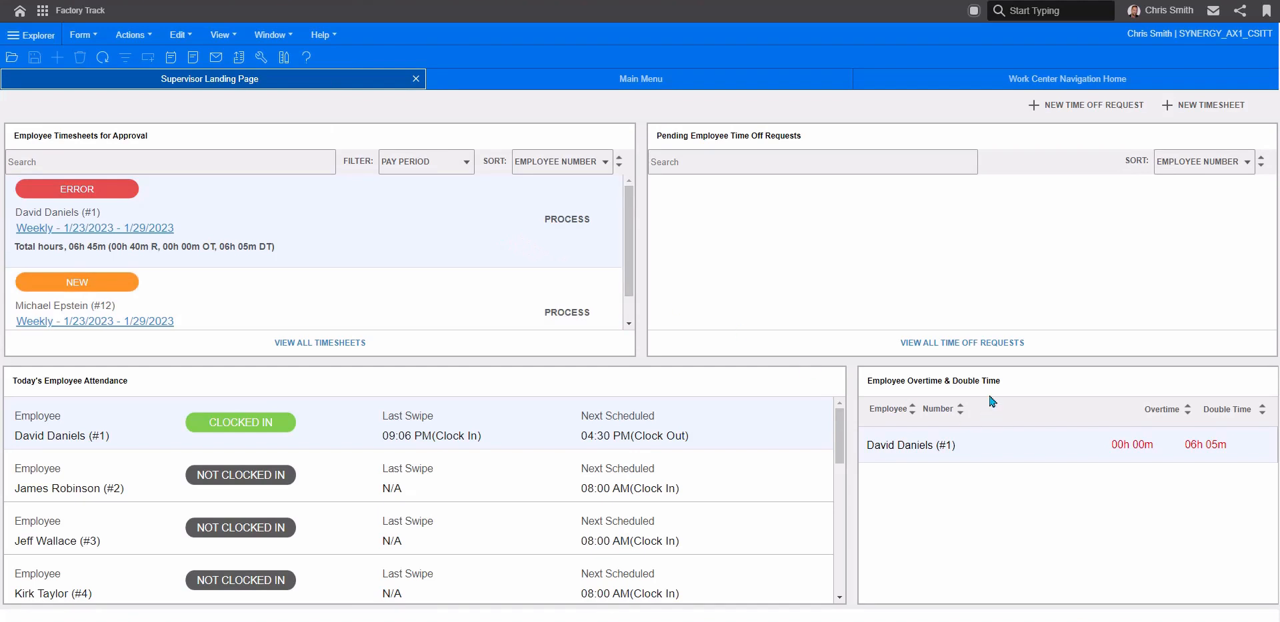
Human Resources28
Covers setting up and maintaining employee records, direct deposit, workers' compensation, self-service access, and configurable onboarding processes managed through the Process Manager.
Human Resources Overview · Initial Human Resources Setup · Maintaining employees in Infor Global HR · Specifying initial information about a new employee · Example: Determining the Difference between Earnings and Pre-Deduction Earnings
Payroll29
Automates end-to-end payroll processing, from setup and parameter configuration through check printing, tip credit calculation, and year-end reporting.
Payroll Overview · Payroll Setup · Setting Payroll Parameters · Payroll Procedures · Compute Payroll Report
About Employee Self Service7
Gives employees on-demand web access to key HR and pay-related information through the Employee Self Service site.
Using the Home Form · Using the Menu · Checking Performance Review Dates · Contacting Human Resources · Maintaining Emergency Contacts
Payroll5
Lets employees review their own deductions, earnings, direct deposit, and hours and pay history, and print related reports.
Reviewing Deductions and Earnings History · Reviewing Direct Deposit History · Reviewing Hours and Pay History · Printing Payroll Information
PO Requisitions4
Lets employees create, track, and approve purchase order requisitions from Employee Self Service.
Creating or Updating a PO Requisition · Viewing PO Requisition History · Approving or Rejecting PO Requisitions
Time Off7
Lets employees and managers request, review, and approve time off, including checking request details and team-wide time-off history.
Requesting Time Off · Changing a Time-Off Request · Checking Details of a Time-Off Request · Reviewing Time Off History · Reviewing Team Time Off
Setting Up Work Shifts6
Defines the work week, shift exceptions, and overrun handling used by MRP, APS, and the Scheduler.
Defining the Work Week · Defining Shift Exceptions · Shift Exception Examples · Handling Shift Overrun · How "Must Complete" and "Allow Overrun" Affect Resource Allocation Decisions
Inventory Management
strongInventory tracking, stock management, reorder point planning, multi-location management, and inventory valuation across warehouses and locations.
›411 documented capabilities in 31 areas
Inventory Management
strong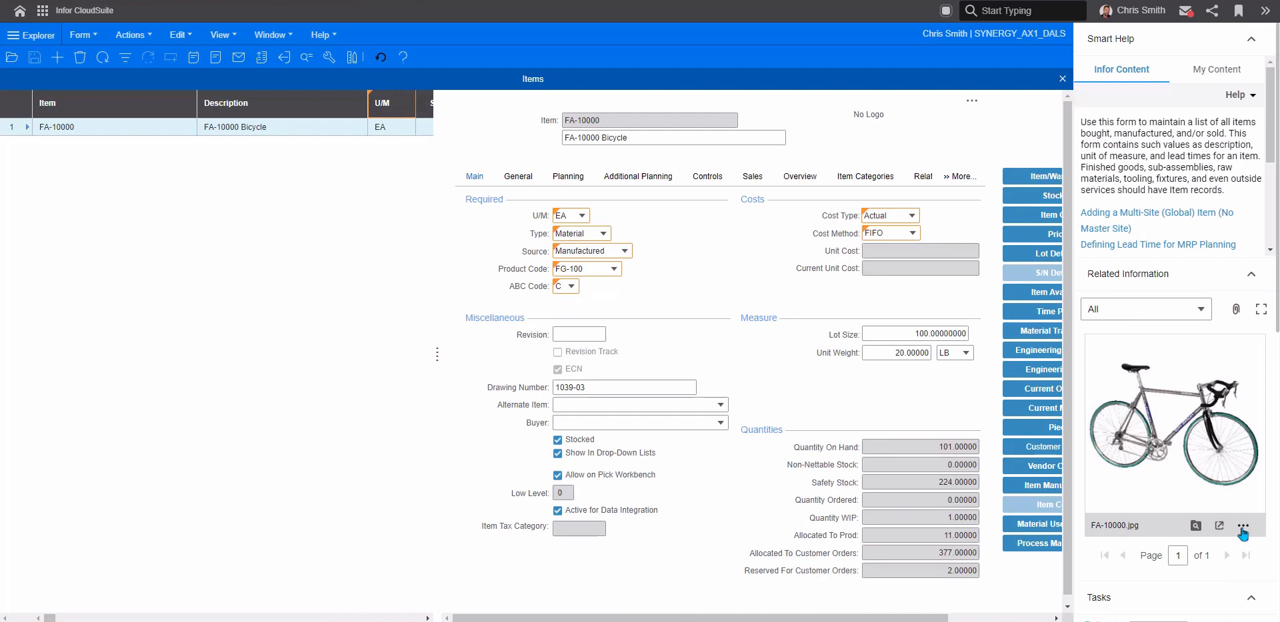
Managing Inventory60
Groups the tools for setting up and maintaining stock records, including non-inventory items, warehouses, units of measure, lot and serial tracking, portal catalogs, cycle counts, and physical inventory counts.
About Non-Inventory Items · Managing Non-Inventory Items · Inventory Control Overview · Inventory Control Steps · About Warehouses
Item Price Requests5
Lets buyers solicit and compare item pricing from a group of vendors through the Vendor Portal, then apply the responses to purchasing documents.
About Item Price Requests · Entering Item Price Requests · Copying Item Price Responses to a PO · Copying Item Price Responses to a PO Requisition
Managing Compliance4
Tracks hazardous or restricted materials and export-control requirements at the item level, including compliance programs and ITAR-related data.
About Item Compliance Programs · Managing Item Compliance · About Export Compliance
Managing Customer Orders5
Covers day-to-day order administration: shipment approvals, non-inventory item costing, billing terms, interaction logging, due-date corrections, price adjustments, reservations, progressive billing, supply pegging, and customer interactions.
Reserved Inventory · About Reserving Inventory for an Order · Reserving Inventory for an Order · Reserving Inventory for an Order Line · Shipping an Order with Reserved Inventory
Costing Items33
Covers the full range of costing methods and processes, including setup, posting, analysis, and comparison of standard, average, LIFO, FIFO, and specific costing.
Costing Overview · Setting Up Costing · Costing Setup · Average Costing Setup · LIFO and FIFO Costing Setup
Defining Lead Time5
Defines fixed and variable lead times used by APS and MRP planning, including the lead time processor algorithm and lead time shifts.
Defining Lead Time for APS Planning · Defining Lead Time for MRP Planning · About the Lead Time Processor Algorithm · Using Lead Time Shifts
Working with ECNs9
Manages engineering change notices used to record and approve changes to items, operations, materials, and revisions.
Engineering Change Notice Steps · Creating an Engineering Change Notice Header · Creating an Engineering Change Notice Line Item · Approving an ECN · Approving an ECN at the Item Level
Vendor Consignment Inventory Setup4
Covers setting up and managing inventory a company owns but stores at a vendor's warehouse.
Perform General Setup, Vendor Consignment Inventory Setup · Define Replenishment Needs at the Consignment Warehouse · Manage Inventory at the Vendor Consignment Warehouse
Using MRP and APS30
Covers both MRP and Advanced Planning and Scheduling engines, including forecasting, exception handling, and comparing the two planning modes.
APS Overview · APS Steps · APS: Initial Setup Steps · APS: Periodic Maintenance Tasks · APS: Routine Procedures
Using Master Production Schedules5
Covers building and running a master production schedule to protect key items from fluctuations in order-based demand.
Using a Master Production Schedule · Creating MPS Receipts Manually · Firming MPS Orders · Running the MPS Processor
Using the Material Planner Workbench6
Provides an alternative to MRP or APS for generating supply orders, plus tools for replenishment rules, source rules, and cross-referencing demand to supply.
Material Planner Workbench Overview · Generating Data for the Material Planner Workbench · About Replenishment Orders · Creating Source Rules for Planned Orders · Cross-Referencing a Range of Line Items
Working with Planned Orders11
Covers controlling, consolidating, and firming planned orders into purchase orders, job orders, production schedules, or intra-site transfers.
Controlling Planned Order Creation · Consolidating Planned Orders · Firming Planned Orders · Firming Planned Orders into Job Orders · Firming a Planned Order into a Production Schedule
About the Planner14
Explains how the Planner compares an order against the long-term shop-floor plan to project real-time completion dates, covering its database, lead-time, lot-size, safety-stock, and resource-availability logic.
Defining item lead times · Standard lead time · Expedited lead time · Using item acquisition schedules · Defining the acquisition schedule
Working with Transfer Orders27
Covers creating, shipping, receiving, and costing transfer orders that move material between warehouses, sites, or entities, including multi-site transfers.
Transfer Orders Overview · Transfer Orders Steps · About Currency Conversions for Transfer Orders · About Push/Pull Transactions · About Transfer Order Costing
Processing Returns and Replacements14
Covers the return material authorization process end to end, from setup through receiving returned goods and issuing credit or replacement.
Return Material Authorization Overview · RMA Setup · RMA Steps · Receiving Returns · About Returns
Features and Options Configurator5
Configures planning items with feature groups and qualifier logic so configurable products can be designed and ordered with selectable options.
Creating and Entering a Planning Item · Designing a Planning Item Layout · Example: Qualifier Masks · Example: Qualifier Strings
Picking, Packing, and Shipping7
Covers the physical fulfillment workflow of picking, packing, and shipping customer orders, plus supporting codes and batch processing.
Order Picking Steps · Order Packing Steps · Order Shipping Steps · About Ship Via Codes · About Shipping Processing Orders
Defining Routings and Bills of Material10
Covers building, importing, copying, and exporting routings and bills of material, including integration with external PLM systems.
BOM Bulk Import Forms Overview · Using the BOM Bulk Import Utility · Using the BOM Import Builder · Copying Routings/BOMs · Copying Routings/BOMs with the Copy Routing/BOM or Engineering Workbench
Setting Up Work Shifts6
Defines the work week, shift exceptions, and overrun handling used by MRP, APS, and the Scheduler.
Defining the Work Week · Defining Shift Exceptions · Shift Exception Examples · Handling Shift Overrun · How "Must Complete" and "Allow Overrun" Affect Resource Allocation Decisions
Plants4
Defines plants, the manufacturing location tied to a site's manufacturing warehouse, and sets default plant and warehouse assignments.
About Plants · Creating Plants · Changing the Default Plant and Warehouse
Customer Consignment Inventory Setup5
Covers setting up and managing inventory that a company owns but stores in a customer's warehouse.
Perform General Customer Setup · Define Replenishment Needs and Create Consignment Transfers · Record Customer Usage · Set Up Multi-Site Use of Customer Consignment Warehouses
Defining Resources7
Models personnel, machines, and equipment as resources so APS and the Scheduler can plan and constrain activity against their availability and capacity.
Resources Overview · Handling Resource Reallocation During Interruptions · Deleting Indirect Labor Codes · Optimizing Resource Selection in the Scheduler · About Infinite Resource Capacity
Defining Work Centers4
Defines work centers for capturing labor and overhead costs and groups them into departments and shared locations.
Work Centers Overview · Creating a Department · Setting Up Multiple Locations/Common Work Center
Using Jobs39
Covers the full job lifecycle, from creation and release through material issuing, outside processing, shop floor execution, co-products, and job costs.
Job Steps · Creating Jobs · Creating an Estimate Job · Cross-referencing a Job Material to a Job · Cross-Referencing a Job Material to a PO Requisition
Using Production Schedules15
Covers building, releasing, and processing production schedules, a simplified blanket-order alternative to individual job orders.
Production Schedules Overview · Production Schedule Steps · Creating the Production Schedule · Creating a Production Schedule Header · Copying from Another Production Schedule
Scheduling Shop Floor Activity40
Covers running and customizing the Scheduler, including batching, operation setup, output analysis, and writing custom scheduling rules.
Scheduling Overview · Scheduling Steps · How Event-based Scheduling Works · Using Scheduler Rules · Scheduler Batching
Recording Status of Shop Floor Activity15
Covers recording shop floor transactions, backflushing, end-of-period costing, backflush reporting, and reversing job transactions.
About Shop Floor Transactions · About Backflushing · Example: Backflushing · About Backflushing and Control Points · About Backflushing Labor and Machine Hours
Production Hub5
Gives a unified view for monitoring and analyzing shop floor activity, including equipment effectiveness, job efficiency, summary metrics, and a job calendar.
Machine OEE · Operations Efficiency · Summary · Job Calendar
New Product Development3
Manages the lifecycle of a new item from concept through production, combining material status controls with dedicated NPD codes and item settings.
Setting Up NPD Codes · Defining NPD Items
IP Rework4
Tracks and manages in-process rework during production, capturing the reason, work center, and cost of each rework occurrence.
Enabling IP rework for the site · Defining IP rework reason codes · Creating a rework job order
Other capabilities10
Items · Database table for Scheduler: PART · Creating JIT Transactions · Infor Rate Shopping - TM Overview
Procurement
strongPurchase order management, supplier management, requisition workflows, contract management, and spend analytics.
›104 documented capabilities in 13 areas
Procurement
strong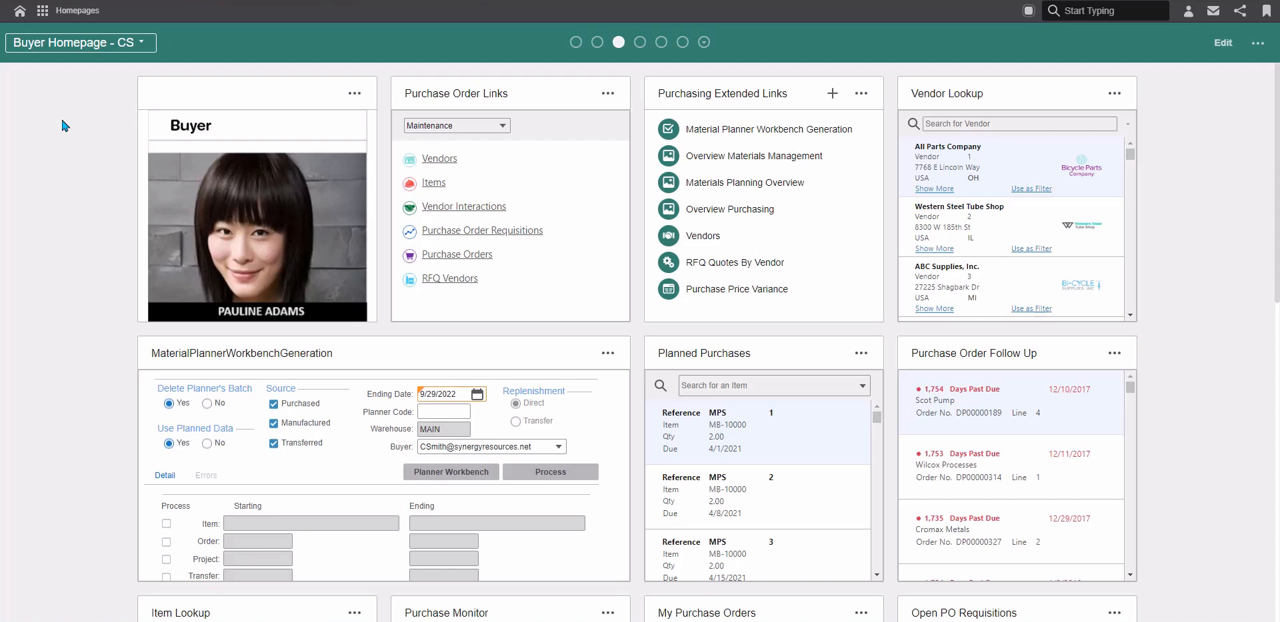
Vendor Information11
Covers maintaining vendor master records, including multi-currency settings, multi-site data, interaction logging, payment holds, and DAS2 reporting types.
About Multiple Currencies for Vendors · Assigning DAS2 Reporting Types to Vendor Invoices · Maintaining Vendors from a Master Site · Logging Vendor Interactions · Replying to an Incoming Vendor Interaction
Item Price Requests5
Lets buyers solicit and compare item pricing from a group of vendors through the Vendor Portal, then apply the responses to purchasing documents.
About Item Price Requests · Entering Item Price Requests · Copying Item Price Responses to a PO · Copying Item Price Responses to a PO Requisition
Purchase Orders34
Covers the full purchase order lifecycle, from requisitions and header/line entry through status changes, landed costs, and multi-site purchasing.
Purchasing Overview · Automatic Vouchering · About Creating Purchase Order Lines Change Logs · Deleting a Purchase Order · Deleting Multiple Purchase Orders
Letters of Credit3
Covers creating vendor letters of credit and linking them to vendor records and purchase orders.
Creating a Vendor Letter of Credit · Linking a Vendor LCR to Vendors and Purchase Orders
Managing Multiple Currencies3
Covers converting vendor records to the euro currency and understanding the conversion process.
About the Vendor Euro Currency Conversion Utility · Converting Vendor Records to the Euro
PO Requisitions4
Lets employees create, track, and approve purchase order requisitions from Employee Self Service.
Creating or Updating a PO Requisition · Viewing PO Requisition History · Approving or Rejecting PO Requisitions
Vendor Consignment Inventory Setup4
Covers setting up and managing inventory a company owns but stores at a vendor's warehouse.
Perform General Setup, Vendor Consignment Inventory Setup · Define Replenishment Needs at the Consignment Warehouse · Manage Inventory at the Vendor Consignment Warehouse
RFQs7
Covers requesting and comparing vendor price quotes and selecting a winning vendor for each line item.
About RFQs · Setting RFQ Parameters · Creating a RFQ Manually · Adding a New Line Item for a RFQ · Selecting a Vendor for a RFQ
About the Planner3
Explains how the Planner compares an order against the long-term shop-floor plan to project real-time completion dates, covering its database, lead-time, lot-size, safety-stock, and resource-availability logic.
Using item acquisition schedules · Defining the acquisition schedule · Assigning the acquisition schedule to an item
Enterprise automations5
Bundles the Value+ enterprise automations, including AI-assisted quality trend analysis, make-vs-buy decisions, and RPA-driven document processing, that automate recurring SyteLine workflows.
Make vs Buy · Authorization and security · Prerequisites · Security roles · Process flow for Make vs Buy
Using Jobs6
Covers the full job lifecycle, from creation and release through material issuing, outside processing, shop floor execution, co-products, and job costs.
Sending Job Materials Outside for Processing · About Outside Process Management · Setting Up and Using Outside Process Management (OPM) · Setting Initial Parameters for Outside Process Management (OPM) · Outside Process Management: Single Line Example
EDI Supply Processing13
Covers setting up and processing vendor-facing EDI transactions, both inbound and outbound.
EDI Setup (Supply Side) · Errors That Stop Supply EDI Transaction Posting · Inbound Supply Transactions · Inbound Supply EDI Transactions - Flat-File Layout · Receiving an EDI Invoice (Inbound 810/INVOIC)
Other capabilities6
About Vendor Hub · Setting Up Surcharges
Warehouse Management
strongWarehouse operations including receiving, putaway, picking, packing, shipping, and warehouse layout optimisation.
›201 documented capabilities in 16 areas
Warehouse Management
strongManaging Inventory54
Groups the tools for setting up and maintaining stock records, including non-inventory items, warehouses, units of measure, lot and serial tracking, portal catalogs, cycle counts, and physical inventory counts.
About Non-Inventory Items · Managing Non-Inventory Items · Inventory Control Overview · Inventory Control Steps · About Warehouses
Managing Customer Orders5
Covers day-to-day order administration: shipment approvals, non-inventory item costing, billing terms, interaction logging, due-date corrections, price adjustments, reservations, progressive billing, supply pegging, and customer interactions.
Reserved Inventory · About Reserving Inventory for an Order · Reserving Inventory for an Order · Reserving Inventory for an Order Line · Shipping an Order with Reserved Inventory
Costing Items16
Covers the full range of costing methods and processes, including setup, posting, analysis, and comparison of standard, average, LIFO, FIFO, and specific costing.
Costing Overview · Setting Up Costing · Costing Setup · Average Costing Setup · LIFO and FIFO Costing Setup
Defining Lead Time5
Defines fixed and variable lead times used by APS and MRP planning, including the lead time processor algorithm and lead time shifts.
Defining Lead Time for APS Planning · Defining Lead Time for MRP Planning · About the Lead Time Processor Algorithm · Using Lead Time Shifts
Vendor Consignment Inventory Setup4
Covers setting up and managing inventory a company owns but stores at a vendor's warehouse.
Perform General Setup, Vendor Consignment Inventory Setup · Define Replenishment Needs at the Consignment Warehouse · Manage Inventory at the Vendor Consignment Warehouse
Using MRP and APS17
Covers both MRP and Advanced Planning and Scheduling engines, including forecasting, exception handling, and comparing the two planning modes.
APS Overview · MRP Overview · MRP Steps · MRP: Initial Setup Steps · MRP: Periodic Maintenance Tasks
Using the Material Planner Workbench6
Provides an alternative to MRP or APS for generating supply orders, plus tools for replenishment rules, source rules, and cross-referencing demand to supply.
Material Planner Workbench Overview · Generating Data for the Material Planner Workbench · About Replenishment Orders · Creating Source Rules for Planned Orders · Cross-Referencing a Range of Line Items
Working with Planned Orders11
Covers controlling, consolidating, and firming planned orders into purchase orders, job orders, production schedules, or intra-site transfers.
Controlling Planned Order Creation · Consolidating Planned Orders · Firming Planned Orders · Firming Planned Orders into Job Orders · Firming a Planned Order into a Production Schedule
About the Planner14
Explains how the Planner compares an order against the long-term shop-floor plan to project real-time completion dates, covering its database, lead-time, lot-size, safety-stock, and resource-availability logic.
Defining item lead times · Standard lead time · Expedited lead time · Using item acquisition schedules · Defining the acquisition schedule
Working with Transfer Orders27
Covers creating, shipping, receiving, and costing transfer orders that move material between warehouses, sites, or entities, including multi-site transfers.
Transfer Orders Overview · Transfer Orders Steps · About Currency Conversions for Transfer Orders · About Push/Pull Transactions · About Transfer Order Costing
Processing Returns and Replacements14
Covers the return material authorization process end to end, from setup through receiving returned goods and issuing credit or replacement.
Return Material Authorization Overview · RMA Setup · RMA Steps · Receiving Returns · About Returns
Picking, Packing, and Shipping7
Covers the physical fulfillment workflow of picking, packing, and shipping customer orders, plus supporting codes and batch processing.
Order Picking Steps · Order Packing Steps · Order Shipping Steps · About Ship Via Codes · About Shipping Processing Orders
Plants4
Defines plants, the manufacturing location tied to a site's manufacturing warehouse, and sets default plant and warehouse assignments.
About Plants · Creating Plants · Changing the Default Plant and Warehouse
Customer Consignment Inventory Setup5
Covers setting up and managing inventory that a company owns but stores in a customer's warehouse.
Perform General Customer Setup · Define Replenishment Needs and Create Consignment Transfers · Record Customer Usage · Set Up Multi-Site Use of Customer Consignment Warehouses
Using Jobs4
Covers the full job lifecycle, from creation and release through material issuing, outside processing, shop floor execution, co-products, and job costs.
Issuing Materials to the Job · Issuing Materials to a Job Order · Moving Purchased Items from a PO into a Job Operation · Filtering Job Materials Records
Other capabilities8
Items · Database table for Scheduler: PART · About Backflushing · Example: Backflushing
Business Intelligence
strongReporting, dashboards, analytics, and data visualisation capabilities built into the ERP platform for operational and strategic decision-making.
›168 documented capabilities in 14 areas
Business Intelligence
strong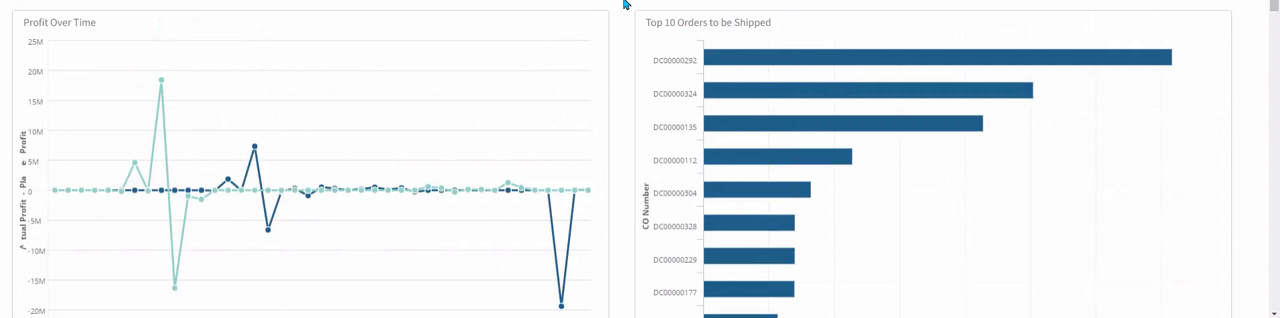
Navigation17
Explains how to reach the Birst analytics package from Infor OS Portal or Ming.le, then move around its dashboards, toolbar, data views, and attribute selectors.
Navigate to Birst from within Ming.le · Work within the dashboard · Use the toolbar · View data · Hover
Excel-Based Toolset for Financial Reporting20
Covers installing, configuring, and using this Excel-based Toolset for Financial Reporting, which pulls SyteLine general ledger data directly into Excel.
Requirements · Recommendations · List separator · Install the tool · Reinstall or upgrade
Analytics overview6
Introduces Infor SyteLine Analytics for Birst and its core reporting, dashboard, and fact components.
About Infor SyteLine Analytics for Birst · Analytics components · Reports · Dashboards · Facts
Using critical numbers as KPIs or widgets6
Covers SyteLine's library of predefined critical numbers, or KPIs, plus the ability to define custom ones and surface them as homepage widgets.
About critical numbers · Critical number definitions · Goal and alert status · Viewing critical numbers · Adding widgets to display critical numbers in Homepages
Costing Items5
Covers the full range of costing methods and processes, including setup, posting, analysis, and comparison of standard, average, LIFO, FIFO, and specific costing.
Costing Analysis · Costing Analysis Overview · Creating Costing Alternatives · Rolling Up Costs for Costing Analysis · Comparing Costs for Costing Analysis
Domain information59
Organizes Birst's available facts into finance, inventory, and sales domains.
Finance domain · Inventory domain · Sales domain · Accounts payable analysis fact · Calculated measures
External Financial Interface5
Connects SyteLine to external financial systems for incoming and outgoing data exchange.
Setting Up an External Financial Interface · Setting Up an Incoming Financial Interface · Updating Data from Data in an External Financial Application · Example: Requesting Data from an External Financial Application
Reports and KPIs8
Documents the standard financial and sales reports and KPIs available in Birst, along with the assumptions behind them.
Assumptions · Accounts payable balances report · Accounts receivable balances report · AR by age report · Average order value report
Financial Statements9
Sets up, prints, and troubleshoots financial statements, including combined and multi-site reporting.
Financial Statement Setup · About Dates in Financial Statements · About Print Sort Methods · Printing a Financial Statement · Troubleshooting Financial Statements
Report Definition7
Creates, edits, copies, and prints custom financial report definitions.
Creating a report definition · Adding report columns · Adding report lines · Editing a report definition · Copying a report definition
Target Group Types3
Defines target group types used to categorize and track organizational performance targets over set time intervals.
Mapping COA with target types · Viewing the Target and Actual Values
Configuration6
Configures items, estimates, jobs, and customer orders through the product configurator, including authorizations and printing.
About Post Configuration · List Configuration Values · Post Configuration Status Overview · Printing Configuration Information · Setting Authorizations for Configuration Users
Document Automation3
Generates and attaches configurable documents, such as proposals and safety data sheets, to SyteLine records.
Attaching Configuration Documents to Records · Setting Up the Document Automation Interface
Other capabilities14
Consolidation Overview · G/L Voucher Overview · Setting an Increment Date · About the Microsoft Outlook Add-in · Extended Analysis with Dimensions and Attributes
Quality Management
strongQuality control, inspection management, non-conformance tracking, CAPA, and compliance with quality standards (ISO, FDA, AS9100).
›27 documented capabilities in 5 areas
Quality Management
strongQCS Overview5
Covers core Quality Control Solution setup, including cost types, disposition codes, failure codes, and item regulations.
About Cost Types · About Disposition Codes · About Failure Codes · About Regulations
Using QCS7
Covers day-to-day QCS tasks, including quick QC receiver creation, gauge calibration, cause codes, change requests, cost activities, and family inspection plans.
Allow Quick QCS · Calibrating a Gauge and Recording the Inspection Data · Cause Code Examples · Closing a Change Request · Cost Activity Examples
Quality Hub3
Consolidates an item's overview info, detailed control-plan data, and summary statistics into one central quality hub.
Details · Summary
Inspections7
Covers building, assigning, and completing reusable inspection step sets for equipment serviced on service orders or contracts.
About Inspections · Setting Up Inspections · Completing Inspections on an SRO · Reviewing Inspections of a Unit · Adding an Inspection to a Service Order
Enterprise automations5
Bundles the Value+ enterprise automations, including AI-assisted quality trend analysis, make-vs-buy decisions, and RPA-driven document processing, that automate recurring SyteLine workflows.
Statistical Process Trend Analysis · Authorization and security · Prerequisites · Security roles · Process flow for SPC Trend Analysis
Asset Management
strongEnterprise asset management including preventive maintenance, asset lifecycle tracking, work order management, and asset depreciation.
›27 documented capabilities in 4 areas
Asset Management
strongContracts4
Covers setting up, creating, invoicing, and amortizing service contracts, including rental agreements and coverage-time calculations.
Rentals · Setting Up Rentals · Generating an Item Rental History Report · Creating and Invoicing a Long Term Rental Agreement
Units14
Covers tracking serviced items and units, warranty codes, unit configurations, and resolving customer/unit conflicts.
About Items, Units and Servicing · Maintaining Warranty Codes for Items · Running the Warranty Expiration Report · Configuring Units · Using the Unit Configuration Form
Fixed Assets7
Tracks fixed assets and calculates and posts depreciation to the general ledger.
Fixed Assets Overview · Fixed Assets Steps · About Depreciation · About Partial Depreciation · Depreciation Calculations
Advanced Plant Maintenance2
Covers using Advanced Plant Maintenance to schedule and manage internal preventative maintenance and repairs.
About Advanced Plant Maintenance
Sales
moderateThe sales side of an ERP: quotes and pricing, order processing, customer and account management, post-sale service, and sales reporting on shared master data.
›369 documented capabilities in 38 areas
Sales
moderate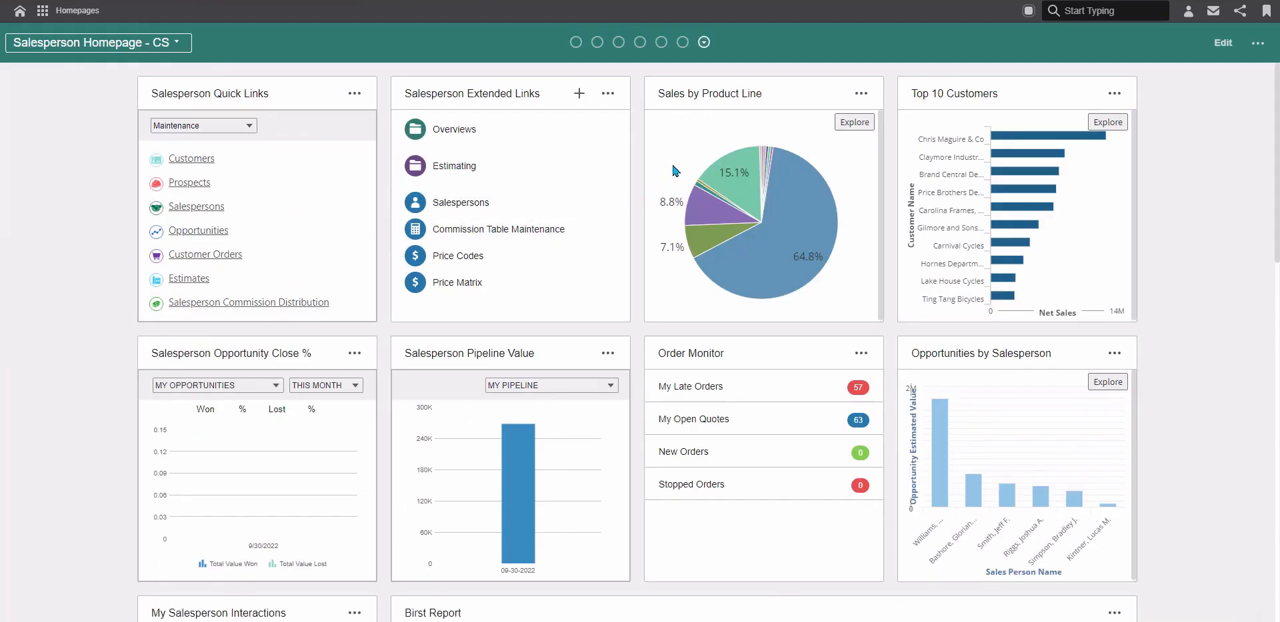
Setting Up New Customers7
Establishes and maintains customer master records, including multi-site customer and ship-to data, province/state codes, sales-contact assignments, and balance corrections.
Customer Orders Overview · Maintaining Customers from a Master Site · Maintaining Multi-Site Customer Ship-Tos · About Province/State Codes · Assigning a Sales Contact to a Ship To Address
Managing Inventory6
Groups the tools for setting up and maintaining stock records, including non-inventory items, warehouses, units of measure, lot and serial tracking, portal catalogs, cycle counts, and physical inventory counts.
About Portal Catalogs · Setting Up Portal Catalogs · Activating Portal Catalogs · Rebuilding Portal Catalogs · Copying a Portal Catalog
Vendor Information4
Covers maintaining vendor master records, including multi-currency settings, multi-site data, interaction logging, payment holds, and DAS2 reporting types.
Working with Demand and Source Vendor Site PO-CO Automation · About Demand and Source Vendor Site PO-CO Automation · Using Demand and Source Vendor Site PO-CO Automation · Unlinking a Source Vendor Site
Estimating and Quoting7
Supports creating customer estimates and estimate lines, linking them to purchase requisitions or jobs, and adjusting projected costs before they become firm orders.
Estimating Steps · Creating a Cross Reference to a Purchase Order Requisition · Creating an Estimate · Creating an Estimate Line · Cross-Referencing an Estimate to an Estimate Job
Managing Customer Orders31
Covers day-to-day order administration: shipment approvals, non-inventory item costing, billing terms, interaction logging, due-date corrections, price adjustments, reservations, progressive billing, supply pegging, and customer interactions.
About Approving Customer Shipments · About Customer Order Entry Non-Inventory Items · Determining the Cost of Goods Material Account · About Multiple Due Date Billing Terms · Attaching Files to Emails Sent from Interaction Forms
Performance Obligation Events3
Covers creating and processing milestone events, including performance obligation thresholds tied to revenue recognition.
Creating and Processing Project Milestone Events · How Performance Obligation Event Thresholds and Amounts are Processed
Contracts30
Covers setting up, creating, invoicing, and amortizing service contracts, including rental agreements and coverage-time calculations.
Using Contracts to Track Maintenance Agreements for Customers · Using Contracts to Generate Service Orders · Setting Up the System for Contracts · Setting Up Contract Status Codes · Setting Up Service Types
Tracking Orders Using a Delivery Order7
Covers grouping multiple customer orders under a single delivery order and tracking number, including when lines and sequences get assigned.
Delivery Orders Overview · Creating Delivery Orders · Assigning Delivery Orders After Shipping · Assigning Delivery Orders Before Shipping · Assigning Delivery Orders and Delivery Order Lines Before Shipping
Using Credit Hold7
Covers placing customers or individual orders on credit hold, activating the feature, and applying it to EDI orders.
About Credit Hold · Using Credit Hold · Activating Credit Hold · Activating Credit Hold for EDI Customer Orders · Manually Placing a Customer on Credit Hold
Domain information28
Organizes Birst's available facts into finance, inventory, and sales domains.
Using Consolidated Invoices16
Covers combining multiple shipped orders into a single invoice per customer over a billing period, and maintaining those consolidated records.
Consolidated Invoice Overview · Setting Up Consolidated Invoices · Setting Up Consolidated Invoicing for a Customer · Setting Up Consolidated Invoicing for a Customer Order · Setting Up Consolidated Invoicing for a Customer Order Line/Release
Using Customer Contracts4
Covers setting up customer-specific pricing contracts, including support for contract manufacturing relationships with multiple end users.
Creating a Customer Contract · Customer Contract Pricing Setup · Setting Up Customer Contracts for Contract Manufacturing
Sending Mass Communications7
Covers sending communications, including emails, faxes, letters, and mail-merge blasts, to groups of sales contacts or portal users.
Sending a Communication to a Group of Contacts · Sending an Email to Portal Users · Sending a Fax or Letter to a Group of Contacts · Sending an Email Blast · Sending an Email Blast without a Template
Using Price Promotions and Rebates6
Covers setting up promotional pricing and rebate programs and managing the credits they generate as orders are invoiced.
Promotion Pricing and Rebate Programs Overview · Applying Promotion Pricing to Customer Order Lines · Maintaining Earned Rebates · Processing Earned Rebates · Closing Rebate Programs
CRM Scenarios7
Walks through common CRM scenarios, including logging calls, recording leads, tracking opportunities, forecasting, closing deals, and running campaigns.
CRM Scenario 1 · CRM Scenario 2 · CRM Scenario 3 · CRM Scenario 4 · CRM Scenario 5
Managing Multiple Currencies4
Covers converting customer records to the euro and creating customer orders and invoices in foreign currencies.
Converting Customer Records to the Euro · Creating Customer Orders and Invoices in Foreign Currencies · About the Customer Euro Currency Conversion Utility
Using Letters of Credit4
Covers creating customer letters of credit and linking them to customer records and orders.
Creating a Customer Letter of Credit · How Letters of Credit Affect Customer Orders · Linking a Customer LCR to Customers and Orders
Field Topics7
Documents individual field definitions used throughout the service module, including escalation basis, billing code, and contract frequency fields.
Basis, Escalation Tasks · Billing Code · Contract Billing Frequency · Change Priority Code · Change Working Status To
Processing Returns and Replacements19
Covers the return material authorization process end to end, from setup through receiving returned goods and issuing credit or replacement.
Return Material Authorization Overview · RMA Setup · RMA Steps · Receiving Returns · About Returns
Features and Options Configurator5
Configures planning items with feature groups and qualifier logic so configurable products can be designed and ordered with selectable options.
Creating and Entering a Planning Item · Designing a Planning Item Layout · Example: Qualifier Masks · Example: Qualifier Strings
Picking, Packing, and Shipping7
Covers the physical fulfillment workflow of picking, packing, and shipping customer orders, plus supporting codes and batch processing.
Order Picking Steps · Order Packing Steps · Order Shipping Steps · About Ship Via Codes · About Shipping Processing Orders
Using Point of Sale for Orders and Contracts24
Covers walk-in retail transactions through the point-of-sale module, including cash drawer setup, rentals, walk-up sales, and returns.
Point of Sale Overview · Setting up the Point of Sale (POS) Feature · Setting up Point of Sale Payment Types · Setting up General Point of Sale Information · Setting up the Point of Sale Receipt
Enterprise automations7
Bundles the Value+ enterprise automations, including AI-assisted quality trend analysis, make-vs-buy decisions, and RPA-driven document processing, that automate recurring SyteLine workflows.
Customer Order Creation · Authorization and Security · Prerequisites · Security roles · Logging In and Defining User Parameters
Setting Up European Union Sales Information8
Covers configuring EU-specific reporting requirements, including sales list and supplementary statistical declaration reports.
European Union (EU) Supplemental Information · Setting Up Information for the EU Sales List Report · Setting Up Information for the EU SSD Report · Intrastat SSD ASCII File Format and Data Mapping · Intrastat SSD XML File Format
Customer Consignment Inventory Setup5
Covers setting up and managing inventory that a company owns but stores in a customer's warehouse.
Perform General Customer Setup · Define Replenishment Needs and Create Consignment Transfers · Record Customer Usage · Set Up Multi-Site Use of Customer Consignment Warehouses
Getting started5
Covers the initial steps needed to begin using the mobile service app, including known platform limitations.
Quick start for non-Infor O/S Portal users · Back office system configuration · Setting permissions and licensing · Known limitations
Configuration3
Covers configuring the mobile app to connect to the back office, with different steps depending on whether Infor OS is used.
Configuring the app to connect to the back office · Useful back office forms
Shipping and Invoicing Credit Card Orders3
Invoices and ships a credit card order as one delivery or split it across several partial deliveries.
Handling Single Shipments for a Credit Card Order · Handling Multiple Shipments for a Credit Card Order
Electronic Data Interchange (EDI) Overview7
Introduces EDI processing, covering standards, translators, and both inbound and outbound transaction handling.
EDI Steps · Posting EDI Inbound Purchase Order Acknowledgements · About EDI Standards · About EDI Translators · About Inbound Transactions
General navigation6
Covers the general navigation elements of the mobile app, including the home page, main menu, action buttons, toolbar, and search.
Using the Home page · Using the Main menu · Using the Action menus and Action buttons · Using the Toolbar buttons · Using the Search options
EDI Demand Processing16
Covers setting up and processing customer-facing EDI transactions, both inbound and outbound.
EDI Setup (Demand Side) · Errors That Stop Demand EDI CO Transaction Posting · Inbound Demand Transactions · About On-Hand Quantities and Locations · Inbound Demand EDI Transactions - Flat-File Layout
Data access and synchronization6
Covers offline data availability, sign-in behavior, data deletion, and resolving synchronization conflicts in the mobile app.
Offline data · Infor O/S offline sign in · Deleting data · Synchronization conflict indicators · Resolving a synchronization conflict
EDI Supply Processing13
Covers setting up and processing vendor-facing EDI transactions, both inbound and outbound.
EDI Setup (Supply Side) · Errors That Stop Supply EDI Transaction Posting · Inbound Supply Transactions · Inbound Supply EDI Transactions - Flat-File Layout · Receiving an EDI Invoice (Inbound 810/INVOIC)
Additional functionality7
Covers supporting mobile forms, credit card authorization, GPS tracking, attachments, printing, and switching sites.
Using the supporting forms · Credit card authorizations · GPS tracking · Attachments · Printing a work order
Extending mobile data4
Covers extending the mobile app with custom fields, new forms, and linked child forms through Mobile Extensions.
Adding custom fields to an existing form · Adding a new form and data · Adding a linked child form
Configuration13
Configures items, estimates, jobs, and customer orders through the product configurator, including authorizations and printing.
Configuring Items, Estimates or Jobs · Configuring an Item, Estimate, or Job · Configuring a Job or Item · Costing Method for Configurable Items · Deleting Configurable Jobs, Items, and Operations
Troubleshooting5
Covers diagnosing common mobile app errors, including server errors, IDO access errors, and sync conflicts.
Server Error: 404 messages · IDO Error: Read or write access · Error: Invalid credentials · Sync Conflict: Method Not Allowed · Error: Error occurred processing a request
Other capabilities21
Delivery schedules · Database table: MATLDELV · Installing the app
Project Management
moderateProject planning, resource allocation, time tracking, expense management, and project accounting for project-centric businesses.
›38 documented capabilities in 5 areas
Project Management
moderateAbout Projects10
Covers project overviews, resources, tasks, details, and integration with Microsoft Project.
Projects Overview · Project Details · Project Resources Overview · Project Tasks Overview · Microsoft Project Integration
Cross-References4
Covers linking project resources to job orders and purchase orders, and removing those links when needed.
Cross-Referencing a Project Resource to a Job Order · Cross-Referencing a Project Resource to a Purchase Order · Deleting or Updating a Project Resource Cross-Reference
Performance Obligation Events3
Covers creating and processing milestone events, including performance obligation thresholds tied to revenue recognition.
Creating and Processing Project Milestone Events · How Performance Obligation Event Thresholds and Amounts are Processed
Microsoft Project Add-In18
Covers installing and using this Microsoft Project Add-In, which synchronizes project tasks and resources between Microsoft Project and SyteLine.
Requirements · Installing the tool · Setting up the tool · Using the tool · Sync In, Sync Out, and Enable Auto Sync Out
New Product Development3
Manages the lifecycle of a new item from concept through production, combining material status controls with dedicated NPD codes and item settings.
Setting Up NPD Codes · Defining NPD Items
Field Service
moderateField service management including work order dispatching, technician scheduling, mobile access, parts management, and service contract management.
›216 documented capabilities in 20 areas
Field Service
moderateManaging Inventory6
Groups the tools for setting up and maintaining stock records, including non-inventory items, warehouses, units of measure, lot and serial tracking, portal catalogs, cycle counts, and physical inventory counts.
About Portal Catalogs · Setting Up Portal Catalogs · Activating Portal Catalogs · Rebuilding Portal Catalogs · Copying a Portal Catalog
Overview6
Covers foundational service configuration, including setting parameters, defining billing code procedures, and using increment dates for recurring reports.
About Service · Billing Code Stored Procedures · Setting Service Parameters · Increment Date Example · Setting an Increment Date
Call Center (Incidents)20
Covers setting up and using the call center to log, escalate, resolve, and convert customer incidents into service orders, backed by a searchable knowledge base.
Setting up the System for Incidents · Setting Up Service Status Codes · Setting Up Priority Codes that Establish Response Times for Incidents · Setting Up Escalation Tasks · Setting Up Service Reasons and Activities
Contracts30
Covers setting up, creating, invoicing, and amortizing service contracts, including rental agreements and coverage-time calculations.
Using Contracts to Track Maintenance Agreements for Customers · Using Contracts to Generate Service Orders · Setting Up the System for Contracts · Setting Up Contract Status Codes · Setting Up Service Types
Inspections7
Covers building, assigning, and completing reusable inspection step sets for equipment serviced on service orders or contracts.
About Inspections · Setting Up Inspections · Completing Inspections on an SRO · Reviewing Inspections of a Unit · Adding an Inspection to a Service Order
Partners14
Covers managing service partners, including mass creation, viewing assignments, tracking transactions, and reimbursing expenses.
About Partners · Performing a Mass Creation of Partners · Using the Partner Console to View Assignments · Recording a Partner End Time · Tracking and Approving Partner Transactions
Scheduling13
Covers scheduling appointments for partners, configuring the scheduling board's display and permissions, and tracking appointment status.
About Scheduling · About Appointments · Setting Up the System for Scheduling · Setting Schedule Parameters · Maintaining Display Settings
Service Request Orders (SROs)43
Covers creating, invoicing, and accounting for Service Request Orders, including setup, data collection, and reporting.
Using SROs to Track Service Requests, Transactions, and Billing · Setting Up the System for Service Request Orders (SROs) · Setting Up Service Product Codes and Distribution Accounts · Setting Up Service Order Types · Setting Up Work Codes
Units14
Covers tracking serviced items and units, warranty codes, unit configurations, and resolving customer/unit conflicts.
About Items, Units and Servicing · Maintaining Warranty Codes for Items · Running the Warranty Expiration Report · Configuring Units · Using the Unit Configuration Form
Map Functionality5
Covers using built-in mapping to search locations, get directions, and track partner GPS positions without leaving the application.
Using the Map Functionality · Searching for a Location on the Map · Getting Directions on the Map · Using the Map GPS Tracking
Field Topics7
Documents individual field definitions used throughout the service module, including escalation basis, billing code, and contract frequency fields.
Basis, Escalation Tasks · Billing Code · Contract Billing Frequency · Change Priority Code · Change Working Status To
Getting started5
Covers the initial steps needed to begin using the mobile service app, including known platform limitations.
Quick start for non-Infor O/S Portal users · Back office system configuration · Setting permissions and licensing · Known limitations
Configuration3
Covers configuring the mobile app to connect to the back office, with different steps depending on whether Infor OS is used.
Configuring the app to connect to the back office · Useful back office forms
General navigation6
Covers the general navigation elements of the mobile app, including the home page, main menu, action buttons, toolbar, and search.
Using the Home page · Using the Main menu · Using the Action menus and Action buttons · Using the Toolbar buttons · Using the Search options
Data access and synchronization6
Covers offline data availability, sign-in behavior, data deletion, and resolving synchronization conflicts in the mobile app.
Offline data · Infor O/S offline sign in · Deleting data · Synchronization conflict indicators · Resolving a synchronization conflict
Primary service flows5
Covers three core mobile service flows—by appointment, by incident, and by service order—each launchable from Home or the main menu.
Appointment-based service flow · Incident-based service flow · Service order-based service flow · Adding and viewing service order planned transactions
Additional functionality7
Covers supporting mobile forms, credit card authorization, GPS tracking, attachments, printing, and switching sites.
Using the supporting forms · Credit card authorizations · GPS tracking · Attachments · Printing a work order
Extending mobile data4
Covers extending the mobile app with custom fields, new forms, and linked child forms through Mobile Extensions.
Adding custom fields to an existing form · Adding a new form and data · Adding a linked child form
Troubleshooting5
Covers diagnosing common mobile app errors, including server errors, IDO access errors, and sync conflicts.
Server Error: 404 messages · IDO Error: Read or write access · Error: Invalid credentials · Sync Conflict: Method Not Allowed · Error: Error occurred processing a request
Other capabilities10
About Advanced Plant Maintenance · Installing the app
Ecommerce
basicIntegrated ecommerce and online storefront capabilities including B2B and B2C portals, product catalogue management, and order management.
Ready to move on Infor CloudSuite?
Price it, put it head-to-head with alternatives, or talk to a partner who has implemented it.
Infor CloudSuite add-ons & integrations
Extend Infor CloudSuite with best-of-breed software that integrates with it:
Highlighted product links go straight to the vendor and are affiliate links — we may earn a commission if you sign up. This never affects which products we list or how we rank them.
Infor CloudSuite Modules FAQ
What is Infor CloudSuite?
Infor CloudSuite is Infor's family of industry-specific cloud ERP suites — including Industrial (manufacturing), Healthcare, Hospitality, and others — built on AWS with the shared Infor OS platform for AI and analytics. Rather than one generic ERP, each CloudSuite edition is pre-configured for its target industry's processes, aimed at large enterprises wanting deep industry fit over broad customization.
What is Infor CloudSuite EME?
Infor CloudSuite EME (Enterprise Management, formerly Infor LN) is Infor's ERP edition for complex manufacturing and distribution, particularly in industries like automotive, industrial equipment, and aerospace with intricate multi-site and engineer-to-order requirements. It's one of several industry-specific editions in the broader Infor CloudSuite portfolio, alongside CloudSuite Industrial and others.
How much does Infor CloudSuite cost?
Infor CloudSuite pricing is custom and not publicly listed, reflecting its enterprise pricing tier and the fact that cost varies significantly by industry edition, module scope, and company size. Typical total contract value runs roughly $300K–$2M+, with implementations taking 9–18 months. Get a quote from Infor or an Infor-certified partner scoped to your specific edition and requirements.
Why choose Infor CloudSuite?
Infor CloudSuite suits large enterprises wanting deep industry-specific functionality — manufacturing, healthcare, hospitality, and others — with less customization required than a generic ERP, plus AWS-hosted cloud infrastructure and Infor OS extras like Coleman AI and Birst analytics. The trade-off is a more complex product portfolio that generally requires an Infor-certified partner to implement well.
What is CloudSuite Industrial within the Infor CloudSuite portfolio?
CloudSuite Industrial is the manufacturing-focused edition of Infor CloudSuite, built for discrete and mixed-mode production with shop floor control and manufacturing execution. It's one of several industry-specific editions Infor offers — others target healthcare, hospitality, and complex engineer-to-order manufacturing — all sharing the same AWS-hosted Infor OS foundation for analytics and AI.