
Odoo Modules & Capabilities
Odoo is rated across 14 of 14 ERP modules, 3 of them a core strength and 240 documented capabilities catalogued across those modules.
- 14of 14
- Modules rated
- 3
- Core strengths
- 240
- Documented capabilities
- Cloud / On-Premise
- Deployment
Odoo module ratings
Ordered strongest to weakest. Each rating reflects standard-edition depth, not what a third-party add-on could bolt on.
Sales
strongThe sales side of an ERP: quotes and pricing, order processing, customer and account management, post-sale service, and sales reporting on shared master data.
›68 documented capabilities in 11 areas
Sales
strong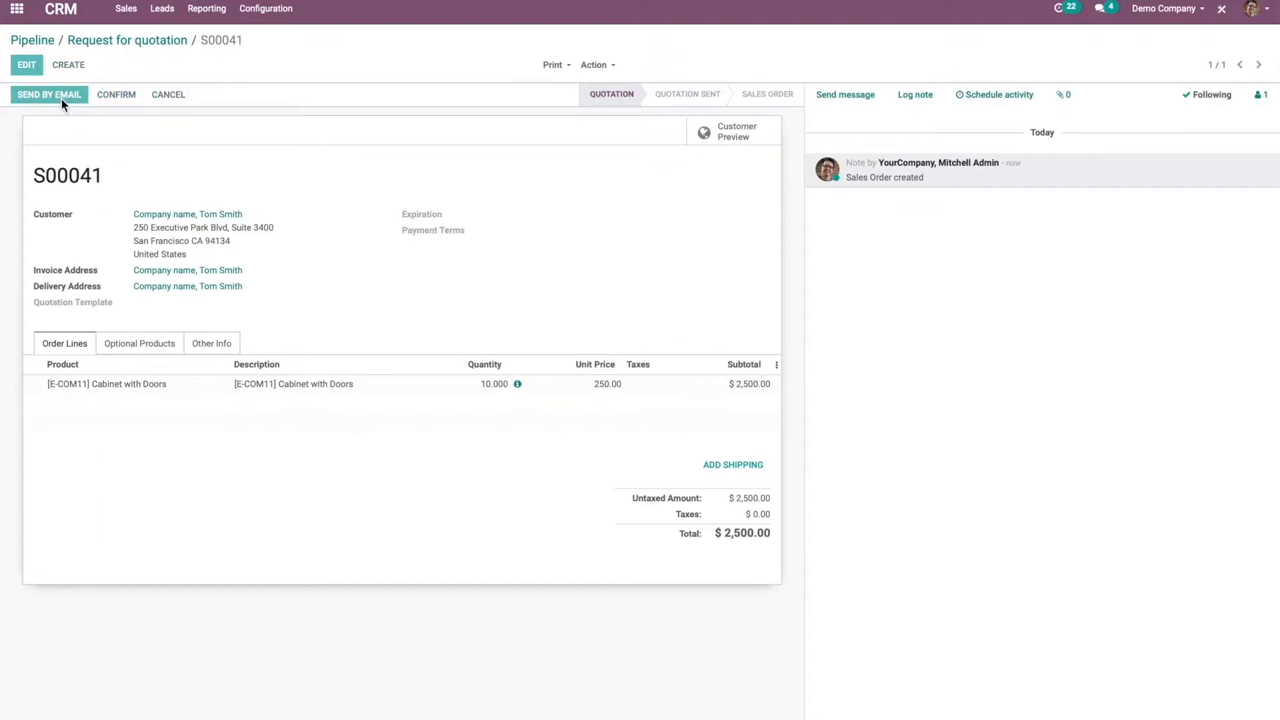
Organize the pipeline7
Structures the sales pipeline by managing lost opportunities so they can be reviewed or reactivated, merging duplicate leads and opportunities into a single record, and configuring sales teams to divide territory and ownership across the organization.
Configuration5
Sets up the core building blocks of an online store: publishing products with images, video, and visibility rules, organizing them into categories and variants, defining pricelists and discounts, and managing B2B versus B2C customer account and checkout behavior.
Configure rental products3
Sets up products for rental by defining period-based pricing and configuring fines for late returns, so items can be offered for hire alongside standard sale products.
Promote and monetize5
Sells event tickets through multiple channels once ticketing is enabled, including standard sales orders, point of sale, and the website store, with ticket products and event details selected at the point of purchase.
Acquire leads5
Brings new leads and opportunities into the pipeline through several channels: converting inbound leads, capturing web contact-form submissions, creating leads manually or from incoming email, generating quotations directly, and mining external company data for prospects.
eCommerce design3
Shapes the customer-facing shopping experience by customizing individual product pages, arranging the catalog with layout and filtering options, and adding features such as wishlists and side-by-side product comparison.
Assign and track leads4
Routes incoming leads to the right salesperson using predictive lead scoring for automated assignment, alongside reporting on unattended leads, lead quality, marketing attribution, and reseller/lead-distribution performance.
Attendee experience4
Lets attendees engage with an event through published tracks and talks, with speaker details, live broadcasting, and quiz-based gamification, while organizers manage the schedule dashboard with grouping and filtering.
Analyze performance5
Measures pipeline health and forecasting accuracy through win/loss pipeline analysis, an expected-revenue view weighted by opportunity probability, and a forecast report that projects future sales results for managers assessing team effectiveness.
Optimize your day-to-day work4
Speeds up day-to-day CRM work with partner autocomplete for faster data entry, gamification to drive team engagement, configurable activity plans, automatic lead enrichment, and support for membership/partnership relationships.
Other capabilities23
Inventory Management
strongInventory tracking, stock management, reorder point planning, multi-location management, and inventory valuation across warehouses and locations.
›10 documented capabilities in 3 areas
Inventory Management
strongProduct management3
Configures how products behave in the warehouse, including product type, units of measure, packages and packaging, and tracks individual units through serial numbers, lot numbers, and expiration dates.
Warehouses and storage4
Sets up warehouse structure and physical storage, including multi-warehouse and location hierarchies, operation types, inventory adjustments and cycle counts, reordering-based replenishment across warehouses, and forecasting and stock reporting.
Replenishment
Daily operations3
Covers scanner-driven inventory tasks such as adjusting stock counts, processing receipts and deliveries, and moving goods between locations, using either default or GS1 barcode nomenclature and optional RFID tag reading.
Ecommerce
strongIntegrated ecommerce and online storefront capabilities including B2B and B2C portals, product catalogue management, and order management.
Finance & Accounting
moderateCore financial management including general ledger, accounts payable/receivable, fixed assets, cash management, and financial reporting. The backbone of any ERP system.
›59 documented capabilities in 8 areas
Finance & Accounting
moderateGet started23
Walks a new company through initial accounting setup, including defining fiscal periods and tax filing schedules, linking bank accounts for automatic statement import, configuring country-appropriate taxes, and establishing the chart of accounts with opening balances.
Chart of accounts
Taxes7
Automates tax computation and the resulting journal entries on invoices and bills, letting a company activate pre-configured tax rates, assign them to products, and file tax returns, with advanced options for customizing how taxes are computed, displayed, and mapped through fiscal positions.
Customer invoices7
Handles the customer invoicing cycle from draft creation through confirmation, sending, payment matching, and dunning for overdue balances, drawing on receivables reporting such as aged balances.
Vendor bills4
Captures vendor bills by manual entry or automated upload from email and PDF, then confirms them into journal entries and tracks payment, supporting self-billing workflows and an aged payable view of outstanding obligations.
Payments4
Records customer and vendor payments either linked to a specific invoice or bill, reducing the amount owed, or as standalone transactions that create outstanding credits or debits, with automatic reconciliation and batch payment processing to match payments against open documents.
Bank and cash accounts5
Manages bank and cash journals for tracking money movements, with automatic feed synchronization for thousands of supported banks or manual entry of statements for institutions that are not directly connected.
Bank reconciliation
Reporting6
Delivers generic and dynamic financial statements including balance sheet, profit and loss, and cash flow reports alongside specialized views for tax, receivables, payables, and audit trails, with drill-down on report lines, PDF/XLSX export, and period-over-period comparison.
Tax return (VAT report)
Other capabilities3
Manufacturing
moderateProduction planning, shop floor control, BOM management, MRP, and manufacturing execution. Supports discrete, process, and mixed-mode manufacturing environments.
›30 documented capabilities in 8 areas
Manufacturing
moderate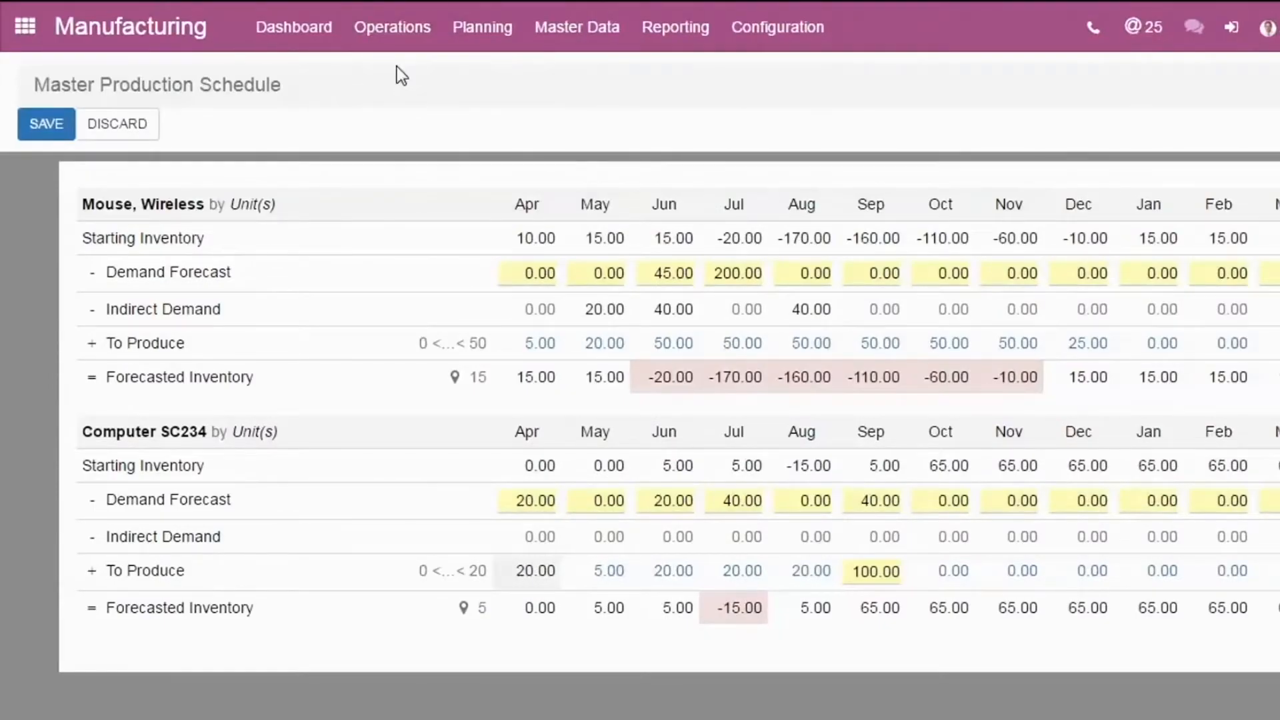
Change management3
Tracks, revises, and reverts changes to products and bills of materials through engineering change orders, letting teams compare BOM versions and apply approved modifications into production.
Basic setup6
Covers foundational production setup: configuring products for manufacturing, building bills of materials, and running one-, two-, or three-step manufacturing processes, plus tracking manufacturing order and work-in-progress costs.
Project management1
Routes engineering change orders through configurable approval stages, assigning approvers and tracking pending sign-offs on a dashboard so stakeholders review changes before they reach the production bill of materials.
Advanced configuration5
Handles sophisticated production scenarios including bills of materials for product variants, kit assemblies, multilevel BOM structures, work center configuration, and dependencies between work orders.
Workflows6
Covers advanced production scenarios such as a master production schedule, work-center time off, scrapping during manufacturing, backorders, splitting or merging manufacturing orders, unbuilding finished goods, by-products, continuous improvement, and lot/serial-tracked manufacturing.
Shop Floor3
Gives operators a floor-level view for running manufacturing orders and logging work, combining a shop floor overview with time tracking of labor spent on each operation.
Subcontracting3
Manages production done by third-party manufacturers through basic subcontracting, resupplying components to the subcontractor, or dropshipping components directly to them, with valuation that folds in component costs, manufacturing fees, and shipping.
Reporting3
Reports on production performance and efficiency, covering delays, resource and equipment utilization, effectiveness metrics, and broader production analytics.
Supply Chain
moderateEnd-to-end supply chain visibility including demand planning, supply planning, logistics, supplier management, and supply chain analytics.
HR & Payroll
moderateHuman resources management including employee records, payroll processing, benefits administration, time and attendance, and talent management.
›2 documented capabilities in 1 areas
HR & Payroll
moderate
Other capabilities2
Project Management
moderateProject planning, resource allocation, time tracking, expense management, and project accounting for project-centric businesses.
›14 documented capabilities in 3 areas
Project Management
moderateProject management5
Sets up and runs projects on a Kanban board, covering project creation with name, manager, dates, and allocated hours, visibility settings for internal versus external users, scheduled activities, and portal sharing for collaboration with clients.
Task management5
Organizes project work through task stages and statuses, task creation, recurring tasks, sub-tasks, and dependencies between tasks.
Advanced4
Extends the ticket pipeline with after-sales workflows, controls for closing tickets, and time tracking that can be billed back to the customer for support work performed.
Procurement
moderatePurchase order management, supplier management, requisition workflows, contract management, and spend analytics.
›13 documented capabilities in 4 areas
Procurement
moderate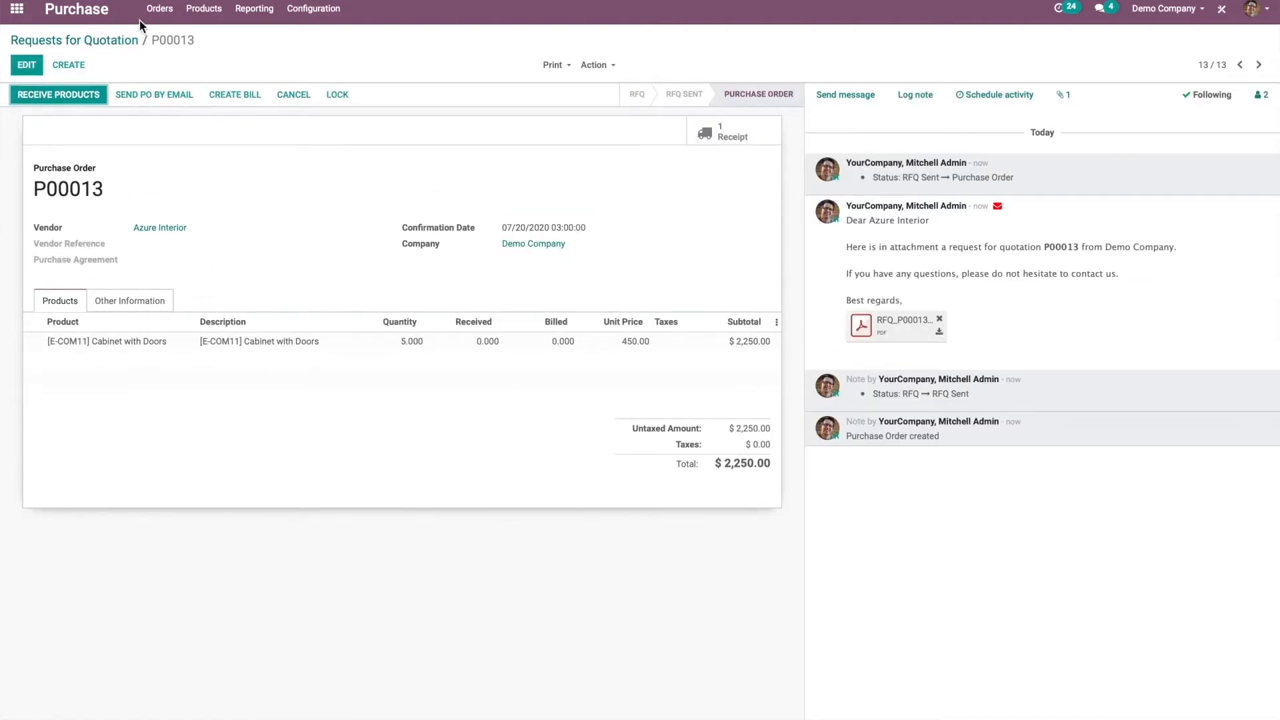
Products3
Configures products for procurement by importing vendor pricelists to manage supplier pricing and setting up standing or temporary reordering rules to automate replenishment and keep stock levels optimal.
Manage deals4
Handles vendor negotiation and agreements through requests for quotation, blanket orders for long-term commitments, calls for tender, purchase templates, control policies, and tracking of vendor bills through the procurement cycle.
Advanced3
Layers strategic buying tools on top of basic purchasing, including demand-based quantity suggestions, purchase and vendor-cost analysis reports, procurement expense tracking, EDI links between purchase and sales orders, and a purchase/vendor analysis dashboard.
Subcontracting3
Manages production done by third-party manufacturers through basic subcontracting, resupplying components to the subcontractor, or dropshipping components directly to them, with valuation that folds in component costs, manufacturing fees, and shipping.
Warehouse Management
moderateWarehouse operations including receiving, putaway, picking, packing, shipping, and warehouse layout optimisation.
›15 documented capabilities in 4 areas
Warehouse Management
moderateSetup2
Covers configuring scanner hardware, printing product and location barcodes, defining which operation types and commands scanners can trigger, and generating barcodes for lot- and serial-tracked items, plus RFID hardware integration.
Warehouses and storage4
Sets up warehouse structure and physical storage, including multi-warehouse and location hierarchies, operation types, inventory adjustments and cycle counts, reordering-based replenishment across warehouses, and forecasting and stock reporting.
Replenishment
Daily operations3
Covers scanner-driven inventory tasks such as adjusting stock counts, processing receipts and deliveries, and moving goods between locations, using either default or GS1 barcode nomenclature and optional RFID tag reading.
Shipping and receiving6
Governs inbound and outbound warehouse flows, covering delivery method setup, one- to three-step receipt and delivery processes, picking and removal strategies, and integration with major shipping carriers.
Quality Management
moderateQuality control, inspection management, non-conformance tracking, CAPA, and compliance with quality standards (ISO, FDA, AS9100).
›8 documented capabilities in 2 areas
Quality Management
moderateQuality control basics3
Structures quality management around control points that define where inspections occur, alerts for flagging issues found on the shop floor or in the warehouse, checks that carry out the inspection, and failure locations for routing defective items.
Quality check types5
Offers different ways to inspect quality, including step-by-step instructions, simple pass or fail evaluation, numeric measurement against tolerances, and photo documentation of the item being checked.
Field Service
moderateField service management including work order dispatching, technician scheduling, mobile access, parts management, and service contract management.
›12 documented capabilities in 3 areas
Field Service
moderateOverview4
Receives customer support requests across multiple channels into a ticket pipeline, applies service level agreements to keep response times on target, and organizes support teams to handle incoming requests.
Advanced4
Extends the ticket pipeline with after-sales workflows, controls for closing tickets, and time tracking that can be billed back to the customer for support work performed.
Other capabilities4
Business Intelligence
basicReporting, dashboards, analytics, and data visualisation capabilities built into the ERP platform for operational and strategic decision-making.
›9 documented capabilities in 2 areas
Business Intelligence
basic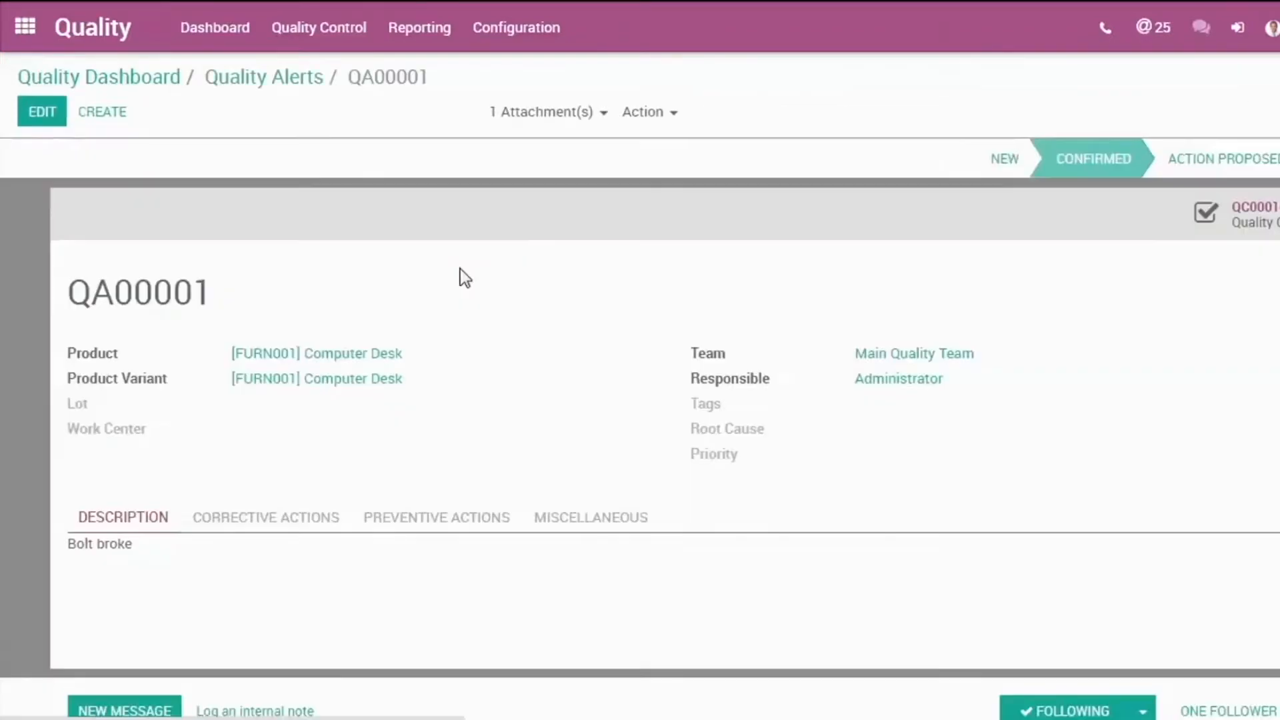
Advanced3
Layers strategic buying tools on top of basic purchasing, including demand-based quantity suggestions, purchase and vendor-cost analysis reports, procurement expense tracking, EDI links between purchase and sales orders, and a purchase/vendor analysis dashboard.
Reporting6
Delivers generic and dynamic financial statements including balance sheet, profit and loss, and cash flow reports alongside specialized views for tax, receivables, payables, and audit trails, with drill-down on report lines, PDF/XLSX export, and period-over-period comparison.
Tax return (VAT report)
Asset Management
basicEnterprise asset management including preventive maintenance, asset lifecycle tracking, work order management, and asset depreciation.
Ready to move on Odoo?
Price it, put it head-to-head with alternatives, or talk to a partner who has implemented it.
Odoo add-ons & integrations
Extend Odoo with best-of-breed software that integrates with it:
Odoo Modules FAQ
What is Odoo?
Odoo is a modular, open-source ERP suite covering finance, CRM, inventory, ecommerce, manufacturing, HR, and more through 40+ integrated apps. It ships in a free Community edition and a paid Enterprise edition, and is aimed mainly at small to midsize businesses and startups looking for an affordable, configurable alternative to larger ERP platforms.
Is Odoo free?
Odoo's Community edition is free and open source, and it's a fully working ERP for a single app or a small combination of apps. Odoo Enterprise, which adds features like advanced manufacturing, full accounting, and official support, is a paid per-user subscription starting around $24.90/user/month. Most growing businesses end up on Enterprise once they need more than one or two modules.
Is Odoo open source?
Yes, for the Community edition, which is released under an open-source license and can be self-hosted at no software cost. Odoo Enterprise adds proprietary modules and official support on top of the open-source core, so the platform is best described as open-core rather than fully open source once you move to paid features.
What is Odoo ERP?
Odoo ERP is the full application suite Odoo SA builds around its open-source core — finance, inventory, manufacturing, CRM, HR, ecommerce, and dozens of other modules that share one database. Businesses can start with a single app and add more as they grow, which is why it's positioned as a modular, budget-friendly ERP for SMBs rather than a single monolithic system.
How much does Odoo cost?
Odoo's Enterprise pricing starts around $24.90 per user per month for its base apps, with cost scaling by number of users and apps selected. The Community edition is free to self-host but excludes some Enterprise-only features and official support. Typical total implementation cost for a small business lands roughly in the $10K–$80K range depending on scope.
Is Odoo self-hosted free?
Self-hosting the Community edition costs nothing in software license fees — you only pay for your own servers and setup. Self-hosting Odoo Enterprise still requires a paid per-user subscription even though you control the infrastructure; the free tier applies to Community, not to Enterprise features run on your own servers.