
Acumatica Modules & Capabilities
Acumatica is rated across 14 of 14 ERP modules, 8 of them a core strength and 1,697 documented capabilities catalogued across those modules.
- 14of 14
- Modules rated
- 8
- Core strengths
- 1,697
- Documented capabilities
- Cloud / On-Premise / Hybrid
- Deployment
Acumatica module ratings
Ordered strongest to weakest. Each rating reflects standard-edition depth, not what a third-party add-on could bolt on.
Finance & Accounting
strongCore financial management including general ledger, accounts payable/receivable, fixed assets, cash management, and financial reporting. The backbone of any ERP system.
›499 documented capabilities in 74 areas
Finance & Accounting
strong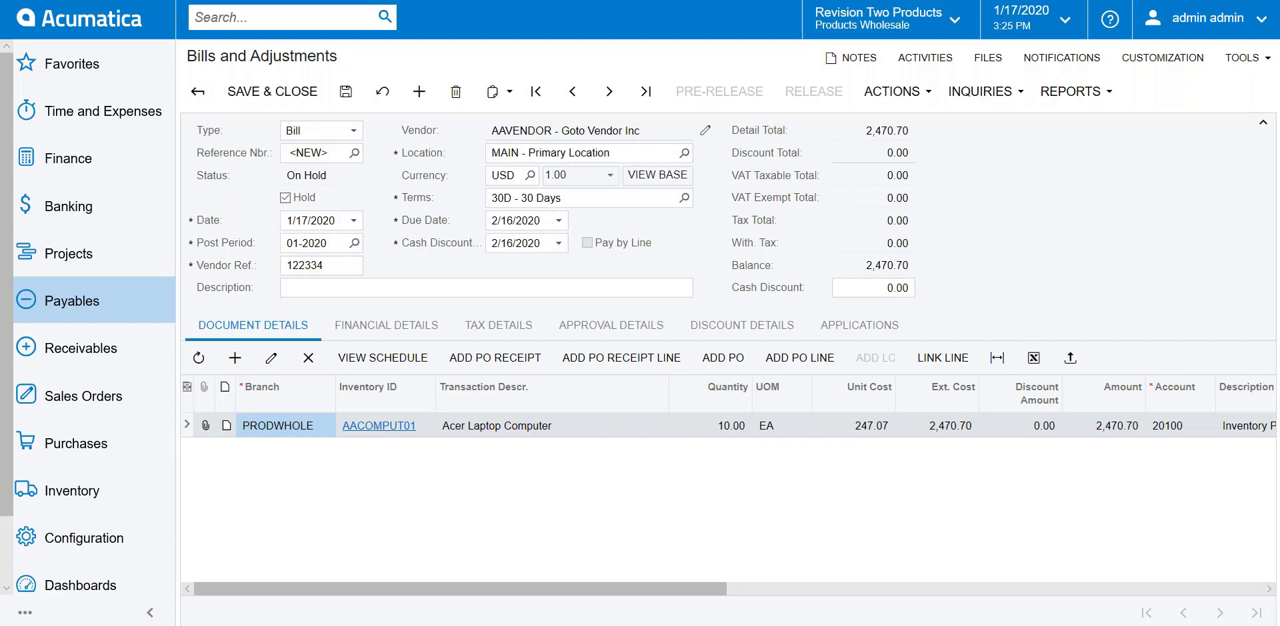
Managing Ledgers4
Supports one actual ledger plus unlimited additional ledgers per company, so organizations can keep actual figures alongside statistical, budget, and reporting data. Includes reporting and statistical ledger types for parallel views of financial information.
Multiple Ledger Support · Reporting Ledgers · Statistical Ledgers
Creating a Vendor6
Creates vendor records with the tools to enter and organize vendor data efficiently, including planning attributes, default settings, locations, and security controls.
Vendors: Vendor-Related Planning · Vendors: Vendor Defaults and Overrides · Vendors: Vendor Locations · Vendors: Security Configuration · Vendors: Configuration Prerequisites
Creating a Customer6
Creates customer accounts holding all the information needed to do business with each customer, including addresses, locations, contacts, payment settings, and financial, purchase, and mailing preferences.
Customers: Customer Account Planning · Customers: Customer Class Settings · Customers: Customer Locations · Customers: Security Configuration · Customers: Configuration Prerequisites
Configuring Cash Accounts5
Supports an unlimited number of cash accounts, kept separate from the general chart of accounts yet linked to GL accounts, to give a clear read on cash flow.
Cash Account Configuration · Cash Account Types · Security of Cash Accounts · Entry Types
Setting Up the Recognition Process3
Sets up revenue and expense recognition by turning on Deferred Revenue Management and defining the deferral codes it needs.
Deferral Code Setup · Recognition Methods for Deferred Revenues or Expenses
Depreciation Configuration8
Chooses a depreciation method and its settings on a per-asset basis, drawing from a range of options including region-specific and table-based approaches.
Predefined Depreciation Methods · Dutch Depreciation Methods · Australian Depreciation Methods · New Zealand Depreciation Methods · Table Depreciation Methods
Implementing the Contract Functionality3
Sets up the base configuration, entities, and initial terms needed before a business can begin drafting contracts.
Contract Functionality Implementation: Configuration Prerequisites · Contract Functionality Implementation: Discount Application to a Contract
Processing Expense Receipts4
Lets employees record and submit individual expense receipts for approval and reimbursement, following the expense policy each company configures.
Expense Receipts: Scanning of Expense Receipts in the Mobile App · Expense Receipts: Expense Receipt Approval · Expense Receipts: Taxes in Expense Receipts
Creating Account Groups3
Groups general ledger accounts into account groups used to track project budgets, costs, and future revenue in project-related documents.
Account Groups: Default Account Groups · Account Groups: Configuration Prerequisites
Managing Companies and Branches5
Sets up the legal companies and branches that make up an organization, each with its own balance sheet and tax reporting where multibranch or multicompany support is enabled.
Companies and Branches · Multiple Branch Support · Basic Models for Multibranch Organization · Security of Organization Branches
Managing the Chart of Accounts7
Lets each company build a structured chart of general ledger accounts tailored to its needs, from account numbering through ongoing maintenance. Covers account identification, retained earnings handling, denominated accounts, and posting and consolidation settings.
Account Identification · Chart of Accounts · YTD Net Income and Retained Earnings Accounts · Denominated Accounts · Post and Consolidation Account Settings
Managing Parent-Child Relationships3
Links customer accounts representing franchises, branches, or other units into parent-child hierarchies, so billing and credit can be managed at the group level.
Parent-Child Relationships: Credit Policy Application · Parent-Child Relationships: Relationship Removal
Managing Cash Transactions5
Records cash-only transactions — funds transfers, cash entries, and transfer-related fees — that don't touch customer or vendor balances, and keeps a check register.
Cash Transaction Processing · Cash Transaction Monitoring · Cash Transaction Approval · Cash Flow Forecasting
Processing Deferrals7
Manages deferrals end to end, with deferral codes assigned to stock and non-stock items driving automatic recognition schedules, adjustments, and contract revenue.
Recognition of Revenue and Expenses · Recognition of Deferrals in Previous Periods · Recognition of Revenue from Customer Contracts · Custom Deferral Schedules · Adjustment of Deferrals
Processing Expense Receipts with Corporate Cards3
Lets employees categorize and track purchases, including project-related spending, made on a company credit card, alongside any out-of-pocket expenses awaiting reimbursement.
Expense Receipts with Corporate Cards: Bank Reconciliation for a Corporate Card · Expense Receipts with Corporate Cards: Mass-Processing of Documents
Configuring Predefined Mailings for Customers3
Sets up ready-made email mailings for sending customer documents out of the sales order and accounts receivable subledgers.
Mailings for Customers: Available Mailings · Mailings for Customers: Mass Processing
Managing Payment Methods3
Configures the payment methods the organization uses to pay vendors and the methods customers use to pay the organization.
Payment Methods for Customers · Payment Methods for Vendors
Managing Recognition for Packages3
Handles revenue recognition for packages sold as multiple-deliverable arrangements (MDAs), splitting a single package price across components with different recognition treatment.
Configuring a Package · Processing Packages
Credit Terms4
Defines payment due dates, cash discount conditions, and single- or multiple-installment terms that a buyer must meet to purchase on credit, configured through the Credit Terms (CS206500) form.
Setup of Credit Terms · Setup and Calculation of Cash Discounts · Examples of Credit and Cash Discount Periods
Processing Expense Claims5
Bundles one or more expense receipts, covering costs such as travel, lodging, and freight, into a claim that is prepared, approved, and reimbursed as a unit.
Expense Claims: Taxes in Expense Claims · Expense Claims: Expense Claims in Different Currencies · Expense Claims: Expense Claim Approval · Expense Claims: Expense Claim Release
Setting Up the Financial Year3
Configures how a fiscal year is broken into periods, since every transaction must post to a defined period. Covers both the initial setup and later adjustments to that year layout.
Financial Year Configuration · Financial Year Modification
Processing Cash Entries4
Captures cash entries carrying the Disbursement or Receipt type and moves them through the rest of system processing.
Cash Entries: Adding Taxes · Cash Entries: Mass Processing of Documents · Cash Entries: Related Forms
Preparing Customer Statements3
Generates periodic customer statements summarizing financial activity and ending balance for a statement cycle, which customers use to reconcile their account.
Customer Statements: Multicurrency and Consolidated Statements · Customer Statements: Statements for Specific Branches
Calculating the Costs of Produced Items3
Calculates the cost of items produced in manufacturing using either an actual or an estimated costing method.
Cost Calculation for Produced Items: Actual Costing Method · Cost Calculation for Produced Items: Estimated Costing Method
Generating Financial Calendars5
Generates financial calendars made up of years and periods in which the organization records revenues and expenses. Supports a master calendar, company-specific calendars, multiple calendars across entities, and period adjustments within a year.
Master Calendar Generation · Companies' Financial Calendars · Multiple Calendar Support · Modification of Periods for a Year
Creating a Non-Stock Item3
Creates non-stock items for services, labor, charges, or goods that do not require warehouse quantity tracking.
Non-Stock Item: Configuration Prerequisites · Non-Stock Item: Related Forms
Performing Funds Transfers4
Records and releases fund movements between bank accounts, and likewise between cash accounts sharing the same linked GL account.
Funds Transfers: Correcting a Released Funds Transfer · Funds Transfers: Mass Processing of Documents · Funds Transfers: Related Forms
Managing Contracts5
Handles ongoing contract operations after activation, such as changing terms, canceling the last recorded action, renewing, and terminating a contract.
Contract Management: Fixed-Price Contracts · Contract Management: Contract Upgrade · Contract Management: Last Action Cancellation · Contract Management: Contract Renewal
Tracking Cash Payments4
Tracks cash payments to simplify reconciliation, accommodating the different ways banks record finance charges and deposits.
Reclassification of Unknown Payments · Registration of Finance Charges · Preparation of Deposits
Tracking Contract Usage3
Records the services delivered under an active contract as contract usage, which is the basis for billing runs, with the record type varying by the scenario a business is tracking.
Contract Usage: Contract Usage · Contract Usage: Labor Items for Billing Contracts
Correcting Sales Invoices3
Corrects a released sales invoice, either through a correction invoice that supersedes it or by canceling the original and issuing a replacement, or no replacement at all.
Sales Invoice Correction: Cancellation of an Invoice · Sales Invoice Correction: Mass-Processing Documents
Processing AP Bills3
Covers creating and releasing vendor bills, with reports and inquiries for tracking the resulting transactions.
AP Bills: Bill Reversal · AP Bills: Mass Processing and Document Consolidation
Managing Bank Statements3
Imports, tracks, and matches bank statement records against transactions in the system, giving fast and accurate tools for cash account reconciliation.
Importing Transactions · Processing Imported Transactions
Preparing Dunning Letters4
Produces printed dunning letters using Dunning Letter (AR661000), a report that can be customized through Acumatica Report Designer.
Preparation of Dunning Letters: Dunning Process by Customer · Preparation of Dunning Letters: Dunning Process by Document · Preparation of Dunning Letters: Using the AR Aging Report
Billing Contracts3
Bills recorded contract usage according to scenario-specific rules, covering ongoing services such as hosting or connectivity as well as maintenance agreements tied to a warranty period.
Contract Billing: Contract Examples · Contract Billing: Mass-Processing
Performing Bank Reconciliation10
Reconciles cash accounts against bank records to surface discrepancies between balances tracked internally and by the bank, supporting strong internal control over cash.
Bank Reconciliation: Optional Reconciliation Operations · Bank Reconciliation: Support for OFX and Other File Formats · Bank Reconciliation: Uploading and Processing of Bank Transactions · Bank Reconciliation: Transaction Matching · Bank Reconciliation: Reconciling Transactions in Foreign Currencies
Processing Debit and Credit Adjustments4
Corrects released AP documents by issuing debit adjustments that reduce the payable balance or credit adjustments that increase it.
Debit and Credit Adjustments: Debit Adjustments with Cash Discounts · Debit and Credit Adjustments: Refunds · Debit and Credit Adjustments: Mass Processing
Processing AR Invoices6
Covers creating, releasing, and tracking customer invoices, including applying payments during the invoicing flow.
AR Invoices: Invoice and Memo Processing Flow · AR Invoices: Invoice Recording · AR Invoices: Invoice Releasing · AR Invoices: Tracking AR Documents · AR Invoices: Mass Processing of Documents
Performing Settlement of Credit Card Payments and EFTs3
Creates bank deposits automatically for credit card payments and electronic funds transfers settled with the bank, removing manual deposit entry.
Reconciliation of EFT Payments · Settlement of Stripe Payments
Applying Overdue Charges4
Calculates additional charges on any document past its due date as of a chosen calculation date, grouped either by statement cycle or by customer class, and reflects the charges on customer statements.
Overdue Charges: Charge Codes · Overdue Charges: Criteria for Creating Overdue Charge Documents · Overdue Charges: Example of Applying Calculation Methods
Configuring Certified Projects3
Configures government-contracted projects such as public construction work, capturing the guaranteed labor rates, associated deductions and benefits, fringe amounts, and reporting obligations tied to the contract.
Certified Projects: Deductions and Benefits · Certified Projects: Fringe Benefits
Correcting AR Invoices3
Corrects issued invoices by creating credit memos and debit memos rather than editing released documents.
AR Invoice Correction: Support for Credit Terms in Credit Memos · AR Invoice Correction: Mass Processing
Processing Direct Write-Offs3
Writes off small or uncollectible customer balances directly, supporting a credit-based write-off as well as a balance-based one under this direct approach.
Direct Write-Offs: Write-Off Setup · Direct Write-Offs: Mass Processing
Importing Financial Data3
Imports trial balances, GL transactions, vendor and customer master records, and outstanding open documents from a prior system during migration, cutting down on manual re-entry.
Preparation for Importing Trial Balances · Import of Trial Balances
Paying AR Invoices8
Records a customer payment against an invoice, then releases the payment together with how it was applied to settle the receivable balance.
Invoice Payments: Payment Processing Flow · Invoice Payments: Payment Recording · Invoice Payments: Manual Payment Application · Invoice Payments: Release of Payments · Invoice Payments: Release of Application Records
Processing Sales with Payments and Prepayments4
Records funds received against a sales order, whether collected in advance or at time of shipment, so businesses can track what has and has not been paid.
Sales with Payments and Prepayments: Increasing of the Authorized Amount · Sales with Payments and Prepayments: Sales Orders with a Required Prepayment Amount · Sales with Payments and Prepayments: Prepayments and Payments in Invoices
Processing Prepayments3
Creates and releases customer prepayments, applies them to invoices, and reverses prepayment applications when needed.
Invoice Prepayments: Release of Prepayments · Invoice Prepayments: Payment Receipts
Preparing a Consolidated Financial Statement3
Builds a consolidated financial statement for a parent and subsidiary running on different base currencies, using the Analytical Report Manager toolkit.
Consolidated Financial Statement: Performing a Translation · Consolidated Financial Statement: Creating a Customized Report
Processing Prepayment Invoices for Sales Orders6
Generates a prepayment invoice carrying the sales order's items and tax on the prepaid amount, either created directly from the order or linked after being created manually.
Prepayment Invoices: Application of Prepayment Invoices to Sales Invoices · Prepayment Invoices: Creation of Prepayment Invoices from Sales Orders · Prepayment Invoices: Application of Group and Document Discounts to Prepayment Invoices · Prepayment Invoices: Linking to Sales Orders · Prepayment Invoices: Mass Creation
Processing Prepayment Invoices in AR4
Handles customer prepayment invoices for jurisdictions where taxes on prepayments must be reported in the period the money is received.
AR Prepayment Invoices: Correction of a Prepayment Invoice · AR Prepayment Invoices: Effortless Refunds · AR Prepayment Invoices: Payment Links
Reclassifying Transactions3
Fixes batches that posted with the wrong ledger account, subaccount, or branch by reclassifying entries instead of reversing and re-keying them.
Reclassifying Transactions: Initiation of the Reclassification Process · Reclassifying Transactions: Correction of Reclassified Transactions
Applying Payments to Particular Lines of AP Documents3
Pays AP bills at the individual line level, giving organizations granular control over which expenses within a document get settled.
Applying Payments to Particular Lines: Support of Taxes · Applying Payments to Particular Lines: Mass Processing
Processing AR Documents with Retainage6
Supports retainage billing, letting a customer hold back a portion of what's owed until agreed contract terms are met — common in construction.
Configuration of the Default Retainage Settings in the Accounts Receivable Subledger · Processing Flow of AR Documents with Retainage · Consolidated Retainage Documents · Examples of Processing Invoices with Retainage · AR Retainage Adjustment Cases
Preparing a Tax Report for Sales Taxes3
Compiles a sales tax report for a given company, tax agency, and open reporting period, streamlining the periodic filing that businesses owe to each tax authority.
Tax Report Preparation: Overview of the Tax Reporting Process · Tax Report Preparation: Tax Report for a Closed Period
Processing AP Documents with Retainage6
Withholds a portion of contract amounts from vendor payments until work is completed, a requirement common in construction, when the Retainage feature is enabled.
Configuration of the Default Retainage Settings in Accounts Payable · Processing Flow of AP Documents with Retainage · Correction of a Bill with Retainage · Examples of Processing Bills with Retainage · AP Retainage Adjustment Cases
Managing Item Costs and Valuation Methods9
Applies a chosen valuation method to track each stock item's cost over time, feeding accurate cost-of-goods-sold figures into sales and inventory postings.
Item Costs and Valuation Methods: Transactions That Record Costs in Layers · Item Costs and Valuation Methods: Average Method · Item Costs and Valuation Methods: FIFO Method · Item Costs and Valuation Methods: Specific Method · Item Costs and Valuation Methods: Standard Method
Preparing Government Reports3
Lets users select the company, branch, period, and state for a filing and hands off to the Aatrix website to complete and submit the report.
Preparing Government Reports: Records of Employment · Preparing Government Reports: Canadian Tax Forms
Processing Vouchers3
Lets users key in a mixed batch of documents on one journal voucher screen, spanning cash receipts, customer invoices, prepayments, disbursements, vendor bills, payments, and general ledger entries.
Voucher Processing Workflow · Journal Voucher Entry
Processing Prepayment Invoices6
Handles vendor prepayment invoices, including jurisdictions where VAT must be recognized and reported at the time a deposit is paid to a supplier.
AP Prepayment Invoices: Creation of a Prepayment Invoice · AP Prepayment Invoices: Impact on a Vendor’s Balance · AP Prepayment Invoices: Paying a Prepayment Invoice · AP Prepayment Invoices: Application of a Prepayment Invoice to AP Bills · AP Prepayment Invoices: Balance Reports
Processing Credit Card Payments6
Stores and updates customer credit card information and uses it to collect invoice payments, including mass-processing of card charges.
Card Payments · Automatic Payment Collection · Credit Card Synchronization with Acumatica Payments · Import of Credit Card Refunds · Automatic Credit Card Surcharges
Closing Inventory Periods3
Closes a given accounting period within the inventory subledger ahead of the general ledger close, blocking any further postings to that period.
Financial Period Closing in the Inventory Subledger · Reconciliation of the Cost of Inventory with the Account Balance
Creating Documents for External Payment Processing3
Integrates with external payment processors such as BILL, removing the need to store vendor bank details locally when vendors are connected to the same platform.
Distributing Debit Adjustments Among Bills · Processing International Payments
Forecasting Budgets by Periods3
Breaks a project's budget down by financial period to compare monthly budgeted amounts against actual revenue and expenses.
Project Budget Forecasts: Generation of Periods · Project Budget Forecasts: Example of Rounding
Recognizing AP Documents from PDFs5
Extracts data from vendor invoice PDFs received by email and turns them into AP bills automatically, eliminating time-consuming manual entry.
AP Documents from PDFs: Recognition of Purchase Orders in Bill Lines · AP Documents from PDFs: Recognition of Project-Related Data · AP Documents from PDFs: Detail Mapping · AP Documents from PDFs: Search for a Vendor by Email Address
Reclassifying Project-Related GL Transactions3
Fixes a set of project-related general ledger transactions that were posted with incorrect account, branch, project, cost code, or task data.
Transaction Reclassification: Mass-Processing · Transaction Reclassification: Limitations
Filing Out the 1099 Forms5
Tracks payments made to US-based independent contractors and generates the IRS's 1099-NEC and 1099-MISC forms needed for filing.
Configuring 1099 Reporting · Maintaining and Filing the 1099 Forms · Filing the 1099 Forms Electronically · End-of-Year Actions
Filing CRA Forms6
Generates T5018 and T4A forms and files them electronically with Canada's tax authority, the CRA, covering contract payment reporting for construction businesses.
Configuring CRA Reporting · Filing the T5018 Form Electronically · Filing the T4A Form Electronically · Printing T4A Slips · Emailing T4A Slips
Performing GL Consolidation3
Prepares consolidation units and imports subsidiary financial data into the parent company, completing the group consolidation cycle.
GL Consolidation: Account Mapping · GL Consolidation: Subaccount Mapping
Working with Taxes in Projects5
Automatically calculates and applies taxes on documents entered for a project, including project-specific tax zones and change order tax handling.
Taxes in Projects: Project Expenses with Taxes · Taxes in Projects: Inclusive Taxes in AR Documents · Taxes in Projects: Project-Specific Tax Zones · Taxes in Projects: Tax Calculation in Change Orders
Managing Multicurrency Projects3
Tracks project costs and revenue in a project-specific currency alongside the company's base currency, including billing customers in their own currency.
Multicurrency Projects: Project-Related Documents in Multiple Currencies · Multicurrency Projects: Unit Rates in the Project Budget
Processing Prepayments for Purchase Orders4
Records an advance payment made to a vendor against a purchase order, which the system later applies on its own to the AP bill it produces.
Prepayments for Purchase Orders: Calculation of the Prepayment Amount · Prepayments for Purchase Orders: Canceling Prepayments · Prepayments for Purchase Orders: Linking Documents
Processing Prepayment Invoices in Purchase Orders3
Generates a prepayment invoice from a purchase order so tax on a vendor deposit is recognized when the payment is made and included in that period's report, a requirement in certain countries.
Prepayment Invoices: Creation of a Prepayment Invoice · Prepayment Invoices: Processing Workflow
Allocating the Purchase Price Variance3
Accounts for the gap between what an item costs per unit on its purchase receipt and what it costs per unit on the resulting bill, a difference that can stem from exchange-rate shifts or vendor price changes.
Purchase Price Variance Allocation: Example 1 · Purchase Price Variance Allocation: Example 2
Other capabilities192
Multicurrency Funds Transfers: Mass Processing · Credit Verification Rules: Configuration Prerequisites · Contract Item Creation: Contract Items · Payment Methods: Direct Deposits · Contract Template Creation: Contract Templates
Manufacturing
strongProduction planning, shop floor control, BOM management, MRP, and manufacturing execution. Supports discrete, process, and mixed-mode manufacturing environments.
›100 documented capabilities in 13 areas
Manufacturing
strong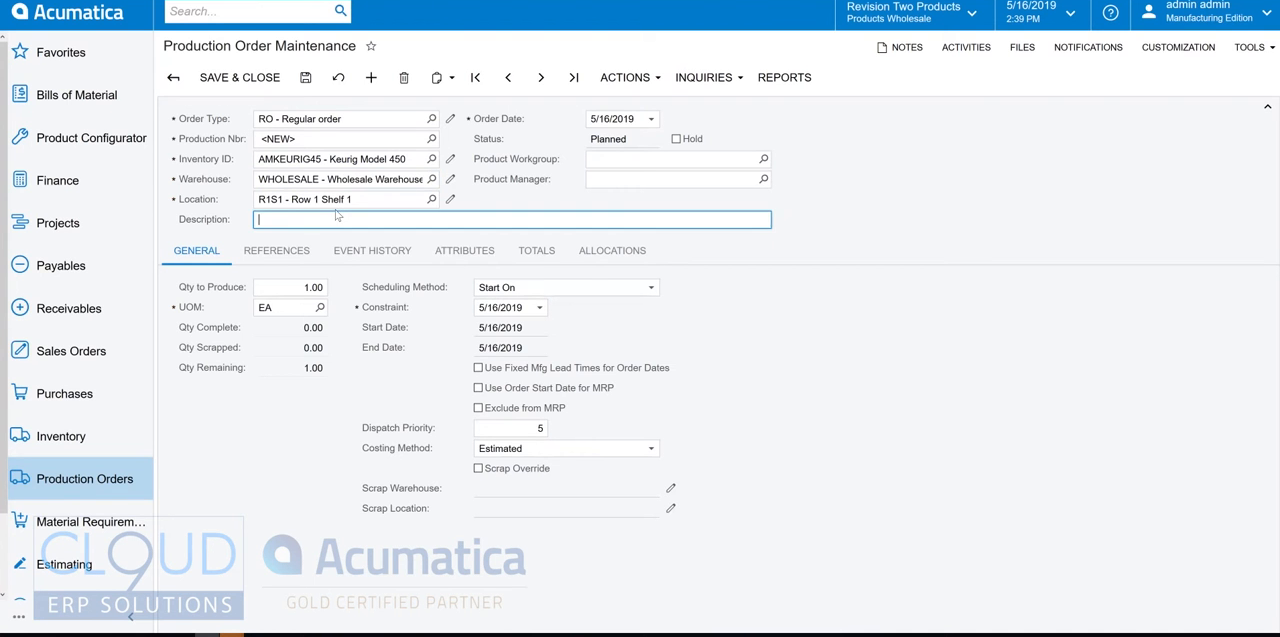
Managing Bills of Material9
Defines the materials, labor, tools, and overhead needed to build an assembly through bills of material, with support for revisions, phantom assemblies, and multiple levels.
Bills of Material: Operations · Bills of Material: Multilevel BOMs · Bills of Material: Phantom Assemblies · Bills of Material: Configuration Prerequisites · Bills of Material: Key Features
Producing Items10
Manages production orders that convert raw materials and components into finished items, tracking labor, item availability, and the resulting work-in-process costs.
Production Processing: Control Point Operations · Production Processing: Nonsequential Reporting of Quantities · Production Processing: Item Availability and Allocation · Production Processing: Production for Sales · Production Processing: Processing of Inventory Transactions
Managing Production Cost Drivers8
Identifies the cost components, such as materials, labor, overhead, and tooling, that combine to form the total manufacturing cost of each finished item.
Production Cost Drivers: Planned and Actual Costs · Production Cost Drivers: Material Costs · Production Cost Drivers: Labor Costs · Production Cost Drivers: Overhead Costs · Production Cost Drivers: Tool and Machine Costs
Calculating the Costs of Produced Items3
Calculates the cost of items produced in manufacturing using either an actual or an estimated costing method.
Cost Calculation for Produced Items: Actual Costing Method · Cost Calculation for Produced Items: Estimated Costing Method
Producing Items with Outside Processing6
Tracks materials and payments when part of production is contracted out to a subcontractor for outside processing operations.
Outside Processing: Configuration · Outside Processing: Subcontractor's Storage of Materials · Outside Processing: Charges for Subcontractor Services · Outside Processing: Automatic Move Transaction · Outside Processing: Processing Workflow
Production Management5
Covers day-to-day production management tasks, including disassembling finished goods, processing rework or repair orders, reversing receipts, and closing production periods.
Disassembly Process · Rework/Repair Orders · Reversal of Production Receipts · Period Closing Tasks
Inventory Planning with MRP6
Balances supply and demand across manufacturing operations through material requirements planning, including forecasts, a master production schedule, and automated planning runs.
Inventory Planning with MRP: Process Details · Inventory Planning with MRP: Forecasts and Master Production Schedule · Inventory Planning with MRP: Planning Transfers in MRP · Inventory Planning with MRP: MRP Processor · Inventory Planning with MRP: MRP Procedures
Other Manufacturing Functionality6
Covers supporting manufacturing functionality such as attributes, factory-floor data collection, master data imports, project integration, and manufacturing reporting.
Using Attributes in Manufacturing · Manufacturing Data Collection · Importing Master Data into Manufacturing · Integration with Projects · Using Manufacturing Data in Inquiries and Reports
Product Configurator8
Uses a rules-based system to configure and price custom, made-to-order products without requiring a unique stock item and BOM for each product variation.
Product Configurator: Processes and Functions · Product Configurator: Rule Processing · Product Configurator: Managing Configurations · Product Configurator: Supplemental Items · Product Configurator: Production Management Integration
Managing Inventory Kits4
Bundles several individual items, whether warehouse-tracked or not, into a single sellable kit, covering both physically assembled kits and intangible kit bundles.
Inventory Item Kits · Stock Kits · Non-Stock Kits
Advanced Planning and Scheduling8
Manages and monitors the shop floor schedule, offering capacity-aware scheduling, top-level capacity planning, and detailed work center, machine, and tool scheduling.
Advanced Planning and Scheduling: Capacity Definition · Advanced Planning and Scheduling: Scheduling Details · Advanced Planning and Scheduling: Operation Lead Time · Advanced Planning and Scheduling: Production Schedule Board · Advanced Planning and Scheduling: Production Order View
Shop Floor Kiosk19
Provides a simplified factory-floor application where shop workers can log hours, quantities, materials, and scrap in real time, plus the settings needed to deploy and administer it.
Shop Floor Kiosk Administration: System Requirements and Prerequisites · Shop Floor Kiosk Administration: Deploying a Kiosk Instance · Shop Floor Kiosk Administration: Configuring the Kiosk Portal · Shop Floor Kiosk Administration: Setting Up and Starting the Kiosk · Shop Floor Kiosk Administration: Configuring Production Employee Access
Other capabilities8
Estimating: Price Breaks
Sales
strongThe sales side of an ERP: quotes and pricing, order processing, customer and account management, post-sale service, and sales reporting on shared master data.
›241 documented capabilities in 31 areas
Sales
strongCreating a Customer6
Creates customer accounts holding all the information needed to do business with each customer, including addresses, locations, contacts, payment settings, and financial, purchase, and mailing preferences.
Customers: Customer Account Planning · Customers: Customer Class Settings · Customers: Customer Locations · Customers: Security Configuration · Customers: Configuration Prerequisites
Setting Up the Recognition Process3
Sets up revenue and expense recognition by turning on Deferred Revenue Management and defining the deferral codes it needs.
Deferral Code Setup · Recognition Methods for Deferred Revenues or Expenses
Implementing the Contract Functionality3
Sets up the base configuration, entities, and initial terms needed before a business can begin drafting contracts.
Contract Functionality Implementation: Configuration Prerequisites · Contract Functionality Implementation: Discount Application to a Contract
Managing Parent-Child Relationships3
Links customer accounts representing franchises, branches, or other units into parent-child hierarchies, so billing and credit can be managed at the group level.
Parent-Child Relationships: Credit Policy Application · Parent-Child Relationships: Relationship Removal
Processing Deferrals7
Manages deferrals end to end, with deferral codes assigned to stock and non-stock items driving automatic recognition schedules, adjustments, and contract revenue.
Recognition of Revenue and Expenses · Recognition of Deferrals in Previous Periods · Recognition of Revenue from Customer Contracts · Custom Deferral Schedules · Adjustment of Deferrals
Managing Sales Documents10
Controls how sales orders, invoices, and shipments are processed and printed, including required steps configured per order type on Order Types (SO201000) and Sales Orders Preferences (SO101000).
Changing the Processing of Sales Documents · Managing Lines in Sales Documents · Changing the Customer in a Sales Order · Checking the Credit Limit in Sales Documents · Printing Sales Documents
Configuring Predefined Mailings for Customers3
Sets up ready-made email mailings for sending customer documents out of the sales order and accounts receivable subledgers.
Mailings for Customers: Available Mailings · Mailings for Customers: Mass Processing
Managing Recognition for Packages3
Handles revenue recognition for packages sold as multiple-deliverable arrangements (MDAs), splitting a single package price across components with different recognition treatment.
Configuring a Package · Processing Packages
Credit Terms4
Defines payment due dates, cash discount conditions, and single- or multiple-installment terms that a buyer must meet to purchase on credit, configured through the Credit Terms (CS206500) form.
Setup of Credit Terms · Setup and Calculation of Cash Discounts · Examples of Credit and Cash Discount Periods
Processing Sales of Stock Items3
Records a customer order for inventory-tracked goods as an SO- or SA-type sales order and processes it through to shipment.
Sales of Stock Items: Stock Allocation with Multiple UOMs · Sales of Stock Items: Mass-Processing of Documents
Managing Route Service Contracts9
Manages contracts for recurring route-based services, specifying which services are performed and how often under the customer agreement.
Route Service Contracts: Billing Types · Route Service Contracts: Renewal of a Service Contract · Route Service Contracts: Copying a Service Contract · Route Service Contracts: Contract Activation · Route Service Contracts: Contract Suspension
Managing Contracts5
Handles ongoing contract operations after activation, such as changing terms, canceling the last recorded action, renewing, and terminating a contract.
Contract Management: Fixed-Price Contracts · Contract Management: Contract Upgrade · Contract Management: Last Action Cancellation · Contract Management: Contract Renewal
Defining Case Classes4
Groups support cases into classes to streamline case distribution, problem-solving information capture, and performance reporting for the support team.
Case Classes: Case Commitments · Case Classes: Modes of Case Billing · Case Classes: Configuration Prerequisites
Tracking Contract Usage3
Records the services delivered under an active contract as contract usage, which is the basis for billing runs, with the record type varying by the scenario a business is tracking.
Contract Usage: Contract Usage · Contract Usage: Labor Items for Billing Contracts
Correcting Sales Invoices3
Corrects a released sales invoice, either through a correction invoice that supersedes it or by canceling the original and issuing a replacement, or no replacement at all.
Sales Invoice Correction: Cancellation of an Invoice · Sales Invoice Correction: Mass-Processing Documents
Processing Project Quotes4
Prepares and sends project quotes to customers before a project exists, then converts an accepted quote directly into a project.
Project Quotes: Creation of Project Quotes from Opportunities · Project Quotes: Creation of a Project from a Project Quote · Project Quotes: Mass Processing
Billing Contracts3
Bills recorded contract usage according to scenario-specific rules, covering ongoing services such as hosting or connectivity as well as maintenance agreements tied to a warranty period.
Contract Billing: Contract Examples · Contract Billing: Mass-Processing
Processing Partial Shipments8
Ships a sales order in full or across multiple partial shipments based on shipping rules set at the system, customer class, or order level.
Shipping Rule Settings · Shipment Creation Rules · Shipment Processing Steps · Shipment Process Variations · Shipping Rule Combinations
Validating Records for Duplicates5
Identifies, prevents, and resolves duplicate records across leads, contacts, customer accounts, vendor accounts, and business accounts, heading off redundant outreach and inaccurate reporting.
Record Validation for Duplicates: Merging of Duplicate Records · Record Validation for Duplicates: Association of Leads and Contacts · Record Validation for Duplicates: Association of Leads with Business Accounts and Contacts · Record Validation for Duplicates: Mass-Validation of Records
Creating Service Contracts5
Creates service contracts with billing terms tailored to the company's process, including options to bill as services are delivered.
Service Contracts: Billing Type Setup · Service Contracts: Activation, Cancellation, and Suspension of a Contract · Service Contracts: Status Update · Service Contracts: Related Inquiry Forms
Managing Emails and Activities6
Tracks emails, tasks, events, and other activities exchanged with leads, contacts, prospects, and customers, giving marketing and sales teams a shared communication history.
Emails and Activities: Time Reporting · Emails and Activities: Emails · Emails and Activities: Events · Emails and Activities: Activities · Emails and Activities: Tasks
Processing Sales with Payments and Prepayments4
Records funds received against a sales order, whether collected in advance or at time of shipment, so businesses can track what has and has not been paid.
Sales with Payments and Prepayments: Increasing of the Authorized Amount · Sales with Payments and Prepayments: Sales Orders with a Required Prepayment Amount · Sales with Payments and Prepayments: Prepayments and Payments in Invoices
Processing Prepayment Invoices for Sales Orders6
Generates a prepayment invoice carrying the sales order's items and tax on the prepaid amount, either created directly from the order or linked after being created manually.
Prepayment Invoices: Application of Prepayment Invoices to Sales Invoices · Prepayment Invoices: Creation of Prepayment Invoices from Sales Orders · Prepayment Invoices: Application of Group and Document Discounts to Prepayment Invoices · Prepayment Invoices: Linking to Sales Orders · Prepayment Invoices: Mass Creation
Creating Business Accounts4
Creates business accounts for prospective customers; these can subsequently be extended into customer or vendor records, and linked to related leads and contacts.
Business Accounts: Association with a Contact · Business Accounts: Extension of a Business Account as a Customer or Vendor · Business Accounts: Configuration Prerequisites
Creating Opportunities4
Tracks a potential deal through the sales pipeline, copying settings from the related business account or contact, validating the address through a third-party provider, and assigning owners by sales territory.
Opportunities: Configuration Prerequisites · Opportunities: Settings · Opportunities: Address Management Through a Third-Party Provider
Managing Opportunities7
Estimates revenue using opportunity stages and generates related documents, including sales quotes, service orders, sales orders, and invoices, as a deal moves toward close.
Opportunity Management: Opportunity Stages · Opportunity Management: Products and Services in an Opportunity · Opportunity Management: Sales Quotes · Opportunity Management: Currency in Opportunities and Sales Quotes · Opportunity Management: Sales Orders
Managing Cases5
Tracks a case through creation, reassignment, escalation, and resolution, including billing settings, related activities, and commitment-time tracking.
Case Management: Billable Cases · Case Management: Return Orders · Case Management: Tracking of Case Commitment Times · Case Management: Time Extensions for Case Commitments
Managing Marketing Reports4
Analyzes lead source, lead processing, and campaign data through generic inquiry forms that marketing teams can customize.
Marketing Reports: Lead Generation and Processing Analysis · Marketing Reports: Lead Conversion and Qualification Analysis · Marketing Reports: Campaign Analysis
Processing Purchases for Sale3
Links a purchase order to the sales order that triggered it when items are bought from vendors only after a customer orders them.
Purchases for Sale: Linking Sales and Purchase Documents · Purchases for Sale: Mass-Processing of Documents
Processing Intercompany Purchases and Returns5
Generates a matching sales order automatically for a purchase order placed between companies or branches under the same tenant, once intercompany sales has been set up.
Intercompany Purchases and Returns: Intercompany Returns · Intercompany Purchases and Returns: Intercompany Drop-Ship Purchase · Intercompany Purchases and Returns: Intercompany Drop-Ship Returns · Intercompany Purchases and Returns: Mass-Processing of Documents
Other capabilities99
Credit Verification Rules: Configuration Prerequisites · Lead Classes: Configuration Prerequisites · Contract Item Creation: Contract Items · Business Account Classes: Configuration Prerequisites · Contact Classes: Configuration Prerequisites
Project Management
strongProject planning, resource allocation, time tracking, expense management, and project accounting for project-centric businesses.
›149 documented capabilities in 32 areas
Project Management
strongProcessing Expense Receipts4
Lets employees record and submit individual expense receipts for approval and reimbursement, following the expense policy each company configures.
Expense Receipts: Scanning of Expense Receipts in the Mobile App · Expense Receipts: Expense Receipt Approval · Expense Receipts: Taxes in Expense Receipts
Creating Account Groups3
Groups general ledger accounts into account groups used to track project budgets, costs, and future revenue in project-related documents.
Account Groups: Default Account Groups · Account Groups: Configuration Prerequisites
Processing Expense Receipts with Corporate Cards3
Lets employees categorize and track purchases, including project-related spending, made on a company credit card, alongside any out-of-pocket expenses awaiting reimbursement.
Expense Receipts with Corporate Cards: Bank Reconciliation for a Corporate Card · Expense Receipts with Corporate Cards: Mass-Processing of Documents
Creating Billing Rules4
Defines billing rules that determine which project transactions and accounts are used when calculating customer billing amounts.
Billing Rules: Configuration Prerequisites · Billing Rules: Progress Billing · Billing Rules: Time and Material Billing
Processing Expense Claims5
Bundles one or more expense receipts, covering costs such as travel, lodging, and freight, into a claim that is prepared, approved, and reimbursed as a unit.
Expense Claims: Taxes in Expense Claims · Expense Claims: Expense Claims in Different Currencies · Expense Claims: Expense Claim Approval · Expense Claims: Expense Claim Release
Managing Billing Rates3
Sets billing rates that can vary by project, task, account group, inventory item, employee, and date range using a flexible rate calculation engine.
Billing Rates: Configuration Prerequisites · Billing Rates: Rate Selection Rules
Creating Project Tasks4
Breaks a project down into individually trackable project tasks, each assignable a billing rule and monitored for completion.
Project Tasks: Tracking Task Completion · Project Tasks: Configuration Prerequisites · Project Tasks: Tracking Time with the Timer
Entering Employee Time9
Lets employees log time spent on work activities, then routes that time for approval, covering standard time cards, equipment time cards, and time entered for crew members.
Employee Time Entry: Earning Types · Employee Time Entry: Time Activities · Employee Time Entry: Creation of Time Activities from Project Time Logs · Employee Time Entry: Time Zones in Time Activities · Employee Time Entry: Time Cards
Creating Labor Items5
Defines labor items representing billable employee time, including default pricing, GL accounts, and applicable taxes.
Labor Items: Rules of Billing · Labor Items: Configuration Prerequisites · Labor Items: Labor Cost Rates · Labor Items: Related Forms
Processing Project Quotes4
Prepares and sends project quotes to customers before a project exists, then converts an accepted quote directly into a project.
Project Quotes: Creation of Project Quotes from Opportunities · Project Quotes: Creation of a Project from a Project Quote · Project Quotes: Mass Processing
Creating and Processing Projects5
Sets up a project along with its budget, costs, and revenue targets, then manages it through each stage from creation to completion.
Project Creation and Processing: Project Security Configuration · Project Creation and Processing: Configuration Prerequisites · Project Creation and Processing: A Project’s Lifecycle · Project Creation and Processing: Mass Processing
Processing Project Transactions5
Collects project-related cost and revenue information into project transactions, whether generated from other documents or entered directly.
Project Transactions: GL Transactions Related to Projects · Project Transactions: Reversal of Project Transactions · Project Transactions: Update of the Project Budget Structure · Project Transactions: Mass Processing of Documents
Preparing Projects to Billing4
Selects the invoice type to prepare for a project and confirms the project is ready before billing begins.
Project Billing Preparation: Billing Limits · Project Billing Preparation: Recurring Billing · Project Billing Preparation: Mass Processing
Billing Projects by Progress4
Automatically generates customer invoices based on the recorded progress of a project.
Progress Billing: Automated Revenue Percentage Calculation · Progress Billing: Revenue Recognition · Progress Billing: Mass Processing of Documents
Billing Projects for Time and Material3
Automatically generates customer invoices from a project's recorded cost transactions for time-and-material engagements.
Time and Material Billing: Adjustments, Remainders, and Write-Offs · Time and Material Billing: Mass Processing
Processing Pro Forma Invoices5
Generates draft pro forma invoices that can be reviewed and revised with a customer before being converted into an accounts receivable invoice.
Pro Forma Invoices: Manual Creation of Pro Forma Invoices · Pro Forma Invoices: Links to Project Transactions · Pro Forma Invoices: Deferred Revenue in Projects · Pro Forma Invoices: Mass-Processing of Documents
Correcting Project Invoices3
Corrects previously issued pro forma and accounts receivable invoices for a project to keep financial records accurate.
Project Invoice Correction: Reversing AR Documents · Project Invoice Correction: Credit Memos for Projects
Tracking Project Inventory3
Reserves items bought specifically for a given project and keeps them separate from general stock so project-specific costs and revenue are captured accurately.
Project Inventory Tracking: Item Availability Tracking · Project Inventory Tracking: Mass Processing
Managing the Project Budget5
Populates and tracks a project's budget, which sets both the spending plan and the cost ceiling, so actual costs can be compared against it as the project progresses.
Project Budget: Mass Processing of Documents · Project Budget: Unit Rate in Budget Lines · Project Budget: Automatic Generation of the Revenue Budget · Project Budget: Recalculation of the Project Balances
Controlling the Project Budget3
Locks original project budget values from editing and verifies that newly entered documents stay within the agreed budget.
Project Budget Control: Overrun Notifications During Document Entry · Project Budget Control: Budget Locking
Tracking Changes to the Project Budget7
Tracks customer-driven budget and commitment changes on a project through change orders, leaving the original figures untouched.
Single-Tier Change Management: Creating a Change Order · Single-Tier Change Management: Releasing Costs Only · Single-Tier Change Management: Budget Update on Change Order Release · Single-Tier Change Management: Locking Commitments · Single-Tier Change Management: Revenue Change Order Number
Processing Change Requests4
Consolidates itemized requests for potential budget changes into one master change order, using a layered review structure for tracking project budget changes.
Change Requests: Configuration of Markups · Change Requests: Consolidation of Revenue Budget Lines · Change Requests: Limitations to Processing Change Orders
Integrating Field Services with Projects3
Ties field service work to project management so service activity is reflected in project timelines, budgets, and expense tracking.
Integration of Field Services and Projects: Workflow Setup · Integration of Field Services and Projects: Related Inquiry Form
Tracking Cost Commitments3
Tracks purchase orders as project cost commitments so committed costs populate the project's cost budget before they're actually incurred.
Committed Costs: External Commitments · Committed Costs: Mass Processing of Documents
Processing Service Documents with Projects3
Governs how service documents behave when tied to a specific project, including showing project-specific inventory quantities for stock item lines.
Availability of Project-Specific Inventory in Service Documents · Assignment of Serial or Lot Numbers for Project Stock Items in Service Documents
Tracking Changes to Commitments3
Applies change orders to adjust a project's committed cost figures whenever commitment tracking is turned on.
Change Orders for Commitments: Commitment Updates on Release of Change Orders · Change Orders for Commitments: Commitment Reopening
Forecasting Budgets by Periods3
Breaks a project's budget down by financial period to compare monthly budgeted amounts against actual revenue and expenses.
Project Budget Forecasts: Generation of Periods · Project Budget Forecasts: Example of Rounding
Reclassifying Project-Related GL Transactions3
Fixes a set of project-related general ledger transactions that were posted with incorrect account, branch, project, cost code, or task data.
Transaction Reclassification: Mass-Processing · Transaction Reclassification: Limitations
Working with Taxes in Projects5
Automatically calculates and applies taxes on documents entered for a project, including project-specific tax zones and change order tax handling.
Taxes in Projects: Project Expenses with Taxes · Taxes in Projects: Inclusive Taxes in AR Documents · Taxes in Projects: Project-Specific Tax Zones · Taxes in Projects: Tax Calculation in Change Orders
Managing Multicurrency Projects3
Tracks project costs and revenue in a project-specific currency alongside the company's base currency, including billing customers in their own currency.
Multicurrency Projects: Project-Related Documents in Multiple Currencies · Multicurrency Projects: Unit Rates in the Project Budget
Managing Project Files6
Brings every file linked to a project or its related records into one place, with access controls and AI-assisted file tagging.
Managing Project Files: Tag and File Access Setup · Managing Project Files: Project Tag Templates · Managing Project Files: Tag Assignment · Managing Project Files: Operations with Files · Managing Project Files: AI-Powered File Autotagging
Other capabilities22
Project Templates and Common Tasks: Configuration Prerequisites · Employee Time Billing: Mass Processing of Documents · Project Inventory Tracking by Warehouse Location: Purchases of Materials and Services · Purchases to the Project Site: Return of Project Drop Shipments · Project Expense Reclassification: Limitations
Inventory Management
strongInventory tracking, stock management, reorder point planning, multi-location management, and inventory valuation across warehouses and locations.
›118 documented capabilities in 21 areas
Inventory Management
strongManaging Warehouse Locations and Processing Single-Step Transfers3
Defines physical storage locations such as aisles and shelves within a warehouse and enables single-step transfers of items between locations in the same warehouse.
Warehouse Locations and Single-Step Transfers: Configuration Prerequisites · Warehouse Locations and Single-Step Transfers: Mass Processing of Documents
Creating a Non-Stock Item3
Creates non-stock items for services, labor, charges, or goods that do not require warehouse quantity tracking.
Non-Stock Item: Configuration Prerequisites · Non-Stock Item: Related Forms
Creating Stock Items8
Defines physical goods purchased or manufactured for resale as stock items, with the system automatically tracking their availability and cost over time.
Stock Items: Identifiers of Items · Stock Items: Units of Measure · Stock Items: Units of Measure That Are Not Divisible · Stock Items: Configuration Prerequisites · Stock Items: Change of an Inventory Account for an Item
Managing Items with Lot and Serial Numbers4
Tracks lot- or serial-numbered items through receipt, storage, production, and shipment, capturing expiration dates and the distribution records regulators require.
Items with Lot and Serial Numbers: Tracking Settings · Items with Lot and Serial Numbers: Numbering Settings · Items with Lot and Serial Numbers: Lot and Serial Attributes
Inventory Planning with MRP6
Balances supply and demand across manufacturing operations through material requirements planning, including forecasts, a master production schedule, and automated planning runs.
Inventory Planning with MRP: Process Details · Inventory Planning with MRP: Forecasts and Master Production Schedule · Inventory Planning with MRP: Planning Transfers in MRP · Inventory Planning with MRP: MRP Processor · Inventory Planning with MRP: MRP Procedures
Creating Non-Stock Items5
Defines items that are not tracked in warehouse quantities, whether physical goods handled differently from stock or intangible offerings, for use in sales and purchase orders.
Non-Stock Items: Identifiers of Items · Non-Stock Items: Rules of Line Completion and Closure · Non-Stock Items: Configuration Prerequisites · Non-Stock Items: Related Forms and Reports
Creating Service Items3
Defines service items, a type of non-stock item representing labor or services rather than physical goods, for use on sales and purchase orders.
Service Items: Configuration Prerequisites · Service Items: Related Forms
Automated Operations with Lot- and Serial-Tracked Items7
Extends automated warehouse scanning workflows to items tracked with a lot or serial ID, covering picking, receiving, transferring, counting, and issuing.
Automated Operations with Lot- and Serial-Tracked Items: Picking and Packing Items · Automated Operations with Lot- and Serial-Tracked Items: Receiving and Putting Away Items · Automated Operations with Lot- and Serial-Tracked Items: Transferring Items · Automated Operations with Lot- and Serial-Tracked Items: Counting Items in Physical Inventory · Automated Operations with Lot- and Serial-Tracked Items: Issuing Items
Security of Inventory Entities3
Restricts which inventory items and warehouses individual users can see and work with through configurable restriction groups.
Inventory Item Security · Warehouse Security
Working with Lot and Serial Numbers3
Manages lot- and serial-tracked inventory used in service documents, including assigning the specific unit at the point of service and recording its attributes.
Assigning Lot and Serial Numbers in Appointments · Using Attributes with Lot and Serial Numbers in Service Documents
Managing Inventory Kits4
Bundles several individual items, whether warehouse-tracked or not, into a single sellable kit, covering both physically assembled kits and intangible kit bundles.
Inventory Item Kits · Stock Kits · Non-Stock Kits
Managing Item Cross-References3
Maps a company's internal inventory IDs to the alternate item numbers used by vendors and customers, including barcode support.
Item Cross-References · Barcode Support
Tracking Project Inventory3
Reserves items bought specifically for a given project and keeps them separate from general stock so project-specific costs and revenue are captured accurately.
Project Inventory Tracking: Item Availability Tracking · Project Inventory Tracking: Mass Processing
Processing Inventory Transactions4
Records item movements into, out of, and between warehouses, whether generated by purchases, sales, or direct receipts, issues, and transfers.
Inventory Transactions · Inventory Receipt Processing · Inventory Issue Processing
Configuring Basic Inventory Processes3
Sets up the basic physical inventory process, including the types of full counts a company can run to verify stock accuracy.
Configuration of Physical Inventory · Types of Physical Inventory
Configuring Advanced Physical Inventory4
Adds faster alternatives to full physical counts, including cycle counting and counting by ABC classification and ranking, with less disruption to daily operations.
Inventory Ranking Methods · Cycle Counting Configuration · Configuration of Physical Inventory Counts by ABC Codes
Managing Item Costs and Valuation Methods9
Applies a chosen valuation method to track each stock item's cost over time, feeding accurate cost-of-goods-sold figures into sales and inventory postings.
Item Costs and Valuation Methods: Transactions That Record Costs in Layers · Item Costs and Valuation Methods: Average Method · Item Costs and Valuation Methods: FIFO Method · Item Costs and Valuation Methods: Specific Method · Item Costs and Valuation Methods: Standard Method
Counting Physical Inventory3
Walks through the physical inventory counting process, from preparing count sheets to entering counted quantities and generating adjustments.
Physical Inventory Counts · Preparation for Physical Count
Closing Inventory Periods3
Closes a given accounting period within the inventory subledger ahead of the general ledger close, blocking any further postings to that period.
Financial Period Closing in the Inventory Subledger · Reconciliation of the Cost of Inventory with the Account Balance
Performing Inventory Planning with DRP4
Applies time-phased distribution requirements planning and sales forecasting to time supply arrivals precisely and match it to date-specific demand across the supply chain, without using production orders.
Inventory Planning with DRP: Processing of Documents · Inventory Planning with DRP: Transfers · Inventory Planning with DRP: Forecasts
Other capabilities33
Warehouses: Configuration Prerequisites · Two-Step Transfers: Mass Processing of Documents · Reason Codes: Configuration Prerequisites · Posting Classes: Configuration Prerequisites · Units of Measure: Configuration Prerequisites
Warehouse Management
strongWarehouse operations including receiving, putaway, picking, packing, shipping, and warehouse layout optimisation.
›56 documented capabilities in 9 areas
Warehouse Management
strongManaging Warehouse Locations and Processing Single-Step Transfers3
Defines physical storage locations such as aisles and shelves within a warehouse and enables single-step transfers of items between locations in the same warehouse.
Warehouse Locations and Single-Step Transfers: Configuration Prerequisites · Warehouse Locations and Single-Step Transfers: Mass Processing of Documents
Automated Picking and Packing Operations3
Automates order picking and packing for shipments using barcode scanning or the mobile app, with a configurable workflow covering both steps.
Picking and Packing Operations: Changing Picking Locations During Picking · Picking and Packing Operations: Efficiency of Warehouse Workers
Processing Partial Shipments8
Ships a sales order in full or across multiple partial shipments based on shipping rules set at the system, customer class, or order level.
Shipping Rule Settings · Shipment Creation Rules · Shipment Processing Steps · Shipment Process Variations · Shipping Rule Combinations
Automated Receiving and Putting Away Operations4
Automates receiving items into a warehouse and putting them away to storage locations using barcode scanning or the mobile app.
Receiving and Putting Away Operations: Receipt Verification · Receiving and Putting Away Operations: Transfer Receipt Processing · Receiving and Putting Away Operations: Purchase Return Processing
Automated Operations with Lot- and Serial-Tracked Items7
Extends automated warehouse scanning workflows to items tracked with a lot or serial ID, covering picking, receiving, transferring, counting, and issuing.
Automated Operations with Lot- and Serial-Tracked Items: Picking and Packing Items · Automated Operations with Lot- and Serial-Tracked Items: Receiving and Putting Away Items · Automated Operations with Lot- and Serial-Tracked Items: Transferring Items · Automated Operations with Lot- and Serial-Tracked Items: Counting Items in Physical Inventory · Automated Operations with Lot- and Serial-Tracked Items: Issuing Items
Security of Inventory Entities3
Restricts which inventory items and warehouses individual users can see and work with through configurable restriction groups.
Inventory Item Security · Warehouse Security
Configuring Advanced Physical Inventory4
Adds faster alternatives to full physical counts, including cycle counting and counting by ABC classification and ranking, with less disruption to daily operations.
Inventory Ranking Methods · Cycle Counting Configuration · Configuration of Physical Inventory Counts by ABC Codes
Counting Physical Inventory3
Walks through the physical inventory counting process, from preparing count sheets to entering counted quantities and generating adjustments.
Physical Inventory Counts · Preparation for Physical Count
Other capabilities21
Warehouses: Configuration Prerequisites · Two-Step Transfers: Mass Processing of Documents · Sales from Multiple Warehouses: Mass Processing of Documents · Project Inventory Tracking by Warehouse Location: Purchases of Materials and Services
Ecommerce
strongIntegrated ecommerce and online storefront capabilities including B2B and B2C portals, product catalogue management, and order management.
›45 documented capabilities in 3 areas
Ecommerce
strongIntegration with BigCommerce19
Covers the setup needed to connect a BigCommerce storefront to Acumatica and keep ecommerce data flowing between the two systems.
Initial Configuration of a BigCommerce Store · Overview of Data Synchronization · Preparing Entities for Synchronization · Automating Synchronization · Synchronizing Customers
Integration with Shopify19
Covers the setup needed to connect a Shopify storefront to Acumatica and keep ecommerce data flowing between the two systems.
Initial Configuration of a Shopify Store · Overview of Data Synchronization · Preparing Entities for Synchronization · Automating Synchronization · Synchronizing Individual and Business Customers
Integration with Amazon7
Covers the setup needed to connect an Amazon seller account to Acumatica and keep marketplace data flowing between the two systems.
Initial Configuration of an Amazon Store · Overview of Data Synchronization · Synchronizing Product Availability · Synchronizing Orders · Synchronizing Inbound Shipments
Field Service
strongField service management including work order dispatching, technician scheduling, mobile access, parts management, and service contract management.
›108 documented capabilities in 14 areas
Field Service
strongManaging Routes3
Defines a route's core details, such as its start and end locations, schedule, and which drivers are eligible to run it.
Routes: Entry of a Route · Routes: Sequence Definition
Route Executions7
Generates and tracks the actual daily run of a route, letting dispatchers review a driver's assigned stops and view the run on a map.
Route Executions: Entry of Route Executions · Route Executions: Modification of a Route Execution · Route Executions: Generation of Appointments for Route Executions · Route Executions: Assignment of Vehicles to Route Executions · Route Executions: Creating a Route Execution on the Fly
Managing Route Service Contracts9
Manages contracts for recurring route-based services, specifying which services are performed and how often under the customer agreement.
Route Service Contracts: Billing Types · Route Service Contracts: Renewal of a Service Contract · Route Service Contracts: Copying a Service Contract · Route Service Contracts: Contract Activation · Route Service Contracts: Contract Suspension
Defining Case Classes4
Groups support cases into classes to streamline case distribution, problem-solving information capture, and performance reporting for the support team.
Case Classes: Case Commitments · Case Classes: Modes of Case Billing · Case Classes: Configuration Prerequisites
Creating Appointments4
Creates the appointment record that carries out a service order's work, capturing which services were performed, the schedule, and the assigned staff.
Staff Assignment: From Service Order to Calendar Board · Appointment Creation: Related Inquiry Forms · Appointment Creation: Calendar Board Form
Creating Service Contracts5
Creates service contracts with billing terms tailored to the company's process, including options to bill as services are delivered.
Service Contracts: Billing Type Setup · Service Contracts: Activation, Cancellation, and Suspension of a Contract · Service Contracts: Status Update · Service Contracts: Related Inquiry Forms
Managing Emails and Activities6
Tracks emails, tasks, events, and other activities exchanged with leads, contacts, prospects, and customers, giving marketing and sales teams a shared communication history.
Emails and Activities: Time Reporting · Emails and Activities: Emails · Emails and Activities: Events · Emails and Activities: Activities · Emails and Activities: Tasks
Tracking Costs in Service Documents3
Captures material and labor costs across service documents so managers can monitor the profitability of each appointment for planning and budgeting.
Tracking Item Costs · Tracking Labor Costs and Billing
Working with Lot and Serial Numbers3
Manages lot- and serial-tracked inventory used in service documents, including assigning the specific unit at the point of service and recording its attributes.
Assigning Lot and Serial Numbers in Appointments · Using Attributes with Lot and Serial Numbers in Service Documents
Equipment Management Use Cases8
Walks through common scenarios for handling equipment sales, upgrades, and replacements across sales orders, service orders, and appointments.
Selling Model Equipment · Selling a Model Equipment Entity and Optional Component · Selling an Optional Component of Target Equipment · Upgrading a Default Component of Model Equipment to Be Sold · Replacing Target Equipment
Managing Cases5
Tracks a case through creation, reassignment, escalation, and resolution, including billing settings, related activities, and commitment-time tracking.
Case Management: Billable Cases · Case Management: Return Orders · Case Management: Tracking of Case Commitment Times · Case Management: Time Extensions for Case Commitments
Integrating Field Services with Projects3
Ties field service work to project management so service activity is reflected in project timelines, budgets, and expense tracking.
Integration of Field Services and Projects: Workflow Setup · Integration of Field Services and Projects: Related Inquiry Form
Processing Service Documents with Projects3
Governs how service documents behave when tied to a specific project, including showing project-specific inventory quantities for stock item lines.
Availability of Project-Specific Inventory in Service Documents · Assignment of Serial or Lot Numbers for Project Stock Items in Service Documents
Other capabilities45
Scheduling Appointments: Calendar Board · Creating Week Codes · Calendar Board Configuration Options · Correcting Appointments · Staff Time in Appointments: Time Recording and Calculation
Supply Chain
moderateEnd-to-end supply chain visibility including demand planning, supply planning, logistics, supplier management, and supply chain analytics.
›162 documented capabilities in 22 areas
Supply Chain
moderateConfiguring Carriers, Packaging, and Freight5
Connects to nationwide carriers for live shipping rates, automatic freight calculation, shipment notifications, and printable carrier labels that customers can use for tracking.
Integration with Carriers · Automatic Packaging for Local Carriers · Manual Packaging of Items · Freight Calculation
Managing Routes3
Defines a route's core details, such as its start and end locations, schedule, and which drivers are eligible to run it.
Routes: Entry of a Route · Routes: Sequence Definition
Managing Sales Documents10
Controls how sales orders, invoices, and shipments are processed and printed, including required steps configured per order type on Order Types (SO201000) and Sales Orders Preferences (SO101000).
Changing the Processing of Sales Documents · Managing Lines in Sales Documents · Changing the Customer in a Sales Order · Checking the Credit Limit in Sales Documents · Printing Sales Documents
Route Executions7
Generates and tracks the actual daily run of a route, letting dispatchers review a driver's assigned stops and view the run on a map.
Route Executions: Entry of Route Executions · Route Executions: Modification of a Route Execution · Route Executions: Generation of Appointments for Route Executions · Route Executions: Assignment of Vehicles to Route Executions · Route Executions: Creating a Route Execution on the Fly
Managing Purchase Documents16
Governs how purchase orders and receipts are processed, including line management for stock, non-stock, and service items, drop-ship handling, and cash-on-delivery transactions.
Support of COD Transactions · Purchase Order Configuration · Purchase Order Statuses · Purchase Order Fulfillment · Drop-Ship Purchase Orders
Processing Sales of Stock Items3
Records a customer order for inventory-tracked goods as an SO- or SA-type sales order and processes it through to shipment.
Sales of Stock Items: Stock Allocation with Multiple UOMs · Sales of Stock Items: Mass-Processing of Documents
Correcting Sales Invoices3
Corrects a released sales invoice, either through a correction invoice that supersedes it or by canceling the original and issuing a replacement, or no replacement at all.
Sales Invoice Correction: Cancellation of an Invoice · Sales Invoice Correction: Mass-Processing Documents
Processing Partial Shipments8
Ships a sales order in full or across multiple partial shipments based on shipping rules set at the system, customer class, or order level.
Shipping Rule Settings · Shipment Creation Rules · Shipment Processing Steps · Shipment Process Variations · Shipping Rule Combinations
Managing Items with Lot and Serial Numbers4
Tracks lot- or serial-numbered items through receipt, storage, production, and shipment, capturing expiration dates and the distribution records regulators require.
Items with Lot and Serial Numbers: Tracking Settings · Items with Lot and Serial Numbers: Numbering Settings · Items with Lot and Serial Numbers: Lot and Serial Attributes
Processing Sales with Payments and Prepayments4
Records funds received against a sales order, whether collected in advance or at time of shipment, so businesses can track what has and has not been paid.
Sales with Payments and Prepayments: Increasing of the Authorized Amount · Sales with Payments and Prepayments: Sales Orders with a Required Prepayment Amount · Sales with Payments and Prepayments: Prepayments and Payments in Invoices
Processing Prepayment Invoices for Sales Orders6
Generates a prepayment invoice carrying the sales order's items and tax on the prepaid amount, either created directly from the order or linked after being created manually.
Prepayment Invoices: Application of Prepayment Invoices to Sales Invoices · Prepayment Invoices: Creation of Prepayment Invoices from Sales Orders · Prepayment Invoices: Application of Group and Document Discounts to Prepayment Invoices · Prepayment Invoices: Linking to Sales Orders · Prepayment Invoices: Mass Creation
Processing Purchases for Sale3
Links a purchase order to the sales order that triggered it when items are bought from vendors only after a customer orders them.
Purchases for Sale: Linking Sales and Purchase Documents · Purchases for Sale: Mass-Processing of Documents
Processing Purchases of Stock Items3
Processes a purchase order for inventory-tracked stock, generating the AP bill after the ordered goods are received.
Purchases of Stock Items: Linking Documents · Purchases of Stock Items: Mass-Processing of Documents
Correcting Purchase Receipts5
Edits a released purchase receipt tied to a standard or drop-ship purchase order, correcting errors or reflecting procurement changes, unavailable once Service Management is turned on.
Purchase Receipt Correction: Inventory Validation · Purchase Receipt Correction: Correction Inventory Issue · Purchase Receipt Correction: Correction of Receipts for Drop-Ship Purchase Orders · Purchase Receipt Correction: Cancellation of a Purchase Receipt
Processing Blanket Purchase Orders3
Records a company's plan to buy a large item quantity from a vendor over time as a blanket purchase order, fulfilled and billed through a series of child orders rather than directly.
Blanket Purchase Orders: Rules of Line Completion and Closure · Blanket Purchase Orders: Purchases for Sale
Processing Prepayments for Purchase Orders4
Records an advance payment made to a vendor against a purchase order, which the system later applies on its own to the AP bill it produces.
Prepayments for Purchase Orders: Calculation of the Prepayment Amount · Prepayments for Purchase Orders: Canceling Prepayments · Prepayments for Purchase Orders: Linking Documents
Processing Prepayment Invoices in Purchase Orders3
Generates a prepayment invoice from a purchase order so tax on a vendor deposit is recognized when the payment is made and included in that period's report, a requirement in certain countries.
Prepayment Invoices: Creation of a Prepayment Invoice · Prepayment Invoices: Processing Workflow
Allocating Landed Costs6
Accounts for extra costs incurred moving purchased goods into a warehouse, or transferring stock between warehouses using an outside carrier, allocating the landed cost by item, weight, or volume.
Configuration of Landed Cost Codes · Processing Landed Cost Documents · Adjusting the Landed Cost Variance · Adding Landed Costs to Items' Costs · Applying Direct-Entry Taxes to Landed Cost Documents
Allocating the Purchase Price Variance3
Accounts for the gap between what an item costs per unit on its purchase receipt and what it costs per unit on the resulting bill, a difference that can stem from exchange-rate shifts or vendor price changes.
Purchase Price Variance Allocation: Example 1 · Purchase Price Variance Allocation: Example 2
Performing Inventory Planning with DRP4
Applies time-phased distribution requirements planning and sales forecasting to time supply arrivals precisely and match it to date-specific demand across the supply chain, without using production orders.
Inventory Planning with DRP: Processing of Documents · Inventory Planning with DRP: Transfers · Inventory Planning with DRP: Forecasts
Processing Intercompany Purchases and Returns5
Generates a matching sales order automatically for a purchase order placed between companies or branches under the same tenant, once intercompany sales has been set up.
Intercompany Purchases and Returns: Intercompany Returns · Intercompany Purchases and Returns: Intercompany Drop-Ship Purchase · Intercompany Purchases and Returns: Intercompany Drop-Ship Returns · Intercompany Purchases and Returns: Mass-Processing of Documents
Other capabilities54
Sales Order Cancellation: Reopening of a Sales Order · Creating Week Codes · Sales from Multiple Warehouses: Mass Processing of Documents · Related Items in Sales Orders: Automated Suggestions for Cross-Sell Items · Sales with Returns: Mixed Orders and Related Documents
Procurement
moderatePurchase order management, supplier management, requisition workflows, contract management, and spend analytics.
›105 documented capabilities in 15 areas
Procurement
moderate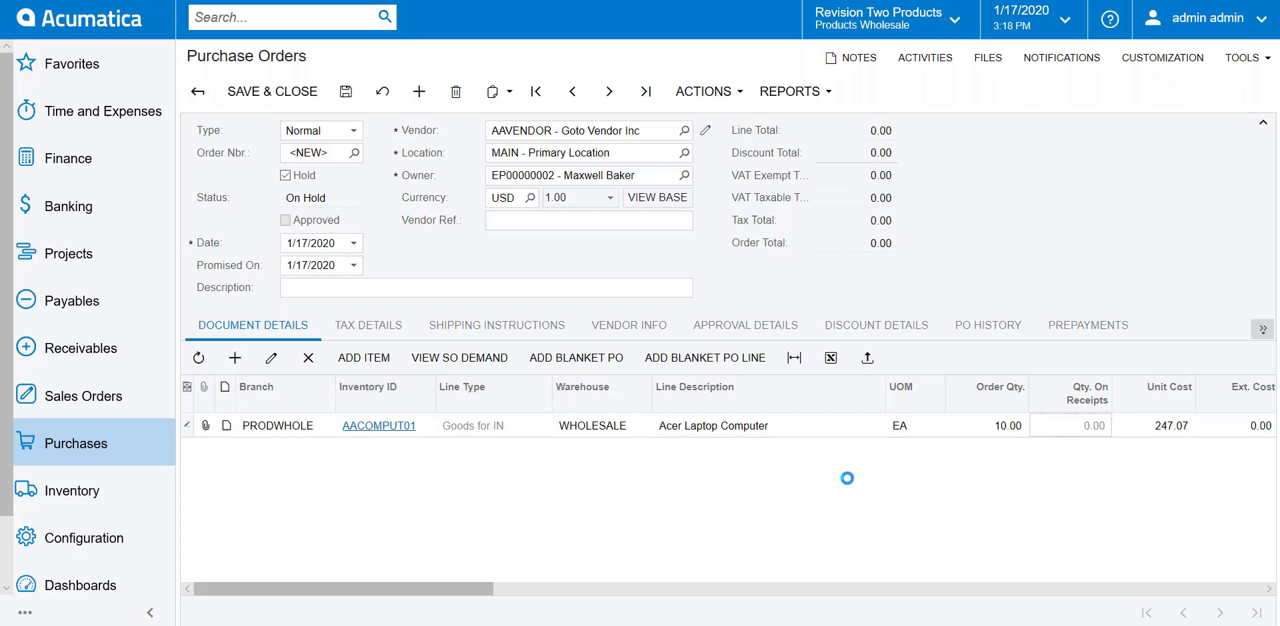
Creating a Vendor6
Creates vendor records with the tools to enter and organize vendor data efficiently, including planning attributes, default settings, locations, and security controls.
Vendors: Vendor-Related Planning · Vendors: Vendor Defaults and Overrides · Vendors: Vendor Locations · Vendors: Security Configuration · Vendors: Configuration Prerequisites
Managing Purchase Documents16
Governs how purchase orders and receipts are processed, including line management for stock, non-stock, and service items, drop-ship handling, and cash-on-delivery transactions.
Support of COD Transactions · Purchase Order Configuration · Purchase Order Statuses · Purchase Order Fulfillment · Drop-Ship Purchase Orders
Producing Items with Outside Processing6
Tracks materials and payments when part of production is contracted out to a subcontractor for outside processing operations.
Outside Processing: Configuration · Outside Processing: Subcontractor's Storage of Materials · Outside Processing: Charges for Subcontractor Services · Outside Processing: Automatic Move Transaction · Outside Processing: Processing Workflow
Automated Receiving and Putting Away Operations4
Automates receiving items into a warehouse and putting them away to storage locations using barcode scanning or the mobile app.
Receiving and Putting Away Operations: Receipt Verification · Receiving and Putting Away Operations: Transfer Receipt Processing · Receiving and Putting Away Operations: Purchase Return Processing
Tracking Cost Commitments3
Tracks purchase orders as project cost commitments so committed costs populate the project's cost budget before they're actually incurred.
Committed Costs: External Commitments · Committed Costs: Mass Processing of Documents
Processing Purchases for Sale3
Links a purchase order to the sales order that triggered it when items are bought from vendors only after a customer orders them.
Purchases for Sale: Linking Sales and Purchase Documents · Purchases for Sale: Mass-Processing of Documents
Processing Purchases of Stock Items3
Processes a purchase order for inventory-tracked stock, generating the AP bill after the ordered goods are received.
Purchases of Stock Items: Linking Documents · Purchases of Stock Items: Mass-Processing of Documents
Correcting Purchase Receipts5
Edits a released purchase receipt tied to a standard or drop-ship purchase order, correcting errors or reflecting procurement changes, unavailable once Service Management is turned on.
Purchase Receipt Correction: Inventory Validation · Purchase Receipt Correction: Correction Inventory Issue · Purchase Receipt Correction: Correction of Receipts for Drop-Ship Purchase Orders · Purchase Receipt Correction: Cancellation of a Purchase Receipt
Processing Blanket Purchase Orders3
Records a company's plan to buy a large item quantity from a vendor over time as a blanket purchase order, fulfilled and billed through a series of child orders rather than directly.
Blanket Purchase Orders: Rules of Line Completion and Closure · Blanket Purchase Orders: Purchases for Sale
Processing Prepayments for Purchase Orders4
Records an advance payment made to a vendor against a purchase order, which the system later applies on its own to the AP bill it produces.
Prepayments for Purchase Orders: Calculation of the Prepayment Amount · Prepayments for Purchase Orders: Canceling Prepayments · Prepayments for Purchase Orders: Linking Documents
Processing Prepayment Invoices in Purchase Orders3
Generates a prepayment invoice from a purchase order so tax on a vendor deposit is recognized when the payment is made and included in that period's report, a requirement in certain countries.
Prepayment Invoices: Creation of a Prepayment Invoice · Prepayment Invoices: Processing Workflow
Allocating Landed Costs6
Accounts for extra costs incurred moving purchased goods into a warehouse, or transferring stock between warehouses using an outside carrier, allocating the landed cost by item, weight, or volume.
Configuration of Landed Cost Codes · Processing Landed Cost Documents · Adjusting the Landed Cost Variance · Adding Landed Costs to Items' Costs · Applying Direct-Entry Taxes to Landed Cost Documents
Allocating the Purchase Price Variance3
Accounts for the gap between what an item costs per unit on its purchase receipt and what it costs per unit on the resulting bill, a difference that can stem from exchange-rate shifts or vendor price changes.
Purchase Price Variance Allocation: Example 1 · Purchase Price Variance Allocation: Example 2
Processing Intercompany Purchases and Returns5
Generates a matching sales order automatically for a purchase order placed between companies or branches under the same tenant, once intercompany sales has been set up.
Intercompany Purchases and Returns: Intercompany Returns · Intercompany Purchases and Returns: Intercompany Drop-Ship Purchase · Intercompany Purchases and Returns: Intercompany Drop-Ship Returns · Intercompany Purchases and Returns: Mass-Processing of Documents
Other capabilities35
Vendor Relations: Application in AP Documents · Purchases with Sales Taxes: Tax Amount Validation · Purchases with Inclusive Sales Taxes: Generated Transaction · Service Orders with Items to Be Purchased: Allocations for Service Orders · Payments for a Shared Vendor: Reports and Inquiries
Business Intelligence
moderateReporting, dashboards, analytics, and data visualisation capabilities built into the ERP platform for operational and strategic decision-making.
›13 documented capabilities in 3 areas
Business Intelligence
moderate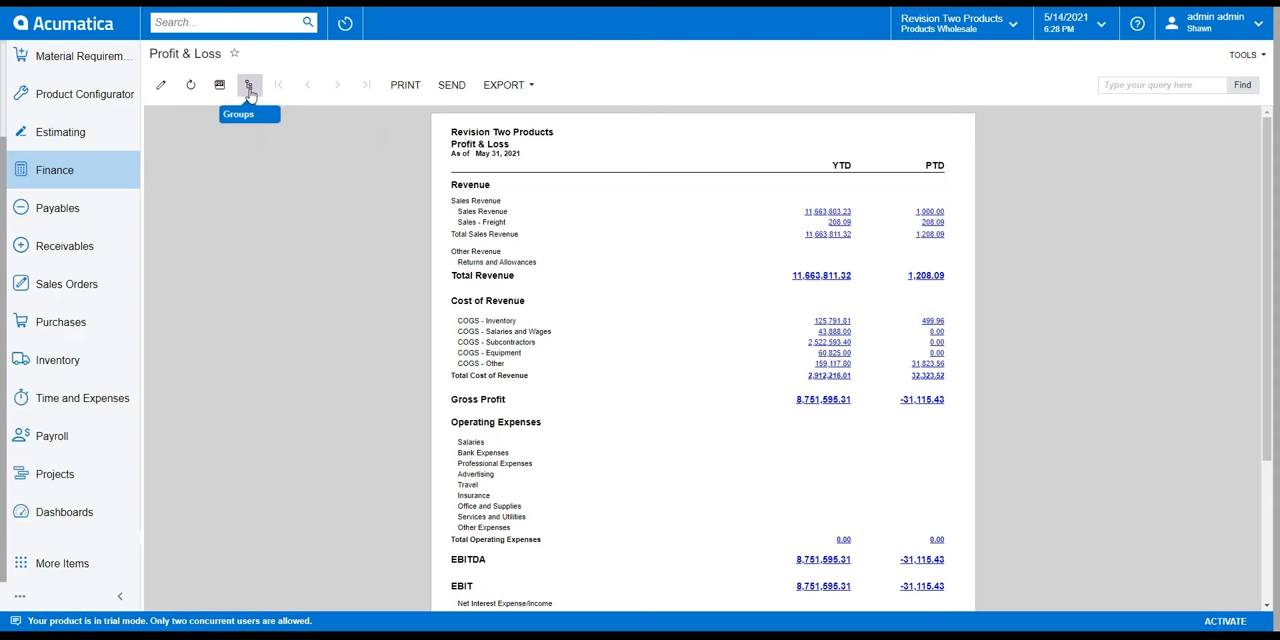
Preparing a Consolidated Financial Statement3
Builds a consolidated financial statement for a parent and subsidiary running on different base currencies, using the Analytical Report Manager toolkit.
Consolidated Financial Statement: Performing a Translation · Consolidated Financial Statement: Creating a Customized Report
Managing Marketing Reports4
Analyzes lead source, lead processing, and campaign data through generic inquiry forms that marketing teams can customize.
Marketing Reports: Lead Generation and Processing Analysis · Marketing Reports: Lead Conversion and Qualification Analysis · Marketing Reports: Campaign Analysis
Other capabilities6
Translation of Financial Statements: Mass Processing · Opportunity Reports: Opportunity Estimation
Asset Management
moderateEnterprise asset management including preventive maintenance, asset lifecycle tracking, work order management, and asset depreciation.
›42 documented capabilities in 4 areas
Asset Management
moderateManaging Equipment6
Maintains a full record for each piece of equipment, covering its serial number, registration, manufacturing and purchase details, components, warranty, owner, and location.
Equipment Types · Resource Equipment · Item Classes for Equipment and Components · Target Equipment · Model Equipment
Creating Service Contracts5
Creates service contracts with billing terms tailored to the company's process, including options to bill as services are delivered.
Service Contracts: Billing Type Setup · Service Contracts: Activation, Cancellation, and Suspension of a Contract · Service Contracts: Status Update · Service Contracts: Related Inquiry Forms
Equipment Management Use Cases8
Walks through common scenarios for handling equipment sales, upgrades, and replacements across sales orders, service orders, and appointments.
Selling Model Equipment · Selling a Model Equipment Entity and Optional Component · Selling an Optional Component of Target Equipment · Upgrading a Default Component of Model Equipment to Be Sold · Replacing Target Equipment
Other capabilities23
Asset Transfers: Mass Processing · Asset Disposal: Mass Processing · Service Templates
HR & Payroll
basicHuman resources management including employee records, payroll processing, benefits administration, time and attendance, and talent management.
›59 documented capabilities in 5 areas
HR & Payroll
basicManaging Employees4
Maintains the company's employee records, linking each one to payroll settings, a system user account, and the workgroups and approval maps they participate in.
Employee Settings · Company Tree and Workgroups · Support of Multiple Work Calendars
Entering Employee Time9
Lets employees log time spent on work activities, then routes that time for approval, covering standard time cards, equipment time cards, and time entered for crew members.
Employee Time Entry: Earning Types · Employee Time Entry: Time Activities · Employee Time Entry: Creation of Time Activities from Project Time Logs · Employee Time Entry: Time Zones in Time Activities · Employee Time Entry: Time Cards
Configuring Certified Projects3
Configures government-contracted projects such as public construction work, capturing the guaranteed labor rates, associated deductions and benefits, fringe amounts, and reporting obligations tied to the contract.
Certified Projects: Deductions and Benefits · Certified Projects: Fringe Benefits
Preparing Government Reports3
Lets users select the company, branch, period, and state for a filing and hands off to the Aatrix website to complete and submit the report.
Preparing Government Reports: Records of Employment · Preparing Government Reports: Canadian Tax Forms
Other capabilities40
Payment Methods: Direct Deposits · Work Locations: Configuration Prerequisites · Taxes: Configuration Prerequisites · Earning Types: Configuration Prerequisites · Workers' Compensation Codes: Configuration Prerequisites
Quality Management
basicQuality control, inspection management, non-conformance tracking, CAPA, and compliance with quality standards (ISO, FDA, AS9100).
Ready to move on Acumatica?
Price it, put it head-to-head with alternatives, or talk to a partner who has implemented it.
Acumatica add-ons & integrations
Extend Acumatica with best-of-breed software that integrates with it:
Highlighted product links go straight to the vendor and are affiliate links — we may earn a commission if you sign up. This never affects which products we list or how we rank them.
Acumatica Modules FAQ
What is Acumatica?
Acumatica is a cloud ERP built for midsize companies, known for resource-based pricing — you pay for the computing resources you use rather than per named user, so headcount can grow without licence costs climbing in lockstep. It covers finance, distribution, manufacturing, project accounting, and CRM natively, with particularly strong construction and wholesale-distribution editions.
How much does Acumatica cost?
Acumatica doesn't publish list pricing — its resource-based model prices a subscription around the application editions, users, and transaction volume a company needs, so cost is quoted per deployment rather than per seat. Total project cost, including implementation, commonly lands between $75,000 and $350,000 for midsize companies.
Which is better, NetSuite or Acumatica?
Neither wins outright — NetSuite is a single multi-tenant SaaS platform with deeper native ecommerce and a larger app marketplace, while Acumatica's resource-based pricing and on-premise/hybrid deployment options suit companies wanting unlimited users or more hosting control. Acumatica's construction and distribution editions are generally considered stronger; NetSuite's finance consolidation is deeper for scaling companies.
Is Acumatica worth the investment compared with cheaper cloud ERP alternatives?
For midsize companies with growing headcount, Acumatica's unlimited-user pricing can be more cost-effective over time than seat-based ERPs, especially once you add finance, distribution, and CRM users. Cheaper point solutions cost less upfront but can't match Acumatica's integrated operations depth — the trade-off is implementation cost and timeline (typically 4–8 months) versus long-run licensing savings.
What is Acumatica used for?
Acumatica is used to run core business operations — financial management, inventory and warehouse control, manufacturing planning, project accounting, and CRM — from a single cloud platform. It's most commonly deployed by construction firms, wholesale distributors, and manufacturers wanting unlimited users across departments without per-seat licensing constraints.
Who owns Acumatica?
Acumatica is a privately held company; its majority owner is the European private equity firm EQT, which acquired a controlling stake in 2019. Acumatica operates independently with its own product roadmap and partner channel, distinct from EQT's other portfolio companies.
Who are Acumatica's main competitors?
Acumatica competes most directly with Oracle NetSuite and Microsoft Dynamics 365 Business Central for midsize cloud ERP deals, and with Sage Intacct for finance-led buyers. In construction and distribution specifically, it also competes with vertical specialists and Epicor. All are evaluated on total cost, industry editions, and partner implementation quality.
How many customers does Acumatica have?
Acumatica reports serving over 10,000 midsize customers worldwide across construction, distribution, manufacturing, retail, and professional services. It has grown quickly among companies wanting a modern cloud alternative to legacy on-premise ERP, without being forced into a rigid per-user licensing model as headcount and usage scale up over time.
What is MYOB Acumatica?
MYOB Acumatica is the Australia/New Zealand-localised version of Acumatica, sold and supported by MYOB under a partnership with Acumatica. It runs the same core cloud ERP platform with local tax, currency, and compliance settings built in, targeted at midsize businesses in that region.
When was Acumatica founded?
Acumatica was founded in 2008, originally built as a cloud-native alternative to on-premise ERPs like Sage and Microsoft Dynamics GP. It launched its resource-based pricing model early on to differentiate from per-user licensing, and has grown into one of the most widely adopted midsize cloud ERP platforms in North America.