
Microsoft Dynamics 365 Modules & Capabilities
Microsoft Dynamics 365 is rated across 14 of 14 ERP modules, 12 of them a core strength and 1,797 documented capabilities catalogued across those modules.
- 14of 14
- Modules rated
- 12
- Core strengths
- 1,797
- Documented capabilities
- Cloud / Hybrid
- Deployment
Microsoft Dynamics 365 module ratings
Ordered strongest to weakest. Each rating reflects standard-edition depth, not what a third-party add-on could bolt on.
Finance & Accounting
strongCore financial management including general ledger, accounts payable/receivable, fixed assets, cash management, and financial reporting. The backbone of any ERP system.
›456 documented capabilities in 26 areas
Finance & Accounting
strongFinancial analytics122
Gathers, analyzes, and shares financial data for business intelligence, spanning Power BI finance apps, configurable financial reporting, and a large library of built-in finance and analysis reports.
Handling finance reporting across business units or legal entities · Power BI finance app · Financial Overview · Income Statement · Balance Sheet
Fixed assets analytics33
Analyzes fixed asset data through standard reports, Excel exports, and ad-hoc analysis covering book values, maintenance, insurance, and disposals.
Ad-hoc analysis of fixed assets data · Monitor maintenance costs · Monitor insurance coverage · View changed depreciation book values · View disposal ledger entries
Closing years and periods13
Guides year-end and period-end closing, from posting any outstanding documents and journals to confirming bank balances are accurate.
Work with accounting periods and fiscal years · Specify posting periods · Overview of tasks to close accounting periods · Update currency exchange rates · Allocate costs and income
Work with expenses6
Covers recording expenses, attaching receipts, submitting and approving reports, and reimbursing employees.
Manage expenses · Create and submit expense reports · Approve expense reports · Post expense reports · Reimburse employee expenses
Autofill (preview)3
Covers Copilot's autofill capability, which proposes values for empty fields while a user is completing a card or document.
Autofill fields with Copilot · Responsible AI FAQ for autofill
Work with the chart of accounts and general ledger (G/L)13
Covers setting up and using the general ledger and chart of accounts, including budgets, revaluation, and audit-ready exports.
Understand the general ledger · Understand the chart of accounts · Create G/L budgets · Review amounts in general ledger accounts · Revalue general ledger account balances
Expense Agent (preview)9
An AI agent that captures receipts, pulls out the data, sorts and itemizes it, then bundles the results into reports awaiting review.
How expense policy compliance works · How the expense agent processes emails · Expense and report statuses · Manage expenses with Expense Agent · Upload and process receipts
Bank account reconciliation assist3
Covers using Copilot to help match and reconcile bank account transactions.
Reconcile bank accounts with Copilot · Responsible AI FAQ for bank reconciliation assist
Chat with Copilot (preview)3
Covers a conversational Copilot interface for finding data and getting in-product help.
Chat with Copilot · Responsible AI FAQ for chat with Copilot
Working with currencies3
Sets up the local currency and any foreign currencies the business transacts in, along with exchange rate updates.
Currencies in Business Central · Update currency exchange rates
Map E-Documents (preview)3
Covers Copilot's ability to match incoming electronic documents against the correct lines on a purchase order.
Map e-documents to purchase order lines with Copilot · Responsible AI FAQ for mapping e-documents with purchase orders using Copilot
Manage receivables18
Covers managing receivables end to end, applying incoming payments to customer ledger entries, reconciling bank accounts, and following up on overdue balances.
Accounts receivable analytics · Payment application overview · Reconcile payments use automatic application · Review or apply payments manually after automatic application · Reconcile payments that can't be applied automatically
Manage payables24
Covers accounts payable management end to end: paying vendors and employees, exporting payment files for the bank, and issuing check or electronic payments.
Accounts payable analytics · Make payments · Work with general journals · Record payments and refunds · Suggest vendor payments
Invoicing prepayments3
Invoices and collects deposits from customers, or remits deposits to vendors, either as a lump sum or spread across order lines.
Create prepayment invoices · Correct prepayments
Reconcile bank accounts6
Matches bank ledger entries against statement transactions on a regular cadence to surface missing payments or bookkeeping mistakes.
Reconcile bank accounts · Reconcile bank accounts using Copilot · Applying payments automatically and reconciling bank accounts · Transfer bank funds · Create bank deposits
Payables Agent3
Covers an AI agent that automates vendor invoice processing end to end, cutting the manual accounting effort typically needed to register purchase invoices correctly.
Supervise agent activities · Responsible AI FAQ for Payables Agent
Accounting for costs8
Provides cost accounting tools to understand and analyze the costs of running the business, from terminology through budgets and reports.
Terminology in cost accounting · About cost accounting · Transfer and post cost entries · Define and allocate costs · Create cost budgets
Manage inventory costs14
Records and reports the cost of inventory and manufacturing, covering standard costing, revaluation, cost adjustment, and reconciliation with the general ledger.
Use item charges to account for additional trade costs · About standard cost calculation · About unit cost calculation · Revalue inventory · Track item cost adjustments
Suggest number series (preview)3
Covers Copilot's ability to suggest number series setup for new record types.
Suggest number series with Copilot · Responsible AI FAQ for suggest number series with Copilot
Summarize (preview)3
Covers Copilot's Summarize feature, which condenses a record's data into a quick overview and flags what needs attention.
Summarize records with Copilot · Responsible AI FAQ for summarize
Expense Agent (preview)9
Covers an AI agent that handles expense processing end to end, capturing receipts, extracting and categorizing data, itemizing charges, and grouping everything into expense reports for approval.
How expense policy compliance works · How the expense agent processes emails · Expense and report statuses · Manage expenses with Expense Agent · Upload and process receipts
Working with Value Added Tax (VAT)10
Manages VAT compliance across the supply chain, including setup, reporting, validation, and rate changes for country-specific regulations.
EU third-party purchase transactions · Work with VAT on sales and purchases · Use non-deductible VAT · Multiple VAT registration numbers · Submit VAT reports to tax authorities
Multi-site and international organizations6
Supports hub-and-spoke organizations where a headquarters manages overall operations while geographically distributed sites run as standalone entities, including consolidation and intercompany processing.
Company consolidation · Intercompany overview · Work with intercompany documents and journals · Manage the intercompany inbox and outbox · Allocate costs to intercompany partners
Incoming documents6
Captures incoming business documents like scanned receipts, PDFs, and emailed attachments, then converts them into electronic records using OCR and links them to purchases and expenses.
Create incoming document records · Use OCR to turn PDF and image files into electronic documents · Create incoming document records directly from documents and entries · Find posted documents without incoming document records · Manage many incoming document records
Subscription billing45
Bills recurring services under contract, with flexible pricing, renewal, deferral, and usage-based billing models plus centralized contract management. Automates recurring invoicing to cut manual effort and errors across the quote-to-invoice cycle.
Overcome subscription business model challenges · Power BI Subscription Billing app · Subscription Billing Overview · Revenue Year-Over-Year · Revenue Analysis
Other capabilities87
Import payroll transactions · Analyze cash flows in your company
Manufacturing
strongProduction planning, shop floor control, BOM management, MRP, and manufacturing execution. Supports discrete, process, and mixed-mode manufacturing environments.
›101 documented capabilities in 4 areas
Manufacturing
strong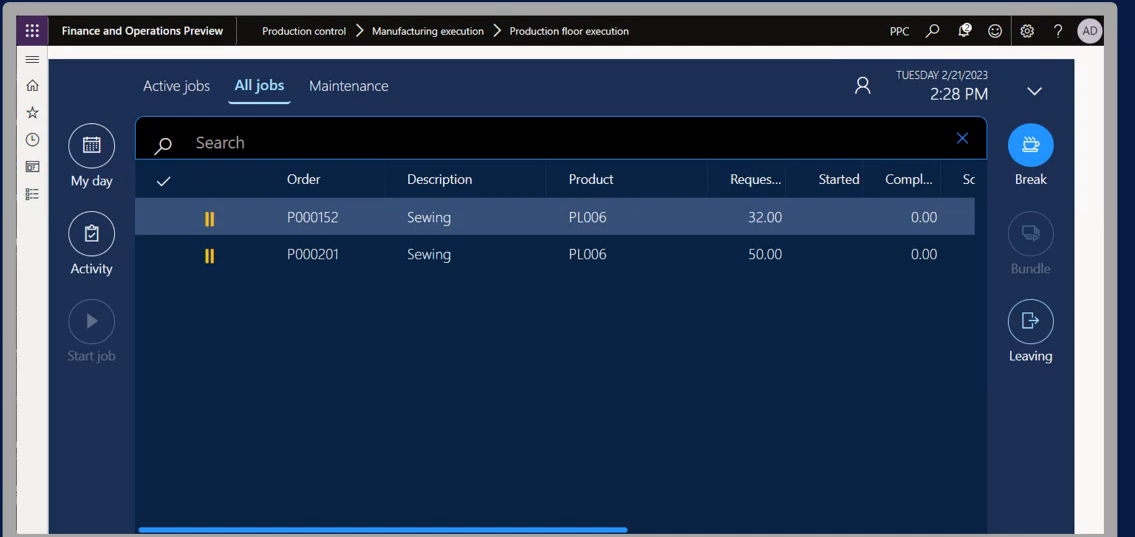
Manufacturing analytics49
Gathers and shares manufacturing data through a Power BI app and a library of built-in production reports covering capacity, cost, and order status.
Power BI manufacturing app · Current Utilization · Historical Utilization · Work Center Load · Allocated Hours
Assembly analytics9
A set of reports covering assembly BOM structure, component costs, availability, and sales-linked assembly analysis.
Assembly BOMs · Item - Able to Make (Time) · BOM Cost Share Distribution · Where-used list · BOM - Raw Materials
Subcontracting5
Covers sending selected production operations to outside vendors, including subcontractor pricing, component handling, and WIP transfers.
Order subcontracting · Manage components · Transfer WIP items · Assign item charges
Other capabilities38
Supply Chain
strongEnd-to-end supply chain visibility including demand planning, supply planning, logistics, supplier management, and supply chain analytics.
›45 documented capabilities in 3 areas
Supply Chain
strongOutbound warehouse processes7
Covers picking, shipping, and cross-docking items leaving the warehouse.
Outbound warehouse processes · Find your work assignments · Pick items with inventory picks · Pick items for warehouse shipment · Ship items
Sustainability Value Chain9
Extends emissions tracking across the value chain — purchasing, transfers, assembly, production, and sales.
Sustainability Value Chain · Value Chain Setup · Default emission values · Value Chain in Purchase · Value Chain in Transfers
Other capabilities29
Sales
strongThe sales side of an ERP: quotes and pricing, order processing, customer and account management, post-sale service, and sales reporting on shared master data.
›194 documented capabilities in 18 areas
Sales
strongSales analytics46
Consolidates sales data into Power BI dashboards, standard reports, and ad-hoc analysis so sales managers can track performance, customers, and pipeline for better decisions.
Power BI Sales app · Sales app overview · Key Sales Influencers · Sales Decomposition · Sales Forecasting
Relationship management analytics16
A set of built-in reports covering contacts, opportunities, campaigns, segments, and sales cycles for monitoring relationship management activity.
Contact - List · Contact - Company Summary · Contact - Person Summary · Contact - Cover Sheet · Contact - Labels
Manage contacts6
Covers recording external parties — prospects, customers, vendors, consultants — as contacts, syncing them with Outlook, classifying them with questionnaires, and merging duplicates.
Contacts · Create contacts · Save business contacts to Outlook · Use profile questionnaires to classify business contacts · Merge duplicate records
Autofill (preview)3
Covers Copilot's autofill capability, which proposes values for empty fields while a user is completing a card or document.
Autofill fields with Copilot · Responsible AI FAQ for autofill
Manage segments5
Covers building targeted contact segments from shared criteria and using them to drive campaigns and track related interactions.
Segments · Create segments · Add contacts to segments · Manage interactions for segments
Manage interactions6
Covers logging emails, calls, meetings, and letters exchanged with contacts, attaching supporting files, and capturing some interactions automatically from sales and service documents.
Interactions · Attachments for interactions · Record interactions with contacts · Create interactions on contacts and segments · Automatically record interactions with contacts
Fulfill service contracts5
Covers setting up and fulfilling customer service contracts, including templates and multi-contract handling.
Fulfill service contracts · Multiple contracts · Work with service contracts and service contract quotes · Change the annual amount on service contracts or contract quotes
Chat with Copilot (preview)3
Covers a conversational Copilot interface for finding data and getting in-product help.
Chat with Copilot · Responsible AI FAQ for chat with Copilot
Manage sales opportunities5
Covers capturing incoming leads as opportunities, assigning them to salespeople, and moving them through the sales cycle toward a close.
Opportunities · Create opportunities · Track email message exchanges · Process sales opportunities
Marketing text suggestions3
Covers Copilot's AI content-generation capability for drafting marketing text for items.
Create marketing text with Copilot · Responsible AI FAQ for marketing text suggestions
Use Dynamics 365 for Sales from Business Central3
Connects Business Central to Dynamics 365 Sales so lead-to-cash data — records, sales, and customer engagement — stays synchronized between the two systems.
Couple and synchronize records manually · View the status of a synchronization
Sales line suggestion (preview)3
Covers Copilot's ability to suggest line items when a sales order is being built.
Suggest lines on sales orders with Copilot · Responsible AI FAQ for sales line suggestions with Copilot
Sales Order Agent3
Covers an AI agent that reads incoming customer emails, identifies the customer and requested items, checks stock availability, clarifies missing details through follow-up messages, and generates the resulting quote or order as a formatted PDF.
Process sales quotes and orders with Sales Order Agent · Responsible AI FAQ for Sales Order Agent
Suggest item substitutions (preview)3
Covers Copilot's ability to suggest substitute items when the one requested isn't available.
Find item substitutions with Copilot · Responsible AI FAQ for suggest item substitutions with Copilot
Suggest number series (preview)3
Covers Copilot's ability to suggest number series setup for new record types.
Suggest number series with Copilot · Responsible AI FAQ for suggest number series with Copilot
Summarize (preview)3
Covers Copilot's Summarize feature, which condenses a record's data into a quick overview and flags what needs attention.
Summarize records with Copilot · Responsible AI FAQ for summarize
Subscription billing45
Bills recurring services under contract, with flexible pricing, renewal, deferral, and usage-based billing models plus centralized contract management. Automates recurring invoicing to cut manual effort and errors across the quote-to-invoice cycle.
Overcome subscription business model challenges · Power BI Subscription Billing app · Subscription Billing Overview · Revenue Year-Over-Year · Revenue Analysis
Other capabilities33
Create and set up a Shopify account
HR & Payroll
strongHuman resources management including employee records, payroll processing, benefits administration, time and attendance, and talent management.
›36 documented capabilities in 4 areas
HR & Payroll
strong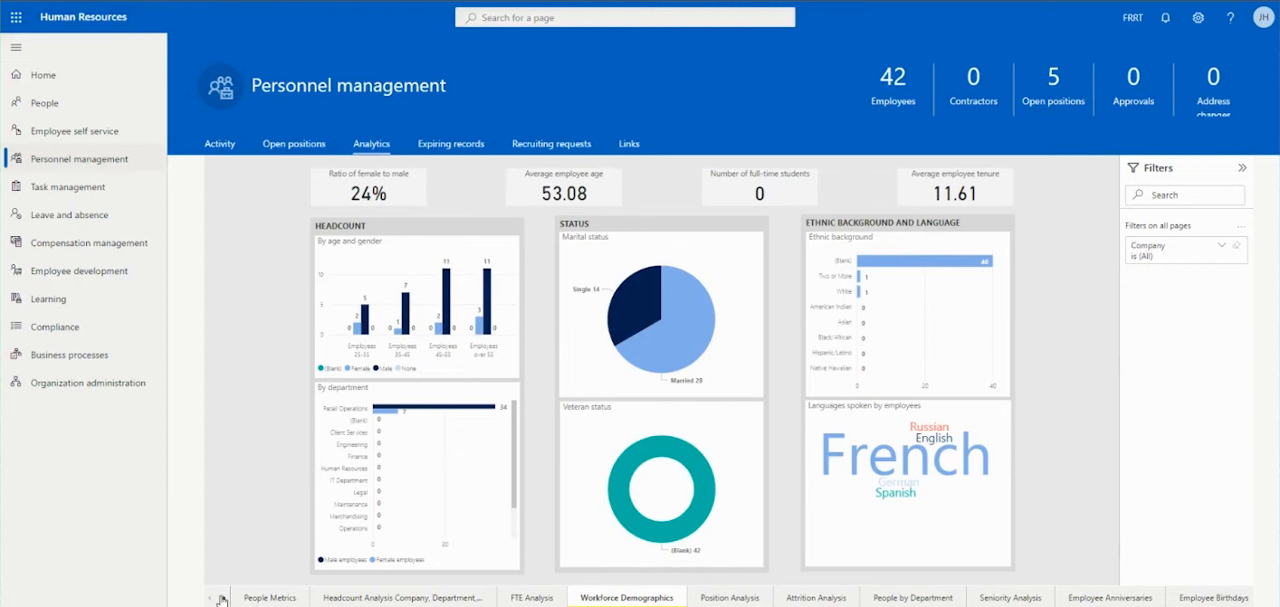
Work with expenses6
Covers recording expenses, attaching receipts, submitting and approving reports, and reimbursing employees.
Manage expenses · Create and submit expense reports · Approve expense reports · Post expense reports · Reimburse employee expenses
Expense Agent (preview)9
An AI agent that captures receipts, pulls out the data, sorts and itemizes it, then bundles the results into reports awaiting review.
How expense policy compliance works · How the expense agent processes emails · Expense and report statuses · Manage expenses with Expense Agent · Upload and process receipts
Expense Agent (preview)9
Covers an AI agent that handles expense processing end to end, capturing receipts, extracting and categorizing data, itemizing charges, and grouping everything into expense reports for approval.
How expense policy compliance works · How the expense agent processes emails · Expense and report statuses · Manage expenses with Expense Agent · Upload and process receipts
Other capabilities12
Project Management
strongProject planning, resource allocation, time tracking, expense management, and project accounting for project-centric businesses.
›40 documented capabilities in 2 areas
Project Management
strongProject management analytics31
Analyzes project performance with a Power BI app, standard reports, and ad-hoc analysis covering profitability, budgets, and resources.
Ad-hoc analysis of project data · Power BI projects app · Projects Overview · Projects Tasks · Projects Profitability
Other capabilities9
Inventory Management
strongInventory tracking, stock management, reorder point planning, multi-location management, and inventory valuation across warehouses and locations.
›176 documented capabilities in 8 areas
Inventory Management
strongInventory analytics52
Turns inventory data into insight with Power BI apps for stock and valuation, standard reports, and ad-hoc analysis for inventory managers.
Power BI inventory app · Inventory Overview · Inventory Forecasting · Inventory by Item · Inventory by Location
Assembly analytics9
A set of reports covering assembly BOM structure, component costs, availability, and sales-linked assembly analysis.
Assembly BOMs · Item - Able to Make (Time) · BOM Cost Share Distribution · Where-used list · BOM - Raw Materials
Inbound warehouse processes7
Covers receiving, matching to inbound documents, put-away, and cross-docking of incoming goods.
Inbound warehouse processes · Find your work assignments · Receive items · Put away items with inventory put-aways · Put away items with warehouse put-aways
Outbound warehouse processes7
Covers picking, shipping, and cross-docking items leaving the warehouse.
Outbound warehouse processes · Find your work assignments · Pick items with inventory picks · Pick items for warehouse shipment · Ship items
Internal warehouse processes12
Covers internal bin-to-bin movement for assembly, production, and project activity, plus location transfers and physical counting.
Flows for production, assembly, and jobs · Pick for production, assembly, or jobs in basic warehouse configurations · Pick for production, assembly, or jobs in advanced warehouse configurations · Put away production output · Move items
Suggest item substitutions (preview)3
Covers Copilot's ability to suggest substitute items when the one requested isn't available.
Find item substitutions with Copilot · Responsible AI FAQ for suggest item substitutions with Copilot
Manage inventory costs14
Records and reports the cost of inventory and manufacturing, covering standard costing, revaluation, cost adjustment, and reconciliation with the general ledger.
Use item charges to account for additional trade costs · About standard cost calculation · About unit cost calculation · Revalue inventory · Track item cost adjustments
Other capabilities72
Procurement
strongPurchase order management, supplier management, requisition workflows, contract management, and spend analytics.
›88 documented capabilities in 4 areas
Procurement
strong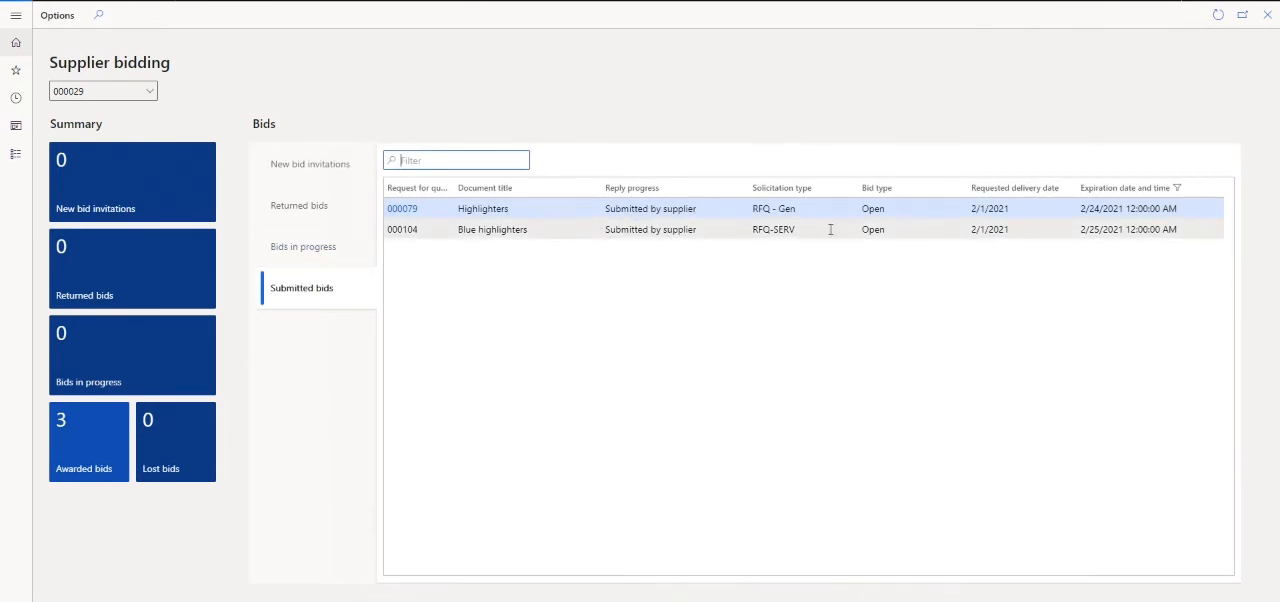
Purchasing analytics41
Monitors purchasing KPIs through a Power BI app, standard reports, and ad-hoc analysis, covering vendors, spend, and payables.
Power BI purchasing app · Purchases Overview · Purchases Decomposition · Key Purchase Influencers · Purchase Forecasting
Inbound warehouse processes7
Covers receiving, matching to inbound documents, put-away, and cross-docking of incoming goods.
Inbound warehouse processes · Find your work assignments · Receive items · Put away items with inventory put-aways · Put away items with warehouse put-aways
Subcontracting5
Covers sending selected production operations to outside vendors, including subcontractor pricing, component handling, and WIP transfers.
Order subcontracting · Manage components · Transfer WIP items · Assign item charges
Other capabilities35
Warehouse Management
strongWarehouse operations including receiving, putaway, picking, packing, shipping, and warehouse layout optimisation.
›176 documented capabilities in 8 areas
Warehouse Management
strong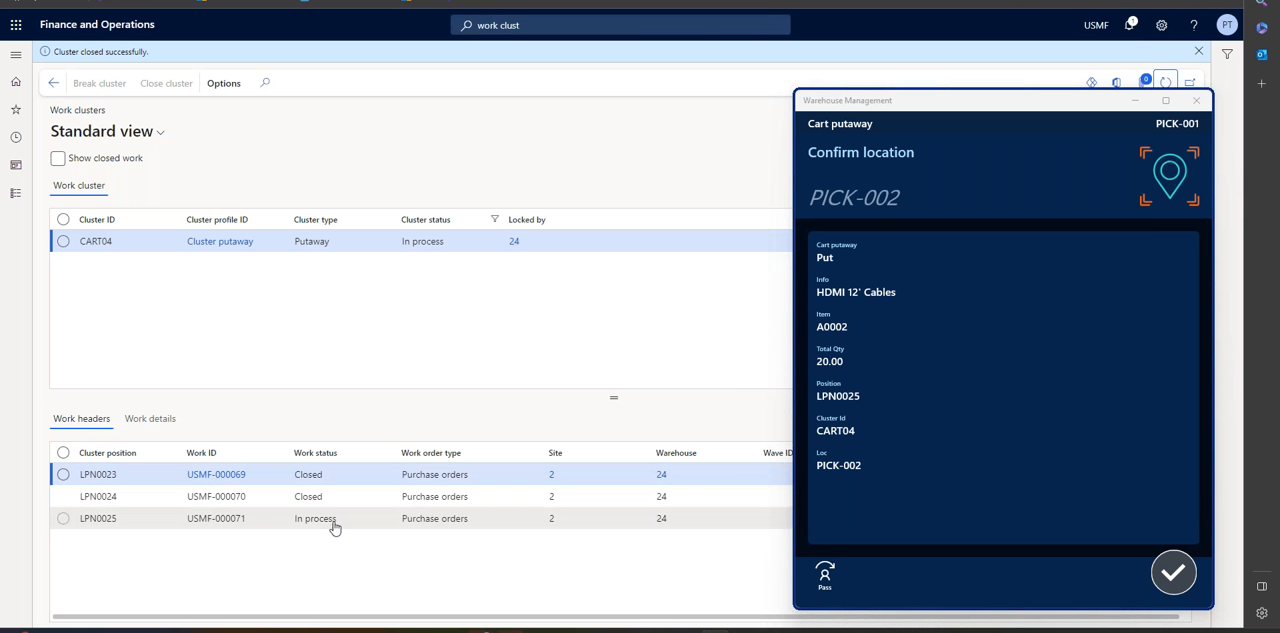
Inventory analytics52
Turns inventory data into insight with Power BI apps for stock and valuation, standard reports, and ad-hoc analysis for inventory managers.
Power BI inventory app · Inventory Overview · Inventory Forecasting · Inventory by Item · Inventory by Location
Assembly analytics9
A set of reports covering assembly BOM structure, component costs, availability, and sales-linked assembly analysis.
Assembly BOMs · Item - Able to Make (Time) · BOM Cost Share Distribution · Where-used list · BOM - Raw Materials
Inbound warehouse processes7
Covers receiving, matching to inbound documents, put-away, and cross-docking of incoming goods.
Inbound warehouse processes · Find your work assignments · Receive items · Put away items with inventory put-aways · Put away items with warehouse put-aways
Outbound warehouse processes7
Covers picking, shipping, and cross-docking items leaving the warehouse.
Outbound warehouse processes · Find your work assignments · Pick items with inventory picks · Pick items for warehouse shipment · Ship items
Internal warehouse processes12
Covers internal bin-to-bin movement for assembly, production, and project activity, plus location transfers and physical counting.
Flows for production, assembly, and jobs · Pick for production, assembly, or jobs in basic warehouse configurations · Pick for production, assembly, or jobs in advanced warehouse configurations · Put away production output · Move items
Suggest item substitutions (preview)3
Covers Copilot's ability to suggest substitute items when the one requested isn't available.
Find item substitutions with Copilot · Responsible AI FAQ for suggest item substitutions with Copilot
Manage inventory costs14
Records and reports the cost of inventory and manufacturing, covering standard costing, revaluation, cost adjustment, and reconciliation with the general ledger.
Use item charges to account for additional trade costs · About standard cost calculation · About unit cost calculation · Revalue inventory · Track item cost adjustments
Other capabilities72
Business Intelligence
strongReporting, dashboards, analytics, and data visualisation capabilities built into the ERP platform for operational and strategic decision-making.
›368 documented capabilities in 17 areas
Business Intelligence
strongFinancial analytics122
Gathers, analyzes, and shares financial data for business intelligence, spanning Power BI finance apps, configurable financial reporting, and a large library of built-in finance and analysis reports.
Handling finance reporting across business units or legal entities · Power BI finance app · Financial Overview · Income Statement · Balance Sheet
Sales analytics46
Consolidates sales data into Power BI dashboards, standard reports, and ad-hoc analysis so sales managers can track performance, customers, and pipeline for better decisions.
Power BI Sales app · Sales app overview · Key Sales Influencers · Sales Decomposition · Sales Forecasting
Purchasing analytics41
Monitors purchasing KPIs through a Power BI app, standard reports, and ad-hoc analysis, covering vendors, spend, and payables.
Power BI purchasing app · Purchases Overview · Purchases Decomposition · Key Purchase Influencers · Purchase Forecasting
Inventory analytics52
Turns inventory data into insight with Power BI apps for stock and valuation, standard reports, and ad-hoc analysis for inventory managers.
Power BI inventory app · Inventory Overview · Inventory Forecasting · Inventory by Item · Inventory by Location
Relationship management analytics16
A set of built-in reports covering contacts, opportunities, campaigns, segments, and sales cycles for monitoring relationship management activity.
Contact - List · Contact - Company Summary · Contact - Person Summary · Contact - Cover Sheet · Contact - Labels
Sustainability analytics17
A set of reports and a Power BI app covering emissions, water and waste usage, ESG compliance, and progress toward net-zero goals.
Ad-hoc analysis of sustainability data · Built-in sustainability reports · Analyzing sustainability entries with financial reports · Handle external ESG compliance reporting · Sustainability Power BI app
Analysis assist3
Covers Copilot's ability to analyze list data and answer questions about it directly inside Business Central.
Analyze data in lists with Copilot · Responsible AI FAQ for analysis assist
KPIs, dashboards, and financial reports14
Covers how businesses define and track KPIs, build financial reports, and connect Power BI dashboards to Business Central data, including installing Power BI apps, setting reporting calendars, and drilling from a visual back to its source records.
Using key performance indicators (KPIs) to meet your business goals · Work with Power BI reports · Use Power BI semantic models with Excel · Track KPIs with Power BI metrics · Installing Power BI apps for Business Central
Autofill (preview)3
Covers Copilot's autofill capability, which proposes values for empty fields while a user is completing a card or document.
Autofill fields with Copilot · Responsible AI FAQ for autofill
Ad-hoc data analysis8
Covers tools for analyzing data outside of standard reports, including sorting, searching, and filtering lists, saving personalized views, and exporting to Excel for deeper, one-off analysis.
Sort, search, and filter · Search and filter FAQ · Save and personalize list views · Analyze page data in Excel · Analyze list and query data with analysis mode
Use reports in daily work9
Covers the day-to-day mechanics of running reports in Business Central: scheduling, bookmarking, printing, exporting, and configuring how each one is formatted and shared.
Run reports · Bookmark a report · Analyze report data with Excel · Print reports · Schedule reports
Chat with Copilot (preview)3
Covers a conversational Copilot interface for finding data and getting in-product help.
Chat with Copilot · Responsible AI FAQ for chat with Copilot
Built-in reports22
Catalogs the ready-made reports available across every functional area of standard Business Central, spanning finance, sales, purchasing, inventory, projects, fixed assets, assembly, manufacturing, and service management.
Prepare financial reporting · Key financial reports · Accounts receivable reports · Accounts payable reports · Sustainability reports
Analyze data in business intelligence tools3
Covers connecting external business intelligence tools, including Microsoft Fabric and on-premises AI insights, to Business Central data for teams that skip the built-in analytics.
Microsoft Fabric and Business Central · Intelligent insights (on-premises)
Suggest number series (preview)3
Covers Copilot's ability to suggest number series setup for new record types.
Suggest number series with Copilot · Responsible AI FAQ for suggest number series with Copilot
Summarize (preview)3
Covers Copilot's Summarize feature, which condenses a record's data into a quick overview and flags what needs attention.
Summarize records with Copilot · Responsible AI FAQ for summarize
Other capabilities3
Import payroll transactions
Field Service
strongField service management including work order dispatching, technician scheduling, mobile access, parts management, and service contract management.
›59 documented capabilities in 5 areas
Field Service
strongService management1
Supports day-to-day service operations from order intake through dispatch and billing.
Service management analytics38
A library of built-in reports covering service orders, contracts, dispatch, profitability, and maintenance performance.
View service statistics · Service Order · Service Item Line Labels · Service Quote · Service Tasks
Planning service5
Configures the rules, pricing, and status values that define an organization's service policies.
Planning service management · Service price management · Service order status and repair status · Allocation status and repair status of service items
Fulfill service contracts5
Covers setting up and fulfilling customer service contracts, including templates and multi-contract handling.
Fulfill service contracts · Multiple contracts · Work with service contracts and service contract quotes · Change the annual amount on service contracts or contract quotes
Deliver service10
Covers creating and posting service quotes, orders, and invoices, and allocating resources to deliver on customer agreements.
Deliver service · Create service quotes · Create service orders · Create service invoices or credit memos · Allocate resources
Asset Management
strongEnterprise asset management including preventive maintenance, asset lifecycle tracking, work order management, and asset depreciation.
›42 documented capabilities in 2 areas
Asset Management
strongFixed assets analytics33
Analyzes fixed asset data through standard reports, Excel exports, and ad-hoc analysis covering book values, maintenance, insurance, and disposals.
Ad-hoc analysis of fixed assets data · Monitor maintenance costs · Monitor insurance coverage · View changed depreciation book values · View disposal ledger entries
Other capabilities9
Ecommerce
moderateIntegrated ecommerce and online storefront capabilities including B2B and B2C portals, product catalogue management, and order management.
›9 documented capabilities in 1 areas
Ecommerce
moderateOther capabilities9
Create and set up a Shopify account
Quality Management
moderateQuality control, inspection management, non-conformance tracking, CAPA, and compliance with quality standards (ISO, FDA, AS9100).
›7 documented capabilities in 1 areas
Quality Management
moderateOther capabilities7
Ready to move on Microsoft Dynamics 365?
Price it, put it head-to-head with alternatives, or talk to a partner who has implemented it.
Microsoft Dynamics 365 add-ons & integrations
Extend Microsoft Dynamics 365 with best-of-breed software that integrates with it:
Microsoft Dynamics 365 Modules FAQ
What is Dynamics 365?
Microsoft Dynamics 365 is a family of cloud business applications spanning ERP and CRM — including Business Central for small-to-midsize companies and Finance and Operations for larger enterprises, plus separate apps for sales, customer service, field service, and marketing. Each app is modular and licensed separately, and all integrate tightly with Microsoft 365, Teams, and Power BI.
What is Microsoft Dynamics 365 used for?
Companies use Dynamics 365 to run finance, supply chain, manufacturing, sales, and customer service from Microsoft's cloud platform. Smaller businesses typically run Business Central for core ERP; larger, more complex organisations run Finance and Operations for deeper multi-entity finance and manufacturing. Most buyers pick it for the native fit with Outlook, Teams, Excel, and Power BI.
How much does Microsoft Dynamics 365 cost?
Dynamics 365 is priced per user per app, starting around $50/user/month for entry-level licences and rising depending on which apps — Finance, Sales, Field Service, and so on — you stack. Because pricing is modular, total cost depends heavily on app and user count; full mid-market implementations, including services, commonly total $150,000 to over $1 million.
Is Business Central the same as Dynamics 365?
No — Business Central is one product within the Dynamics 365 family, aimed at small and midsize companies needing core ERP such as finance, inventory, and sales. Dynamics 365 as a whole also includes Finance and Operations for larger enterprises, plus separate CRM-style apps for sales, customer service, and field service. Dynamics 365 is the umbrella brand, not a single product.
What is Dynamics 365 Business Central?
Business Central is Microsoft's ERP for small and midsize businesses, covering finance, inventory, sales, purchasing, and light manufacturing in one cloud application. It's the successor to Dynamics NAV and sits below Finance and Operations in Microsoft's ERP lineup — chosen by companies that need integrated ERP without the complexity or cost of the enterprise-tier product.
Why is Dynamics 365 so bad?
Complaints usually center on licensing complexity — per-app, per-user pricing that gets expensive once you stack apps like Finance, Sales, and Field Service — and implementation quality that varies by partner, since Microsoft sells mainly through a large reseller channel. Extensions can also become hard to maintain over time. Its real strengths (Microsoft 365 integration, modularity, Copilot AI) depend heavily on careful partner and licence selection.
Is Dynamics 365 included in Microsoft 365?
No — Dynamics 365 is licensed and sold separately from Microsoft 365, the Office/Teams/Outlook subscription. They integrate closely, and having Microsoft 365 makes Dynamics 365 adoption smoother since Outlook, Teams, and Excel connect natively, but you must purchase Dynamics 365 apps and user licences on top of any Microsoft 365 plan.
Which is better, NetSuite or Microsoft Dynamics 365 Business Central?
Both target midsize companies but differ in architecture: NetSuite is a single multi-tenant SaaS platform with deep native ecommerce; Business Central leans on Microsoft 365 and Power Platform integration and a broad partner network for customisation. NetSuite generally has more mature multi-entity financial consolidation; Business Central wins for companies standardised on Outlook, Teams, and Excel.
What is Dynamics 365 Power Platform?
Power Platform is Microsoft's low-code toolset — Power Apps, Power Automate, Power BI, and Copilot Studio — that runs on the same Dataverse data model as Dynamics 365. It lets business users build custom apps, automate workflows, and create reports on top of Dynamics 365 data without a full custom development project.
How many companies use Microsoft Dynamics 365?
Microsoft reports Dynamics 365 is used by more than 500,000 companies worldwide, spanning small businesses on Business Central to large enterprises on Finance and Operations. It's positioned as one of the fastest-growing enterprise ERP and CRM platforms, driven largely by Microsoft's existing Office and Teams customer base adopting the Dynamics suite.