
Which PSA software is best for Salesforce?
In this post we look at why Salesforce users use PSA software and which professional services automation software can be a great fit for Salesforce.
Updated: July 2026
The best PSA software for Salesforce depends on one decision: whether you want a Salesforce-native app that stores project data inside your own org — Certinia, Kantata SX, Klient or Mission Control — or a standalone PSA connected to Salesforce, such as NetSuite, Sage Intacct or Workday. Native suits Salesforce-first services firms; integrated suits firms whose finance system already lives elsewhere.
Salesforce provides market-leading functionality for CRM, sales, service, marketing automation and commerce, but it does not ship a full professional services automation suite. That gap is filled two very different ways, and picking the wrong one is the most expensive mistake in a Salesforce PSA selection. This guide explains the native-versus-integrated split, then compares the credible options in each camp.
Salesforce-Native PSA vs Integrated PSA: The Core Difference
A Salesforce-native PSA is a managed package installed from the AppExchange. It runs on the Salesforce platform, stores its records in your Salesforce org, and inherits your existing security model, reports, permissions and automation. There is no second database and no sync.
An integrated PSA is a separate application — usually an ERP with project modules — that keeps its own database and exchanges data with Salesforce over a connector. Accounts and opportunities flow one way; project and billing data flows back.
| Salesforce-native PSA | Integrated PSA / ERP | |
|---|---|---|
| Where data lives | Inside your Salesforce org | Vendor's own database |
| Examples | Certinia, Kantata SX, Klient, Mission Control | NetSuite, Sage Intacct, Workday, Dynamics 365, SAP, Acumatica |
| Sync layer | None — one data model | Connector or middleware to maintain |
| Admin skills | Your existing Salesforce admin | Salesforce admin and ERP administrator |
| Reporting | Native Salesforce reports across CRM and delivery | Reporting split across two systems |
| General ledger | Depends — some native apps include one, some do not | Full ERP-grade GL, consolidation and statutory reporting |
| Typical fit | Services firms running on Salesforce, finance not yet fixed | Firms with an incumbent ERP or complex multi-entity finance |
The practical test is simple. If your billable delivery teams and your sales teams need to look at the same customer record, native wins. If your CFO already runs a multi-entity general ledger somewhere else, integrated wins — and no amount of AppExchange elegance changes that.
Interactive Tool
Match Your Firm to the Right Salesforce PSA
Answer a few questions about your project types, billing models, finance stack and how much of your business already runs in Salesforce, and we will shortlist the native and integrated PSA options that actually fit.
Salesforce-Native PSA Software (AppExchange)
These are the applications that run on the Salesforce platform itself. They are what most buyers searching for "Salesforce PSA" actually have in mind.
Certinia (formerly FinancialForce)
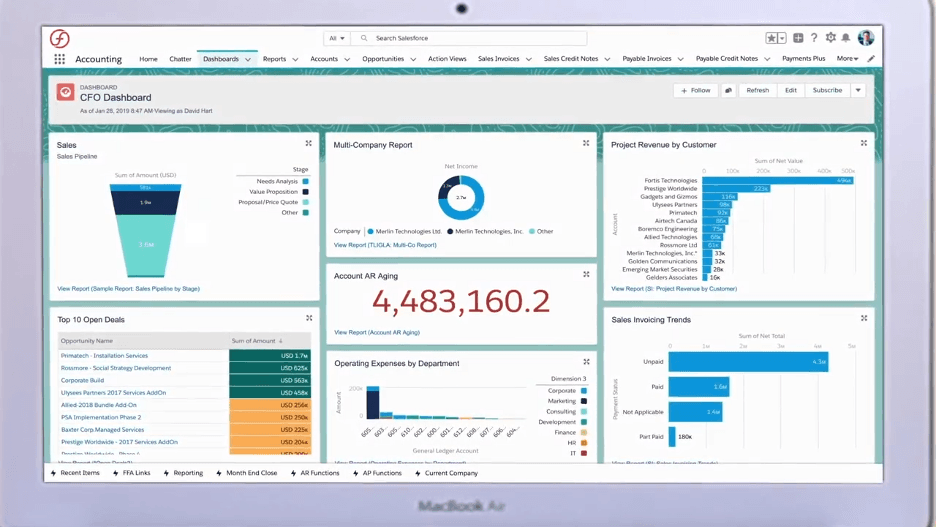
Certinia is the best-known Salesforce-native PSA vendor. The company rebranded from FinancialForce in 2023 to reflect a move beyond finance into a broader services platform — if you are reading older comparison content that still says "FinancialForce," it is describing the same product line.
Certinia spans two pillars relevant here: Professional Services Cloud (project management, resource planning, time and expense capture, project accounting) and ERP Cloud (accounting, billing, revenue management). That combination is unusual — it means Certinia is one of the few options where you can run CRM, delivery and the general ledger on a single Salesforce data model without a connector anywhere in the picture.
Certinia is the natural shortlist entry for mid-market and enterprise services firms that are Salesforce-committed and want finance in the same org.
Read our full Certinia (FinancialForce) Solution Guide
Kantata SX
Kantata SX is the enterprise Salesforce-native PSA in Kantata's line-up. It arrived via Kimble, which merged with Mavenlink in 2022 to form Kantata — the merged company kept two separate products, and the distinction matters when you evaluate them:
- Kantata SX (formerly Kimble) is built on the Salesforce platform and installs into your org.
- Kantata OX (formerly Mavenlink) is a standalone platform with its own infrastructure and no native CRM.
If you are Salesforce-based, SX is the relevant product; OX belongs in the integrated camp. Kantata SX is strongest on resource management and forecasting, and is generally aimed at larger consultancies where predictable utilization and revenue forecasting are the board-level metrics.
Klient PSA
Klient is a fully Salesforce-native PSA built as a managed package: it stores its data in Salesforce, runs on Salesforce security, and has no separate database or nightly sync. Klient publishes list pricing at $39 per user per month and reports an average go-live of around three weeks — a useful reference point, because implementation timeline is where native and integrated options diverge most sharply.
Its six modules cover estimating and forecasting, project management, resource management, task and time, customer collaboration and billing. Klient has also leaned hard into Salesforce Agentforce, shipping AI agents that operate inside the customer's own org under the admin's existing security model.
Klient suits small and mid-sized services teams and Salesforce-based SaaS companies that want project delivery next to the opportunity record without an ERP-scale programme.
Mission Control (Aprika)
Mission Control, from Aprika, is a Salesforce-native project management and PSA app on the AppExchange. It covers task and resource management, time capture, project budgets, role forecasting, capacity management, Gantt and Kanban views, and a PMO dashboard. Aprika lists it at $39 per user per month with a five-seat minimum and a 14-day trial.
Mission Control is delivery-first rather than finance-first — there is no general ledger here. It is the pragmatic choice for teams that need to run projects properly inside Salesforce and are content to keep accounting in a separate system.
PSA Software That Integrates With Salesforce
The second path keeps Salesforce as the CRM and puts project delivery and finance in a separate ERP, joined by a connector. This is the right answer more often than native vendors admit — particularly where an ERP is already in place.
NetSuite

Oracle NetSuite is a cloud suite that includes PSA features for project management, project accounting, finance, resource management and revenue recognition. Oracle publishes a NetSuite-to-Salesforce connector to pass customer and sales data between the two.
NetSuite is the strongest integrated option where finance breadth matters more than living inside Salesforce — multi-subsidiary consolidation, statutory reporting and complex revenue recognition. Our NetSuite PSA module guide covers the functional detail.
Read our full NetSuite Solution Guide
Sage Intacct

Sage Intacct is a cloud financial management and PSA solution widely used by accounting, architecture and professional services firms. Sage and Salesforce have built a documented integration between the two platforms, and Intacct PSA adds project accounting, project management and dimensional reporting.
Sage Intacct is a common landing spot for firms that outgrow entry-level accounting but do not want a full ERP programme.
Read our full Sage Intacct Solution Guide
Workday

Workday built its reputation on human capital management and has since developed financial management and PSA capability including project management, project accounting, revenue recognition and planning. It has no CRM of its own, which is precisely why the Workday–Salesforce connector exists.
Workday suits large, people-heavy services organizations where headcount, skills and utilization are the core planning problem.
Read our full Workday Solution Guide
Microsoft Dynamics 365

Microsoft Dynamics 365 Project Operations covers the PSA ground — opportunity-to-cash for project businesses, resourcing, time and expense, and project accounting — and integrates with Salesforce despite Microsoft selling a competing CRM. In practice, Dynamics is chosen for PSA by firms already standardized on Microsoft 365, Teams and Power BI.
Read our Microsoft Dynamics 365 Solution Guide
SAP S/4HANA Cloud

SAP S/4HANA Cloud carries professional services scenarios through its project control and commercial project management capabilities: engagement setup, resource assignment, time and expense capture, project billing and revenue recognition, all posting straight into the SAP general ledger. Salesforce data is brought across using SAP's integration tooling rather than a native app.
S/4HANA is only a sensible PSA answer for large enterprises that already run SAP elsewhere — typically firms where professional services is one line of business alongside manufacturing or product revenue, and finance must consolidate in a single ledger. For a services-only firm with no SAP incumbency, this is a disproportionate choice; the SAP professional services automation guide sets out the scope properly.
Read our full SAP S/4HANA Cloud Solution Guide
Acumatica

Acumatica's PSA capabilities give project and service businesses integrated finance, billing, project accounting and resource management. Acumatica users can connect Salesforce through options including the Commercient Sync integration.
Acumatica's consumption-based licensing makes it worth a look for firms with a large number of light users.
Read our full Acumatica Solution Guide
BigTime Enterprise (Projector PSA)
Projector PSA was acquired by BigTime and is now positioned as BigTime's enterprise edition. It is a standalone, finance-first PSA — strong on time capture, billing accuracy and project margin control — with a bi-directional Salesforce connector that syncs account, opportunity and project data, so a won opportunity in Salesforce can open a project automatically.
It is worth flagging a marketing subtlety here: BigTime describes its Salesforce integration as "native" because it is built in-house rather than bought from a third party. That is not the same thing as a Salesforce-native app. Projector's data lives in BigTime, not in your org — it belongs in the integrated column.
Get a free personalised ERP shortlist
Tell us your industry and company size and we'll recommend the best-fit vendors.
What is Professional Services Automation Software?
Professional services automation (PSA) software is the platform consulting firms, agencies, accountants, architects and legal practices use to run billable work end to end: selling engagements, resourcing them, capturing time and expenses, managing project margin, and billing accurately.
PSA does this by pulling the professional services lines of business — finance, project management, resource management, sales and human resources — into one platform under one data model. That is what makes utilization, margin and forecast numbers agree with each other for the first time.
Does Salesforce include a PSA?
No. Salesforce does not include a professional services automation product. Sales and service are core Salesforce clouds, but PSA also requires project management and project accounting, resource and capacity planning, time and expense capture, contract management, billing and revenue recognition — none of which ship with Salesforce. Salesforce leaves that space to AppExchange partners such as Certinia, Kantata, Klient and Mission Control, and to ERP vendors that connect in.
PSA Software Modules
Professional services automation adds functionality that Salesforce users typically lack:
- Billing and invoicing
- Project management
- Project accounting
- Resource and capacity management
- Time and expense capture
- Revenue recognition
- Human resources
- Financial management and accounting
- Reporting and analytics
Benefits of PSA for Salesforce Users
Salesforce is a market-leading platform for customer data and engagement, but it does not cover finance and accounting, project management, resource planning, payroll, billing or revenue recognition. Those are exactly the capabilities that determine whether a services firm is profitable.
The numbers explain the urgency. SPI Research's 2026 Professional Services Maturity Benchmark — which surveyed 509 professional services organizations — found that billable utilization fell to 66.4% in 2025, the lowest point in SPI's surveying history, while professional services revenue growth reached only 5.2%. When a third of capacity is not billing, visibility into who is on what, and at what margin, stops being a reporting nicety.
Salesforce users who add PSA typically pursue:
- Better resource utilization rates
- Projects delivered on time and on budget
- Less revenue leakage between delivery and invoicing
- Cleaner revenue recognition and compliance
- Improved cashflow and profitability
- A single customer view from first touch to final invoice
Native or Integrated: Which Should You Choose?
Work through four questions in order.
1. Where does your general ledger live today? If you have an established ERP with multi-entity consolidation, integrating it with Salesforce is almost always cheaper than migrating finance into an AppExchange app. If your finance stack is entry-level accounting you have outgrown, native is genuinely on the table.
2. How much of the business already runs in Salesforce? If sales, service and customer success are all in Salesforce and delivery is the odd one out, native removes a sync layer, a second login and a second reporting model.
3. What timeline can you carry? Native managed packages install into an existing org — Klient publishes a three-week average go-live. ERP-plus-connector programmes are measured in months, because you are implementing finance, not just projects.
4. Who will administer it? Native means your Salesforce admin extends what they already know. Integrated means you own a connector, a second application and the interface between them, permanently.
If you want a structured way to score these, our PSA requirements template lays out the functional criteria, and the best PSA software guide covers the wider market beyond Salesforce.
Which PSA Software is best for Salesforce?
There is no single best PSA for Salesforce — there is a best PSA for your architecture.
- Salesforce-first services firms and SaaS companies: shortlist Klient and Mission Control for delivery-led needs, Certinia where finance should join the same org.
- Larger consultancies with forecasting and utilization at the centre: Kantata SX.
- Firms with an incumbent ERP or complex multi-entity finance: integrate — NetSuite, Sage Intacct, Workday, Dynamics 365 or Acumatica, and S/4HANA only where SAP is already the standard.
Whichever direction you lean, evaluate four to eight vendors against written requirements rather than demos. Salesforce PSA selections go wrong when a native app is bought without checking whether finance can actually leave the incumbent ERP — or when an ERP connector is bought and the delivery team never logs into it. Buyers evaluating the wider platform question should also read our companion guide on which ERP is best for Salesforce, and our PSA vendor directory for the full landscape.
Frequently Asked Questions
What is PSA in Salesforce?
PSA in Salesforce means professional services automation delivered either as an app installed from the Salesforce AppExchange, or as a separate system connected to Salesforce. It adds project management, resource planning, time and expense capture, project accounting and billing — capabilities Salesforce itself does not provide.
Is Certinia the same as FinancialForce?
Yes. FinancialForce rebranded to Certinia in 2023. The Salesforce-native PSA product line continued under the new name, so older articles and reviews referring to "FinancialForce PSA" are describing what is now Certinia Professional Services Cloud.
Do I need a Salesforce-native PSA or a standalone PSA with a connector?
Choose native if the majority of your business already runs in Salesforce and you want one data model, one admin skill set and no sync. Choose a standalone PSA with a connector if your general ledger already lives in an established ERP, or you need multi-entity consolidation and statutory reporting that AppExchange apps are not designed to replace.
Which PSA platform has the best Salesforce integration?
Native apps do not integrate with Salesforce — they run on it, which removes the question entirely. Among these, Certinia, Kantata SX, Klient and Mission Control are all managed packages installed into your own org. If you need a standalone system, NetSuite, Sage Intacct and Workday all publish documented Salesforce connectors.
How much does Salesforce PSA software cost?
Published list pricing for the smaller native apps starts around $39 per user per month — both Klient and Mission Control list at that figure, with Mission Control requiring a five-seat minimum. Enterprise native platforms such as Certinia and Kantata SX are quoted per deal and land materially higher, and integrated ERP options add implementation cost on top of licensing. Remember that native app licensing sits on top of your existing Salesforce licences, not instead of them.
Free Download
PSA Requirements Template for Salesforce Buyers
A structured requirements checklist covering project management, resourcing, time and expense, billing and revenue recognition — so you can score native and integrated PSA options against the same criteria instead of vendor demos.
Further Reading
Compare the vendors mentioned in this article
See how Oracle NetSuite, Microsoft Dynamics 365, Acumatica, Sage Intacct stack up side by side.
Further Reading
Best ERP for Multi-Entity Businesses (2026): Top Systems Compared
The best ERP systems for multi-entity and multi-subsidiary companies in 2026, compared on intercompany accounting, consolidation, and multi-currency. Independent research.
BlogBest ERP for Multi-Entity Businesses (2026): Top Systems Compared
The best ERP systems for multi-entity and multi-subsidiary companies in 2026, compared on intercompany accounting, consolidation, and multi-currency. Independent research.
BlogDeltek Alternatives & Competitors (2026)
The best Deltek alternatives for 2026 by buyer type: GovCon (Unanet, JAMIS), AEC (Monograph, BQE) and broad ERP (NetSuite, IFS). Pricing, DCAA fit & ratings.
See Pricing
ERP Benchmark: Which Vendors Do Companies Actually Choose?
See real-world vendor adoption data for your industry — 23,000+ tracked implementations.
Interested in Oracle NetSuite?
Request a free, no-obligation demo and get personalised pricing for your business.
Get a Oracle NetSuite Demo
See Oracle NetSuite in action with a personalised walkthrough for your business.
Want to discuss this further?
Reach out and our team will help you navigate your ERP journey.