
Which ERP is best for Salesforce?
Is Salesforce an ERP system? No — it is a CRM. Here is how Salesforce ERP integration works, which ERP systems pair best, and what it costs.
No — Salesforce is not an ERP. Salesforce is a CRM. It manages sales, marketing, and customer service, but it has no native finance, inventory, or manufacturing modules, so most companies integrate Salesforce with a dedicated ERP like NetSuite, SAP, or Dynamics 365 to run the back office. Updated July 2026.
Both small and large growing companies use Salesforce and often ask us for recommendations for ERP systems that integrate with SFDC. There are a number of good ERP systems for Salesforce, and there are real benefits to selecting a strong ERP and Salesforce integration strategy.
In this article we explain why Salesforce is a CRM rather than an ERP, how Salesforce ERP integration works in practice, which ERP systems pair best with it, and roughly what it costs.
Is Salesforce an ERP system?
Salesforce is not an ERP system. Salesforce is a customer relationship management (CRM) platform made up of applications and modules such as sales, marketing automation, ecommerce, service, and data management. It is the front office — where you win and keep customers.
An ERP (enterprise resource planning) system is the back office. It runs financial management and accounting, supply chain, inventory, manufacturing, and project management. Salesforce can do many of the things an ERP does, but it cannot replace one. To close the general ledger, cost a bill of materials, or manage a warehouse, you still need a dedicated ERP from a vendor like NetSuite, SAP, Infor, or Microsoft.
Companies across manufacturing, professional services, distribution, and beyond therefore rely on integrating Salesforce with a separate ERP system rather than trying to make one tool do both jobs.
Is Salesforce a CRM or an ERP?
Salesforce is a CRM. The two categories overlap on customer and order data, which is why the question comes up so often, but they solve different problems. A CRM tracks leads, opportunities, quotes, and customer relationships. An ERP tracks money, stock, and production. The table below shows where each system's responsibility actually sits.
| System | Category | Handles | Does not handle |
|---|---|---|---|
| Salesforce | CRM (front office) | Sales, marketing, service, quotes, pipeline | General ledger, inventory, manufacturing, payroll |
| NetSuite / SAP / Dynamics 365 | ERP (back office) | Finance, inventory, supply chain, manufacturing | Marketing automation, service cases, campaign management |
Most growing companies end up running both and connecting them, so a closed deal in Salesforce flows straight into an invoice, a fulfilment order, and a revenue entry in the ERP. For the category-level breakdown beyond Salesforce specifically, see our ERP vs CRM comparison.
Benefits of Salesforce ERP Integration
As customer expectations on both B2C and B2B companies increase every year, having data flow from the front office to the back-office ERP is crucial. For many companies Salesforce is the critical front and mid-office platform of choice for customer relationship management, marketing automation, sales, subscriptions, and more.
In fact, many companies build their entire product and service offerings on Salesforce itself, also known as the Force.com platform. This is common for software-as-a-service companies. The trend is only set to continue as businesses become digital-first and create new digital business models to serve their customers.
But while front-office systems like Salesforce are important in building highly effective sales funnels, ERP systems let you fulfil your customer promise — and are equally important in producing scalable companies.
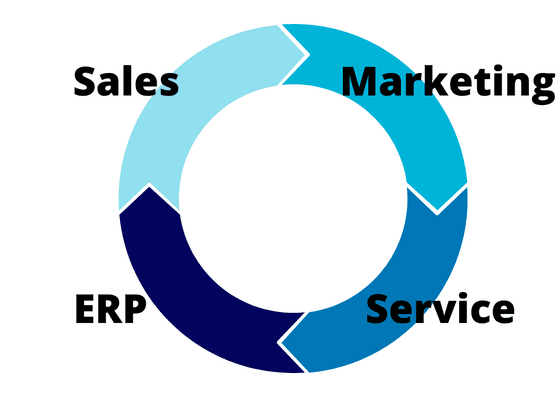
Improve Your Customer Service
Improving the customer experience is a key benefit of tight Salesforce and ERP integration. ERP systems that integrate with Salesforce let you push and pull sales order data, customer and product data, and financial and logistics data in real time.
For example, in the retail and e-commerce industry, many companies rely on passing data from their Salesforce front end to their ERP and fulfilment systems via batch upload. But when customers expect next-day delivery, sending that data in real time between Salesforce and your ERP becomes a competitive advantage. It also reduces the chance of bigger issues caused by human error, such as missing orders completely.
Increase Profitability
Strong integration between your Salesforce systems and ERP platform can increase your bottom line in numerous ways depending on your industry. Say your business is in the software-as-a-service industry. Using Salesforce data alone, you can report on sales, build ideal customer profiles, and launch campaigns.
But by combining ERP and Salesforce data, you gather much deeper insights into which customers and segments are most profitable, who fails to pay on time, and where your biggest financial wins are. Bridging this gap is key to building a long-term, sustainably profitable company.
Reduce IT Cost & Administration
Selecting an ERP system that natively integrates with Salesforce CRM can reduce the IT burden and cost in your organization. Maintaining integrations between your ERP and other platforms can be expensive and time-consuming, as both Salesforce and most ERP systems need to be patched and upgraded regularly. As those patches land, the connection that links them can break as the underlying systems change.
An ERP consultant once explained it to me as trying to keep two surfboards perfectly aligned while they float on the ocean. Waves inevitably come in the form of new software updates, and you continually need to realign the boards — or the systems. Now imagine you have several surfboards that all need to stay aligned to keep your business running. This is why many companies choose ERP systems with native, robust integrations with Salesforce.
Get a free personalised ERP shortlist
Tell us your industry and company size and we'll recommend the best-fit vendors.
How Salesforce ERP integration works
There is no single "Salesforce ERP." Instead, there are three common patterns for connecting Salesforce to a back-office ERP, and the right one depends on your budget, data volumes, and how real-time you need to be. Our full ERP integration guide covers this in more depth.
- Native / built-on-Salesforce apps. Products like Rootstock and Certinia (formerly FinancialForce) run inside the Salesforce platform, sharing one data model. There is no integration to maintain because there is only one system of record. This is the tightest option but ties you to the Salesforce ecosystem.
- Prebuilt connectors. Vendors such as NetSuite, Acumatica, and Microsoft Dynamics 365 ship packaged Salesforce connectors that map standard objects (accounts, orders, invoices) out of the box. Fast to deploy, lower maintenance, but less flexible for heavily customized orgs.
- Middleware / iPaaS. Integration platforms like MuleSoft (owned by Salesforce), Boomi, Celigo, or Workato sit between Salesforce and any ERP — SAP, Oracle, Infor — and orchestrate real-time, bidirectional syncs with error handling and monitoring. The most flexible and scalable option, and usually the most expensive.
As a rule of thumb: if you want the simplest setup, choose an ERP built on or with a native connector to Salesforce; if you already run SAP or Oracle and need enterprise-grade orchestration, budget for middleware.
How much does Salesforce ERP integration cost?
Salesforce ERP integration pricing varies widely because you are really paying for three things: the ERP licences, the Salesforce licences, and the connective tissue between them. A prebuilt connector for a mid-market ERP like NetSuite or Acumatica typically adds a few thousand dollars a year plus a one-off configuration project. A middleware platform such as MuleSoft is a larger commitment — often a five-figure annual subscription before implementation — but scales to many systems, not just Salesforce and one ERP. Native apps built on Salesforce (Rootstock, Certinia) avoid a separate integration cost entirely but carry per-user platform pricing. Model the total cost of ERP licences, Salesforce seats, and integration together, not in isolation.
ERP Software for Salesforce
Salesforce is such a behemoth in the CRM space that very few software vendors have tried to take it on head-to-head, apart from SAP and Oracle. Even so, no ERP vendor can afford not to integrate with the popular CRM. Here are the ERP systems that pair best with Salesforce, and how each one connects.
| ERP | Built on Salesforce? | Integration method | Best fit |
|---|---|---|---|
| Rootstock | Yes (native) | Shared Salesforce data model | Manufacturing, distribution, ecommerce |
| Certinia (ex-FinancialForce) | Yes (native) | Shared Salesforce data model | Services, SaaS, billing & PSA |
| Sage Intacct | No | Long-standing native connector | Professional services, SaaS, finance-led firms |
| NetSuite | No | Prebuilt Salesforce connector | SMB to mid-market, all-round back office |
| Microsoft Dynamics 365 | No | Prebuilt connector / middleware | Mid-market to enterprise, Microsoft shops |
| SAP | No | Middleware (MuleSoft, Boomi) | Large enterprise, complex supply chains |
Rootstock
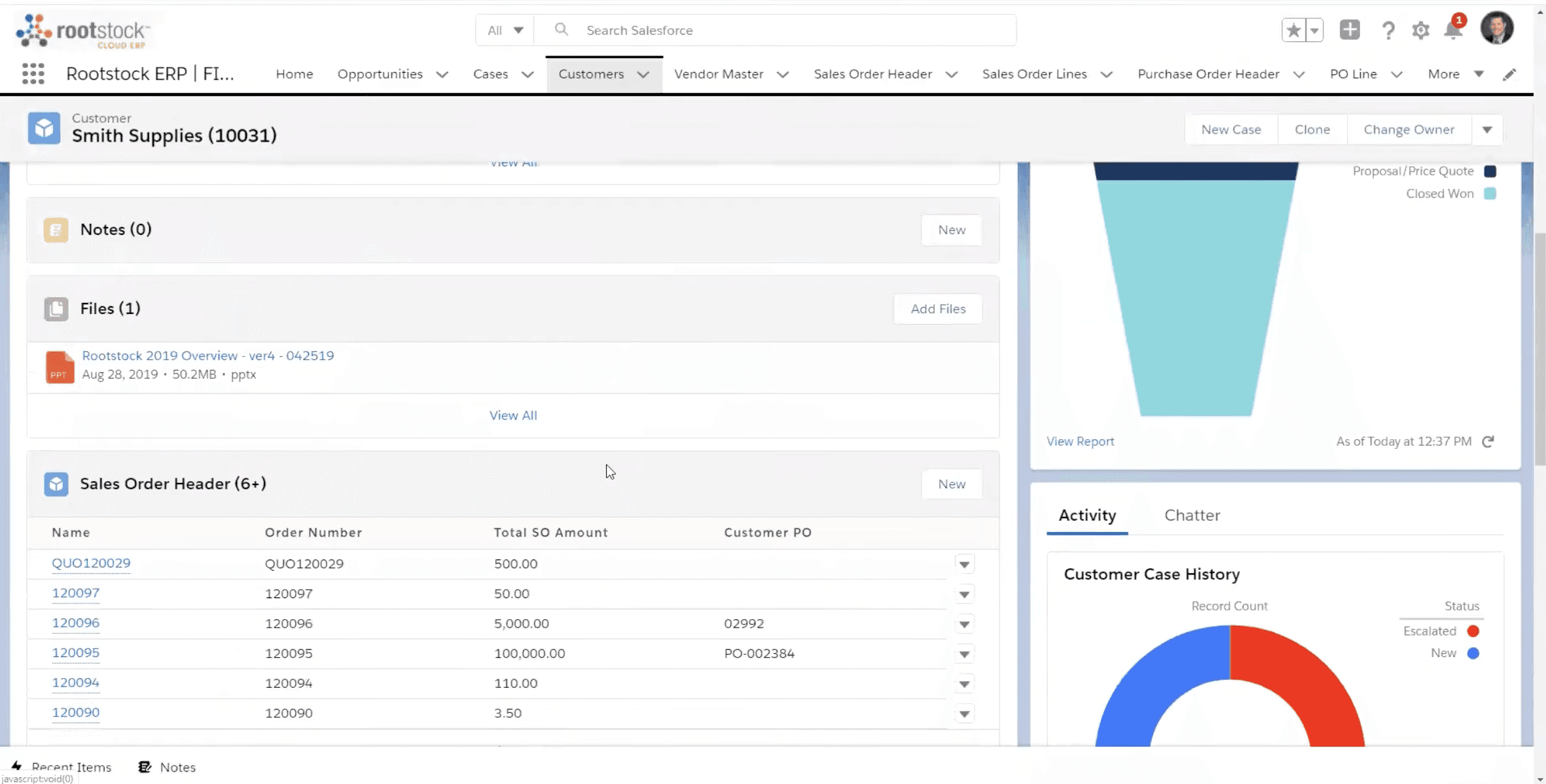
Rootstock is the leading ERP for Salesforce users in the manufacturing, retail, ecommerce, and distribution space. Rootstock customers can easily feed sales-order data into their production schedules and optimise the customer experience at the same time.
Rootstock is a native Cloud ERP system built on the Salesforce platform, letting customers leverage a common data model from sales through to operations and fulfilment. It also offers one of the most intuitive low-code and no-code toolsets, so customers can build custom apps and extensions for specific use cases.
Download the Rootstock ERP Solution Guide
Certinia (formerly FinancialForce)
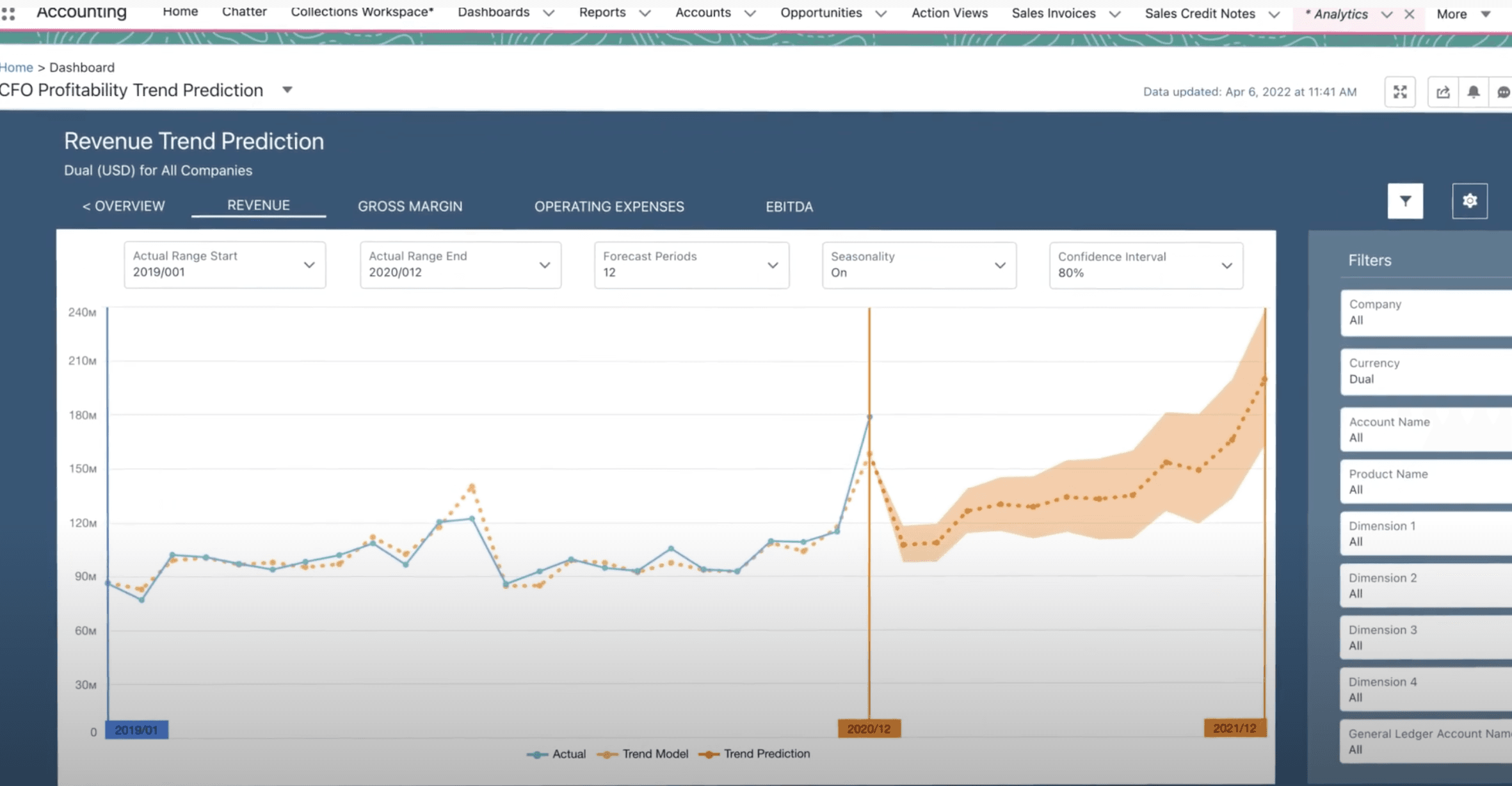
FinancialForce was rebranded as Certinia in May 2023, following investment from Haveli Investments. The product itself is unchanged in concept: a Cloud ERP and services suite built natively on the Salesforce (Force.com) platform. Because it runs inside Salesforce, SFDC users get tight integration with their financial and services data out of the box. Certinia provides capabilities for billing, revenue management, professional services automation (PSA), and project management. You can read our full Certinia (FinancialForce) review for a deeper look.
Sage Intacct

Sage has very little coverage in the CRM, service, and marketing space, and Sage Intacct is no exception. For many years, Sage has partnered with SFDC and publicised that relationship widely.
Sage Intacct and Salesforce are a great CRM-and-ERP combination for professional services companies, SaaS vendors, and other people-, service-, or project-centric industries.
Oracle Netsuite

Oracle Netsuite is an extremely popular Cloud ERP for small and medium-sized businesses and ships with a prebuilt Salesforce ERP connector. That makes integration between the two systems straightforward and cheap to maintain, which is a big reason NetSuite is one of the most common back-office pairings for Salesforce-led businesses.
Interactive Tool
Compare Salesforce-integrated ERPs against your requirements
Define your modules, industry, company size and budget, then line up NetSuite, Sage Intacct, Dynamics 365 and Rootstock side by side — no sales call required.
Frequently Asked Questions
Is Salesforce an ERP?
No. Salesforce is a CRM (customer relationship management) platform, not an ERP. It handles sales, marketing, and service but has no native finance, inventory, or manufacturing modules, so companies integrate it with a dedicated ERP.
Is Salesforce an ERP system?
Salesforce is not an ERP system. It is the leading CRM system. To run accounting, supply chain, and manufacturing you pair Salesforce with an ERP such as NetSuite, SAP, or Microsoft Dynamics 365.
Is Salesforce a CRM or an ERP?
Salesforce is a CRM. CRM software manages the front office — leads, opportunities, and customers — while ERP software manages the back office — finance, inventory, and operations. Most companies run both and integrate them.
Which ERP integrates best with Salesforce?
Rootstock and Certinia are built natively on Salesforce, so they share its data model. NetSuite, Acumatica, and Dynamics 365 offer prebuilt connectors, while SAP and Oracle are typically connected through middleware such as MuleSoft.
How much does Salesforce ERP integration cost?
It depends on the method. Prebuilt connectors for mid-market ERPs add a few thousand dollars a year plus a configuration project; middleware platforms like MuleSoft run into five figures annually; native apps avoid a separate integration cost but carry per-user platform pricing.
Further Reading
Compare the vendors mentioned in this article
See how Oracle NetSuite, Microsoft Dynamics 365, Acumatica, Sage Intacct stack up side by side.
Further Reading
Best ERP for Multi-Entity Businesses (2026): Top Systems Compared
The best ERP systems for multi-entity and multi-subsidiary companies in 2026, compared on intercompany accounting, consolidation, and multi-currency. Independent research.
BlogBest ERP for Multi-Entity Businesses (2026): Top Systems Compared
The best ERP systems for multi-entity and multi-subsidiary companies in 2026, compared on intercompany accounting, consolidation, and multi-currency. Independent research.
BlogDeltek Alternatives & Competitors (2026)
The best Deltek alternatives for 2026 by buyer type: GovCon (Unanet, JAMIS), AEC (Monograph, BQE) and broad ERP (NetSuite, IFS). Pricing, DCAA fit & ratings.
See Pricing
ERP Benchmark: Which Vendors Do Companies Actually Choose?
See real-world vendor adoption data for your industry — 23,000+ tracked implementations.
Interested in Oracle NetSuite?
Request a free, no-obligation demo and get personalised pricing for your business.
Get a Oracle NetSuite Demo
See Oracle NetSuite in action with a personalised walkthrough for your business.
Want to discuss this further?
Reach out and our team will help you navigate your ERP journey.